
Vandaag of morgen in huis

Kwaliteit gegarandeerd

Welkomstaanbiedingen ontgrendelen: GRATIS bezorging | Tot 80% korting | Gratis 30 dagen JoyPlus-proefperiode
Download de app
A smartphone gimbal stabiliser can reduce shaking while filming and make it easier to keep yourself, a group or a moving subject in shot. That is useful for TikTok videos, YouTube vlogs, livestreams, holiday films and everyday content.
However, not every phone gimbal is suitable for every user. Marketing copy often focuses on AI, tracking or long battery life, while important details such as compatibility, weight and stabilisation axes receive less attention. With this buying guide, you will know what to look for before purchasing a portable smartphone gimbal.
A face-tracking gimbal can be useful when you only film with the manufacturer’s camera app. However, the tracking function is not automatically available in every social media app. So check:
According to Insta360’s product information, the Flow 2 Pro supports tracking via DockKit in more than 200 compatible iOS apps. This does not mean that every app or Android phone offers the same capabilities. Check the latest compatibility list before purchasing.
A 3-axis gimbal generally corrects more directions of movement than a 2-axis gimbal. This can be useful when walking, travelling or filming fast-moving subjects. A 2-axis gimbal, on the other hand, can be lighter, simpler and more affordable for static vlogs or short clips.
As well as the number of axes, check the maximum phone weight and the dimensions of the clamp. A smartphone with a heavy case, additional lens or power bank may exceed the recommended limit.
Battery life is affected by tracking, Bluetooth, lighting, app usage and temperature. Manufacturers therefore often state a maximum operating time under specific conditions. According to the product description, the Verbex C16 has a battery life of up to 8 hours. The hohem gimbal states up to 11 hours. Treat these figures as a guide and take a USB-C power bank with you for a long day of filming.
A 2-axis gimbal such as the Verbex C16 is designed for basic movement correction. This is suitable for:
A 3-axis gimbal such as the Insta360 Flow 2, Flow 2 Pro and hohem Smartphone Gimbal Stabilizer offers correction across more directions of movement. This is practical when filming while walking, rotating the camera or following a subject.
No anti-shake stabiliser can make every recording completely free from movement. Your filming technique, walking speed and the surface you are walking on will still affect the result.
Check the stated dimensions of the phone holder. According to the product specifications, the Verbex C16 is suitable for most smartphones with a width of 67 to 84 mm. Measure your phone with its case on before ordering.
Also consider:
A phone that is not properly centred can put extra strain on the motors. Always secure the device firmly and do not use the gimbal if the clamp is damaged.
A foldable phone stabiliser is easier to fit into a rucksack or small bag. An integrated tripod or extendable selfie stick can remove the need for additional accessories. Check, however, that the folded dimensions are suitable for your bag.
A joystick and physical buttons are useful when you want to switch quickly between photo and video modes. App integration can add functions such as panorama, timelapse, gesture control and tracking. UK users should also check whether the app is available in their preferred language and what permissions it requires.
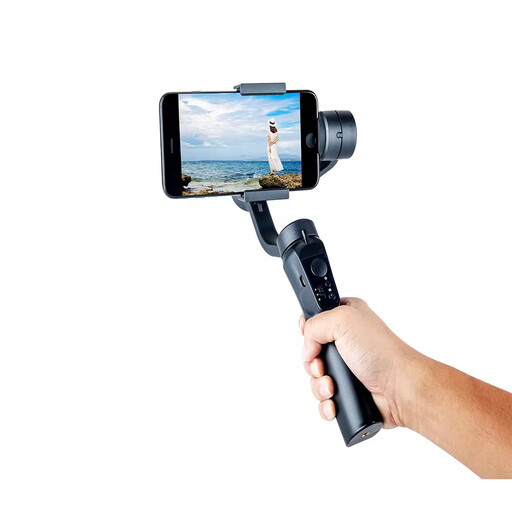
Why it suits this profile: This portable phone gimbal offers essential functions for vlogs, travel and livestreams, without requiring you to invest in a more advanced system straight away.
Compatibility is clearly stated for phones measuring 67–84 mm. This allows you to check in advance whether your device will fit.
2-axis stabilisation, foldable design, USB-C charging, joystick and support for ActiveTrack and gesture control according to the product specifications.
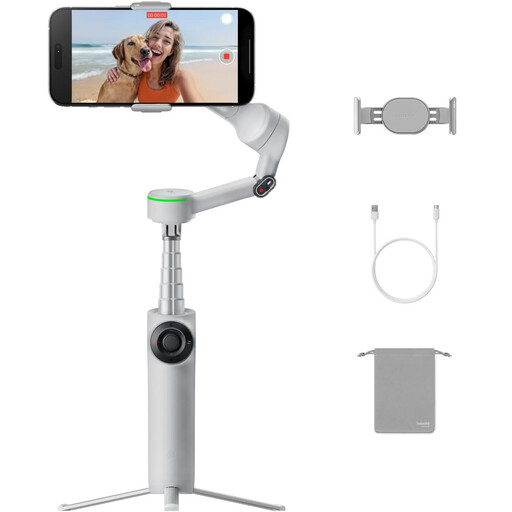
Why it suits this profile: The combination of 3-axis stabilisation, AI tracking and built-in accessories is ideal for creators who want to expand their mobile filming setup.
The product information separately lists the AI Tracker, DockKit support and compatible iOS apps. Even so, check that it suits your workflow.
3-axis stabilisation, 360° pan tracking, built-in tripod and selfie stick, AI Tracker and a stated battery life of up to 10 hours.
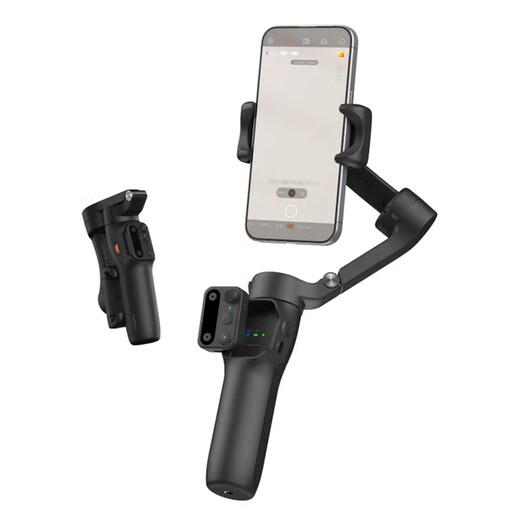
Why it suits this profile: The 3-axis gimbal and remote control are practical for solo creators, travellers and users who often film while walking or from a distance.
The specifications list the stabilisation, battery life and remote control separately. This allows you to assess which functions you will actually use.
3-axis anti-shake stabilisation, remote control up to 10 metres, foldable design and a stated battery life of up to 11 hours.
We have compiled a complete, up-to-date list of products that fully meet these strict selection criteria and the applicable European safety regulations.
Many models are designed for both systems, but app functions may differ. Check the phone width, weight and minimum operating system version. With features such as DockKit or advanced AI tracking, support may vary by platform and app.
Service life depends on charging habits, hinges, motor load and storage. Use the gimbal within the recommended temperature range, charge it with suitable accessories and make sure the phone does not exceed the stated weight limit. Store the device folded and in a dry place.
There may be additional costs for a protective case, tripod, power bank or paid app functions. A model with a built-in tripod, selfie stick or remote control can reduce the number of separate accessories you need. Also check whether tracking only works with a specific app and whether certain functions require a subscription.
