
Vandaag of morgen in huis

Kwaliteit gegarandeerd

Welkomstaanbiedingen ontgrendelen: GRATIS bezorging | Tot 80% korting | Gratis 30 dagen JoyPlus-proefperiode
Download de app
A smartphone gimbal can reduce camera shake, track your subject and double as a tripod or selfie stick. But not every model is practical for everyday use. Vloggers, travellers and social media users often run into the same problems: a phone holder that doesn’t fit properly, tracking that only works in a particular app, or a design that’s too heavy to carry around.
Use these checks to find a gimbal for iPhone or gimbal for Android that suits the way you film.
An AI tracking gimbal can follow a face, person or other subject, but exactly how it works depends on the app, smartphone and recording mode. Insta360’s product description says the Flow 2 supports person, group and pet tracking, among other features. It also mentions active zoom tracking, with certain functions limited to specific iPhone Pro and Pro Max models, according to Insta360.
Before buying, check:
A gimbal with a tripod is handy for vlogging, group photos or livestreaming. However, a compact design can topple on uneven ground or in windy conditions. A long selfie stick raises the centre of gravity, particularly if you’ve attached a heavy phone case or an extra light.
Set the tripod up on a flat surface and make sure all the legs are fully extended. For outdoor use, a separate, sturdier tripod may be a better choice.
“Suitable for iPhone and Android” doesn’t tell you everything. Check the maximum phone size, the weight of your smartphone with its case, how it attaches and which Bluetooth permissions or app permissions are needed. For example, a magnetic holder won’t work with every Android phone unless you use an extra ring or a compatible case.
A 3-axis smartphone gimbal corrects movement in three directions. This is especially helpful when walking, panning or filming smooth transition shots. A basic smartphone stabiliser with just a handle or digital image correction will give you a different result.
Check the following:
The Insta360 Flow 2 and DJI Osmo Mobile 7P are listed in their product information with a run time of up to around 10 hours. Actual run time can vary depending on tracking, Bluetooth, lighting, app use and whether you’re charging your smartphone.
For a long trip, it’s worth bringing a USB-C power bank. Also check whether the gimbal can charge your phone and whether you’ll need an extra module or cable.
A built-in selfie stick, remote control, light or teleprompter can save you carrying extra equipment. However, not every combination of accessories is suitable for every device. Check for:
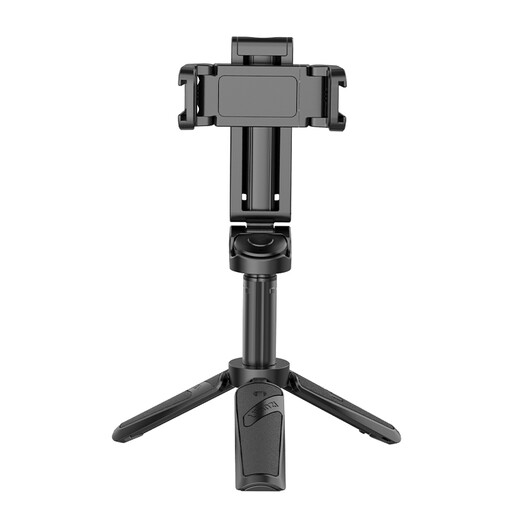
Why it suits this profile: This 3-in-1 selfie stick combines a phone holder, mini tripod and Bluetooth remote control. It’s a practical choice for beginner vloggers who want to start filming without investing in a full gimbal.
The phone is held in place by a mechanical clamp, so you don’t have to rely on magnetic compatibility. The manufacturer does advise making sure the phone is fully secured in the clamp.
Suitable for iPhone and Android, with an extendable stick, tripod mode and remote control.
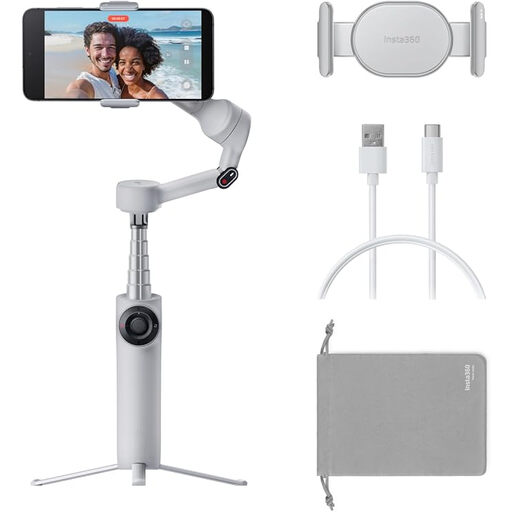
Why it suits this profile: The Flow 2 is designed for creators who want several features in one foldable device. According to the product description, it combines a 3-axis gimbal, built-in tripod, selfie stick, remote control and tracking.
The foldable design means you need to carry less separate equipment. Check in advance which tracking features are available for your phone.
According to Insta360, the model offers multi-person and pet tracking, with a stated run time of up to 10 hours.
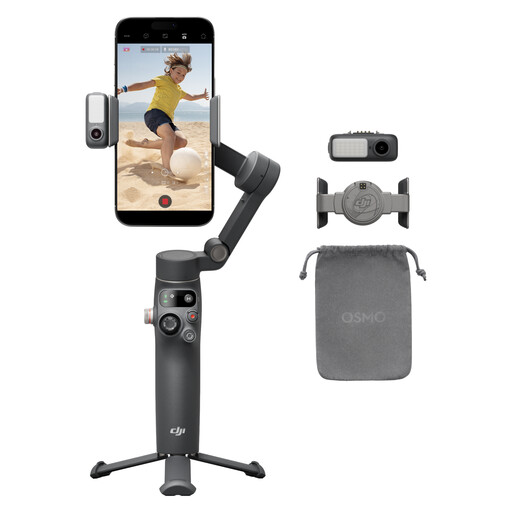
Why it suits this profile: This model is designed for vloggers and creators who want to combine a 3-axis stabiliser, built-in extension rod and tripod with tracking and lighting.
The product description mentions an integrated extension for tracking, lighting and microphone reception. Check which DJI app you need and confirm compatibility before buying.
According to DJI, the model features ActiveTrack 7.0, a built-in extension rod and a stated run time of up to 10 hours.
We’ve put together a complete, up-to-date list of products that meet these strict selection criteria and current European safety regulations.
A smartphone gimbal is often the centrepiece of your kit, but a few vlogging accessories can make it easier to use:
When using magnetic accessories, take care around credit cards and magnetically sensitive equipment, and follow the manufacturer’s safety warnings. Use each clamp, screw and quick-release fitting only within its stated payload limit.
Not always. Check the phone’s size and weight, Bluetooth support and compatible app. A phone with a thick case may be too heavy or too wide for the holder. Magnetic systems may require a compatible ring or case.
Yes, a 3-axis gimbal is designed for this, but the results depend on balance, walking speed and the surface you’re walking on. Don’t exceed the stated payload limit, and use the tripod on a flat, stable surface.
As well as the purchase price, you may need to pay for an app subscription, extra lighting, a microphone, a power bank or a protective bag. Many basic features work without extra accessories, but check in advance which tracking and editing features require payment or are tied to a particular app.
