Shaky footage can completely undermine the message of your content. You have a great story and a beautiful location, but the final result on YouTube or Instagram lacks the professional polish you envisioned. Purchasing an accessory like a smartphone gimbal can be a smart move. However, the market is flooded with models making big promises. It's easy to make the wrong choice, leading to frustration and an unused device collecting dust in a closet.
This article serves as a no-nonsense guide. We'll explain what to look for when buying a smartphone stabilizer and highlight several models based on their specifications and features.
What to Look for When Buying a Gimbal
Before making a choice, it's helpful to understand the key parameters. These specifications determine how the gimbal performs and whether it's suitable for your needs.
Stabilization: 2-Axis vs. 3-Axis
A gimbal's core function is to stabilize. This is done across several axes.
- 2-axis stabilization: Corrects movements on the tilt axis (up and down) and the pan axis (left and right). This is a basic form of stabilization that already offers a significant improvement over handheld filming.
- 3-axis stabilization: Adds the roll axis (tilting) to the mix. A 3-axis gimbal therefore also compensates for unwanted sideways tilts, resulting in smoother, more cinematic footage, especially when walking or during faster movements. For most content creators aiming for a professional result, this is the standard.
Compatibility and Payload Capacity
Not every gimbal works with every phone. Always check the gimbal's specifications for supported dimensions (width and thickness) and the maximum weight of the smartphone. A phone that is too heavy or too large can strain the gimbal's motors, leading to poor performance or even damage.
Battery Life and Charging Options
The battery life determines how long you can film before the gimbal needs to be recharged. This is usually expressed in hours. For a full day of shooting or a longer recording session, a battery life of 8 hours or more is recommended. Some models offer the ability to charge your smartphone from the gimbal's battery, which can be useful during long shoots.
Portability and Design
A gimbal is an accessory you carry with you. A foldable and lightweight design is therefore a key advantage for travelers and vloggers. Extras like a built-in tripod or an extension rod increase its versatility without requiring you to carry extra accessories.
Software and Smart Features
Modern gimbals often work in tandem with an app. These apps provide extra features such as:
- ActiveTrack (subject tracking): The gimbal automatically follows a selected person or object.
- Gesture Control: Start or stop a recording with a hand gesture.
- ShotGuides: The app provides suggestions for creative shots.
Check if the app and its features are compatible with your type of smartphone (iPhone or Android).
Our Top Picks for 2026
Based on the criteria above, we have selected a few models that cater to different needs and budgets.
1. DJI Osmo Mobile 7P Gimbal Stabilizer
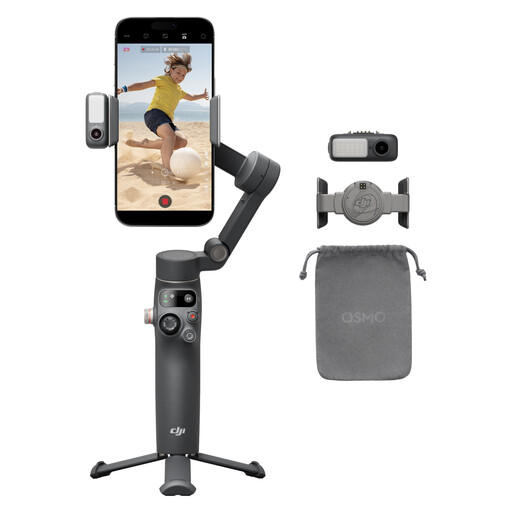
- Why this product: The Osmo Mobile 7P is a comprehensive model with many integrated features. The combination of a gimbal, extension rod, tripod, and a multi-functional module with lighting and a microphone receiver makes it an all-in-one solution.
- Pros:
- Stabilization: Robust 3-axis gimbal stabilization.
- Features: Built-in extension rod and tripod, eliminating the need for extra accessories.
- Tracking: ActiveTrack 7.0 with 'Dual Lens Enhanced Tracking' for, according to the manufacturer, more stable and smarter tracking.
- Battery: A maximum runtime of 10 hours and the ability to charge your phone.
- Ease of Use: Magnetic design for quick mounting and automatic launch of the DJI Mimo app.
- Who it's for: The serious content creator or vlogger looking for a complete and integrated solution for creating high-quality videos, without the hassle of separate components.
View the DJI Osmo Mobile 7P
2. DJI Osmo Mobile SE Intelligent Gimbal
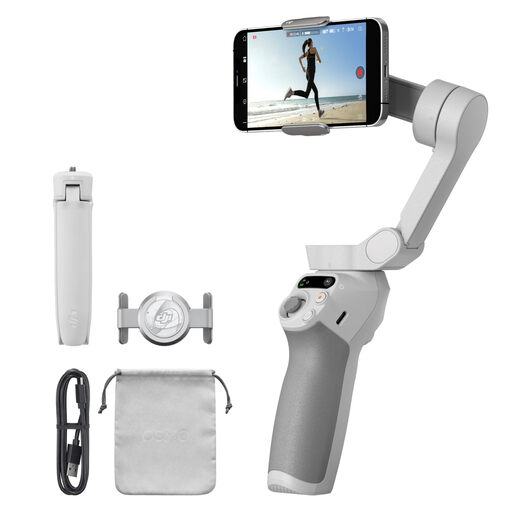
- Why this product: The Osmo Mobile SE offers the core functionalities of an advanced gimbal in a more compact and portable form factor. It focuses on the essentials: excellent stabilization and smart tracking.
- Pros:
- Stabilization: Advanced 3-axis gimbal stabilization for smooth footage.
- Portability: Compact, foldable design (352g) with a magnetic clamp for quick attachment.
- Tracking: Equipped with ActiveTrack 6.0 for reliable subject tracking.
- Battery: A runtime of up to 8 hours, sufficient for most shooting days.
- Software: Seamless integration with the DJI Mimo and LightCut apps for shooting assistance and easy editing.
- Who it's for: Ideal for travelers, vloggers, and social media users seeking a reliable and highly portable mobile stabilizer. A great balance between performance and ease of use.
View the DJI Osmo Mobile SE
3. Verbex C16 Smart Mobile Phone Anti-shake Stabilizer
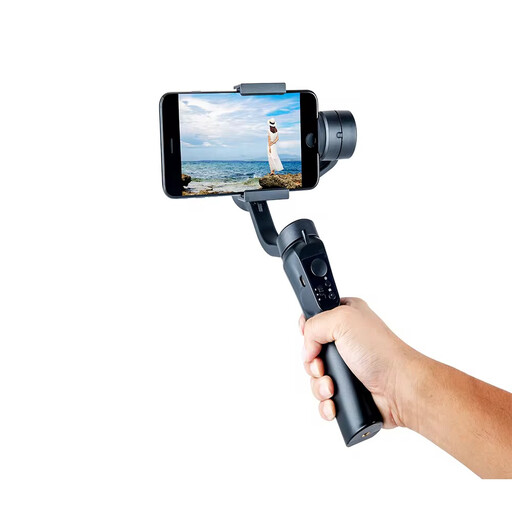
- Why this product: The Verbex C16 is an accessible entry-level model that offers basic stabilization. It stands out with its 2-axis stabilization technology, placing it in a different product category than the 3-axis models.
- Pros:
- Stabilization: 2-axis gimbal stabilization to reduce shakes and vibrations.
- Portability: Foldable and lightweight design, comparable to the Osmo Mobile SE.
- Features: Includes AI face tracking and can be controlled via an app.
- Battery: A runtime of up to 8 hours.
- Compatibility: Suitable for most smartphones with a width between 67-84 mm.
- Who it's for: For beginners or casual users who want to experiment with a gimbal for their phone without a major investment. Suitable for static shots or slow walking movements where the third stabilization axis is less critical.
View the Verbex C16
Can't Find the Right Gimbal? Consider Upgrading Your Phone
An external gimbal is a powerful tool, but it's also another device to carry and charge. If the options above don't meet your needs, or if you prefer a more integrated solution, it might be worth considering a new smartphone. Modern camera phones feature increasingly advanced optical and electronic image stabilization (OIS and EIS), which already offer a significant improvement in many situations.
Frequently Asked Questions About Smartphone Gimbals
What is the difference between a 2-axis and a 3-axis gimbal? A 2-axis gimbal stabilizes up-and-down (tilt) and left-right (pan) movements. A 3-axis gimbal adds stabilization for tilting movements (roll). This results in significantly smoother footage, especially when walking or during faster action.
Does a gimbal work with any smartphone, like an iPhone or Android? Most gimbals are designed to work with both iPhone and Android devices. However, it is crucial to check the gimbal's specifications for supported dimensions (width, thickness) and phone weight to ensure compatibility.
Do I need an app to use a gimbal? For basic stabilization, an app is often not strictly necessary. The gimbal will stabilize the phone as soon as it is turned on and balanced. However, to access advanced features like object tracking, timelapse, panorama, and other creative shooting modes, using the manufacturer's companion app is required.
Written by the Joybuy Product Recommendation Officer


