A smart speaker for playing live albums next to a wall is only suitable if the available space meets the guidance for that exact model; automatic tuning does not replace this check. Then choose one speaker or a compatible stereo pair based on where you listen and how much space you have, and check that your album can be played through your preferred service or source. The features described here are not the result of a comparative listening test.
Who is this choice relevant to?
Listener with limited wall space
You want to play live albums in a fixed spot, but your shelf or furniture is close to a wall. Compare the available space with the guidance for the exact model; Sonos and Apple give different placement advice for the speakers mentioned here.
Live album listener with a regular listening spot
You’re considering placing two speakers to the left and right of your listening spot. First check which models can be used as a stereo pair and whether both speakers will fit in your chosen positions.
Listener with an existing music source
You want to keep using an existing streaming service or a device such as a CD player. Check how you’ll play your music and whether you’ll need an adapter and cable.
What should you look for when choosing?
Measure the space before choosing a model: placement distances vary by manufacturer and exact model, and aren’t a universal guide for all smart speakers.
| What to consider |
What to check before buying |
Who this matters to |
| Positioning by the wall |
Measure the available space and follow the guidance for the exact model. Sonos recommends 2,5 cm of clearance behind the Era 100; Apple recommends at least 15 cm of space around HomePod during setup. |
If my speaker is going on a narrow shelf next to a wall, I want to know whether the available space meets the model’s recommendations. Around 29% of consumers prioritise positioning by the wall. |
| One speaker or a stereo pair |
Check whether two units of the same model can be paired and whether there’s room for both. Apple requires two HomePods of the same model for a HomePod stereo pair. |
For a regular listening spot, I want to weigh up whether two compatible speakers are worth having in the left and right positions. Around 24% of consumers prioritise choosing a stereo pair. |
| Album and playback method |
Check that your album can be played through your preferred service or source. Apple notes that some Apple Music features require a subscription and eligible content; using line-in with the Era 100 requires an adapter and suitable cable. |
I want to play my live album through my existing service or source, and I also pay attention to the transitions between tracks. Around 23% of consumers prioritise album and source compatibility. |
| Controls and microphones |
Check which microphones and control options the exact version has. Denon says the Home 150 NV is a version without microphones. |
If I want to weigh up the controls and microphones in my home, I want to know in advance which features the version I’ve chosen has. Around 12% of consumers prioritise controls and microphone options. |
| Complete setup |
Allow for the number of speakers you’ll need and, when using an external source with the Era 100, a separate adapter and suitable cable. |
I’d rather compare what I need for my complete setup than look at just one speaker. Around 12% of consumers prioritise the requirements of the complete setup. |
Common mistakes
-
Assuming automatic tuning means you can place a speaker right up against the wall
Manufacturers give placement requirements for specific models. Automatic tuning doesn’t confirm that every position directly against a wall is suitable.
Measure the space and follow the instructions for the exact version, even if the model has a tuning feature.
-
Comparing the space needed for one speaker with that needed for a stereo pair
A stereo pair needs two compatible speakers and space for both. For a HomePod pair, Apple says the speakers must be the same model.
First decide whether you want one speaker or a pair, then compare the space needed for the complete setup.
-
Assuming an external music source will connect without accessories
Using line-in with the Sonos Era 100 requires a separate Sonos adapter and a suitable cable.
Check your source’s output and which components you’ll need before choosing how to play your music.
Brands to compare
Sonos
The Era 100 is worth considering if you want to compare wall placement, a stereo pair or an external audio source.
- Sonos recommends leaving 2,5 cm of space behind the Era 100 and describes Trueplay tuning. Two Era 100 speakers can be paired.
- Line-in requires a separate adapter. Sonos also says the Era 100 must first be set up over Wi-Fi before you can use Bluetooth.
Apple
HomePod is worth considering if you use a compatible iPhone or iPad and want to compare Apple’s playback options.
- Apple describes sound adjustment based on placement and support for a stereo pair made up of two HomePods of the same model.
- Apple recommends leaving at least 15 cm of space around the speaker during setup. Some Apple Music features require a subscription and eligible content.
JBL
The Authentics 200 is worth considering if you want to compare the streaming options described and automatic tuning.
- JBL lists AirPlay, Spotify Connect and automatic tuning on start-up, among other features.
- The manufacturer’s description doesn’t establish how the Authentics 200 will sound in your specific alcove or with your live album.
Denon
The Home 150 and Home 150 NV are worth considering if you’re looking at a HEOS setup.
- For the standard Home 150, Denon documents features including HEOS and gapless playback of certain local files.
- Denon describes the Home 150 NV as a version without microphones; features of the standard Home 150 don’t automatically apply to the NV version.
Joybuy products
This selection features connected Bose audio equipment with described music playback options. Check that the design and playback method suit your listening spot and live albums.
 No image available
Bose Lifestyle Ultra Speaker - Black
Could suit you if you want to control music over Wi-Fi using an app; check that the features described work with your album and listening setup.
- The product information lists Wi-Fi and app control.
- The product information lists multi-room use and a single speaker.
View at Joybuy
 No image available
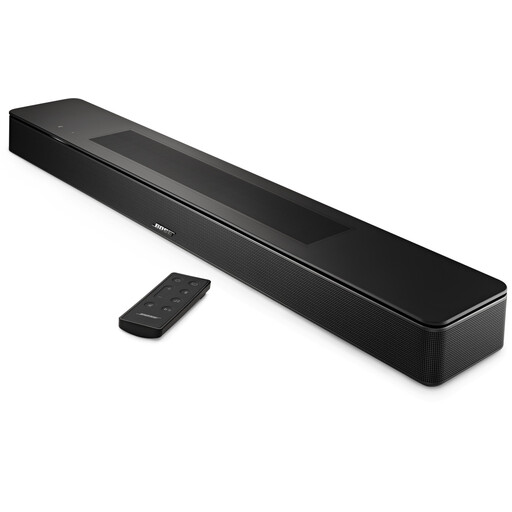
Bose Smart Soundbar - Black
If you want to listen using one of the streaming options listed, check that your service and live album are compatible, and that a soundbar suits your setup.
- The product information lists Bluetooth, AirPlay 2, Spotify Connect and Chromecast.
- The product information lists five drivers.
View at Joybuy
Frequently asked questions
Can you place a HomePod right up against the wall?
Apple recommends leaving at least 15 cm of space around a HomePod or HomePod mini during setup. Measure the space before choosing this model.
Can you connect a CD player to a Sonos Era 100?
Yes, if your CD player has a suitable audio output and you use the required Sonos Line-In Adapter and a suitable cable. If the Era 100 is part of a Sonos home cinema setup, also check the usage requirements.
Can you use the Era 100 over Bluetooth straight out of the box?
No. Sonos says the Era 100 must first be set up over Wi-Fi using the Sonos app before you can use it as a Bluetooth speaker.
Do you only need a compatible speaker for Dolby Atmos on a HomePod?
No. For the Dolby Atmos music playback described by Apple, you also need an Apple Music subscription and eligible content. Apple notes that Dolby Atmos isn’t supported on HomePod mini.


