
Focused blues listener
You usually listen from one spot and are weighing up whether separately positioned left and right channels matter more than having one compact speaker. Sonos and Apple explain how to set up stereo pairs.


Start by checking how you’ll play your own recordings, then listen from your usual spot at your normal volume. One speaker takes up less space, while two compatible speakers can be placed separately on the left and right. Choose a stereo pair only if you have room for both speakers and the extra cost is worthwhile for you. Also check the controls, bass settings and whether your neighbours might hear the music.
You usually listen from one spot and are weighing up whether separately positioned left and right channels matter more than having one compact speaker. Sonos and Apple explain how to set up stereo pairs.
You want to play existing recordings, music from your phone or a streaming service, so you check which connection and playback method work with the exact model. Sonos and Apple outline different connection options and system requirements.
You want to listen at a volume and from a position that take housemates and neighbours into account, and you’re thinking about the privacy implications of built-in voice control. The Dutch government advises agreeing how to deal with noise issues together first; the Dutch Data Protection Authority recommends considering privacy when choosing a smart device, too.
A good fit if: you’re short on space or want to play music from several devices.
The trade-off: one speaker isn’t the same as two stereo channels that can be positioned separately.
A good fit if: you usually listen from one spot and have room for a speaker on the left and right.
The trade-off: you need two compatible speakers, and a pair doesn’t guarantee better sound from every spot.
| What to consider | What should you check? | Who is this important to? |
|---|---|---|
| Sound and stereo | Check whether the exact model supports a pair of two speakers, then listen to familiar recordings at your normal volume. | If I listen from one spot, I want to know whether separate channels make the setup worthwhile for me. Around 31% of consumers prioritise sound and stereo positioning. |
| Source and controls | Make a note of where your recordings are stored and check playback through the app, Bluetooth, AirPlay, a supported music service or, if available, a line input. | I want to be able to play my own files, music from my phone or a streaming service without relying on an unsupported connection. Around 25% of consumers prioritise compatibility with their music source and the controls. |
| Positioning and neighbours | Consider the space available and how the sound carries at the volume you usually use. | In an open-plan flat, I want to find a position and volume that work for others, too. For around 19% of consumers, positioning and being considerate of neighbours are the main priorities. |
| Privacy and controls | Check the privacy and security information, and find out how to mute the microphone on the exact model. | If I don’t need hands-free voice control, I want to know which controls will still be available and how the microphone works. Around 13% of consumers prioritise privacy and the controls they want. |
| Complete setup | Factor in whether you need a second compatible speaker, an adapter or a particular service. | I want to know everything my chosen setup requires upfront, not just which first speaker to buy. Around 12% of consumers name the total cost of the setup as their main consideration. |
A listed connection doesn’t automatically tell you whether your files or phone will play using the method you want. Check support for the exact model and the source you use.
Check in advance how you’ll play your files and use your app and phone.
You need a supported pair for separate left and right channels. To connect a wired source to the Sonos Era 100, you’ll also need a separate line-in adapter.
Compare the cost of the complete setup with one speaker, including any second compatible speaker and the adapter you need.
A stereo pair requires two speakers and two places to position them; a wired source for the Era 100 may also need a separate adapter.
Manufacturers’ descriptions of sound and tuning don’t prove how an ordinary blues recording will sound from your listening spot, or how much your neighbours will hear.
Listen to familiar recordings at your normal volume, then assess the positioning and settings in your own space.
Sonos offers models with different playback options and stereo-pair features.
The Google Home Speaker is designed for Google Home control and, according to Google, can be paired with a second speaker of the same type.
The HomePod (2nd generation) is worth considering if you already use a compatible Apple setup.
These picks range from one speaker with several playback options to a set of two speakers for a stereo pair.
 No image available
A good fit if you’re looking for one speaker with several playback options.
Listed options: Wi-Fi, Bluetooth, AirPlay 2, Spotify Connect and Google Cast. An app or service is required.
 No image available
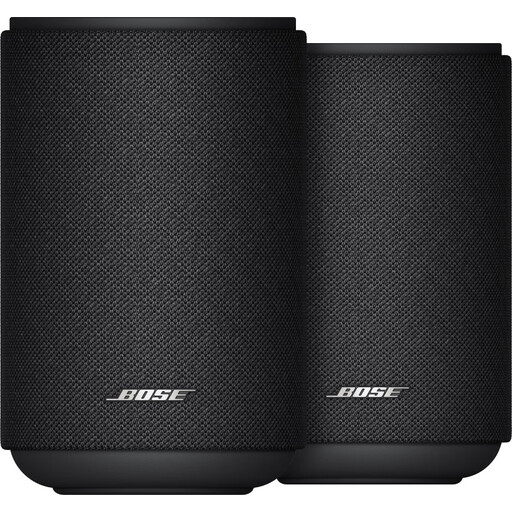
A good fit if you want to position two speakers separately as a stereo pair.
The set includes two speakers, and the product information lists an equaliser. For use in a surround setup, it says the speakers can be paired with a Bose Lifestyle Ultra soundbar.
 No image available
A good fit if you’re looking for one speaker with several wireless and wired playback options.
Listed options and connections: Wi-Fi, Bluetooth, AirPlay 2, USB and AUX. The product information also lists a 10-band equaliser.
No. One suitable speaker may be enough if you’re short on space. Choose a supported pair if separate left and right positioning matters to you and you have room for both speakers. Listen at your usual volume before deciding whether the upgrade is worthwhile.
It depends on the source and the exact model. Sonos lists Bluetooth, AirPlay 2 and a line input for the Era 100; the line input requires a separate adapter. For other models, check which apps or playback methods are supported. Don’t assume you can stream audio over Bluetooth based on a Bluetooth specification alone.
Start from your usual listening spot and try a position and volume that work for others, too. Use EQ or room tuning as an adjustment option, not as a guarantee of a particular sound. If your neighbours are affected by noise, the Dutch government advises agreeing how to deal with it together first.
Allow for a possible second speaker, an adapter and any service you want to use. ACM ConsuWijzer says that for ordinary online consumer purchases, you generally have a legal cooling-off period of up to 14 days after delivery, with some exceptions. The seller is responsible for the legal guarantee; the cooling-off period and guarantee are separate rights.
The Dutch Data Protection Authority advises checking the privacy statement and security information before buying. Also find out how to mute the microphone on the exact model. A model without built-in voice control doesn’t have a standalone voice assistant.