
Vandaag of morgen in huis

Kwaliteit gegarandeerd

Welkomstaanbiedingen ontgrendelen: GRATIS bezorging | Tot 80% korting | Gratis 30 dagen JoyPlus-proefperiode
Download de app
A movie night on your bedroom ceiling, an important presentation at the office, or projecting a football match in the garden. A TV is often too restrictive, but the projector market can be overwhelming. Which model is right for you?
This article serves as a practical guide. We'll cut through the specs and marketing jargon to explain what you need to look for, helping you make an informed decision on a smart projector that fits your needs.
Before making a choice, it's helpful to understand a few key technical specifications. These determine the image quality, ease of use, and flexibility of the projector.
The sharpness of the image is determined by the native resolution. Many models support a 1080p input, but the actual (native) resolution might be lower, such as 720p. For a truly sharp, detailed home cinema experience, a native 1080p projector is an excellent choice.
Brightness is expressed in ANSI lumens. This is a standardised measurement that indicates the brightness of the projected image. A higher number of ANSI lumens means a brighter picture, which is especially important if you plan to use the projector in a room that isn't completely dark or as an outdoor projector.
A smart projector stands out with its built-in operating system (like Android TV) and connectivity. A projector with Wi-Fi and Bluetooth is essential. Wi-Fi allows you to use apps like YouTube or Netflix directly from the device without connecting a laptop. With Bluetooth, you can easily connect an external speaker or headphones for better sound.
Features like a projector with auto-focus and automatic keystone correction add to the ease of use. These allow the projector to automatically sharpen the image and correct distortion when it's not placed directly in front of the projection surface.
How and where do you plan to use the projector? A compact mini projector is ideal for on-the-go use or if you have limited storage space. A portable projector with a built-in battery offers maximum freedom. Some models feature a unique design, such as a 360-degree rotating stand, or come as a set with a projector with a tripod for a stable and flexible setup.
Based on the criteria above, we've highlighted a few popular choices. These models offer a great balance of functionality, image quality, and ease of use.
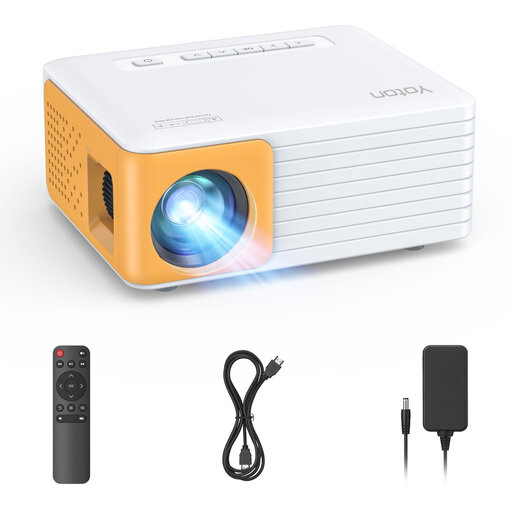
Why it stands out: This model is extremely compact and lightweight (420 grams), making it an excellent choice for those looking for a projector for occasional use or to take on trips. It's a no-frills device that focuses on the essentials.
Pros:
Who is it for? For the user seeking a simple, affordable, and highly portable projector for movie nights at home or on the go. This is not a smart projector; you will need an external device (like a laptop or a cabled smartphone) to play content.
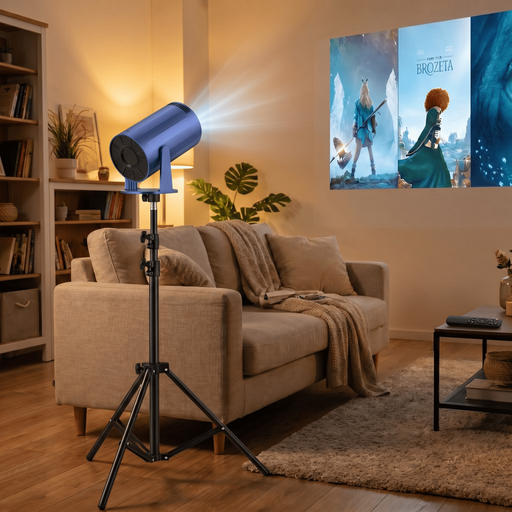
Why it stands out: This projector combines smart functionality with a unique, flexible design. The 220-degree rotating stand allows for effortless projection on walls and ceilings. The built-in Android TV 11.0 makes it a full-fledged smart projector.
Pros:
Who is it for? Ideal for users looking for an all-in-one entertainment solution. Perfect for the bedroom, movie nights with friends, or even yoga sessions, thanks to its flexible projection and built-in smart features.
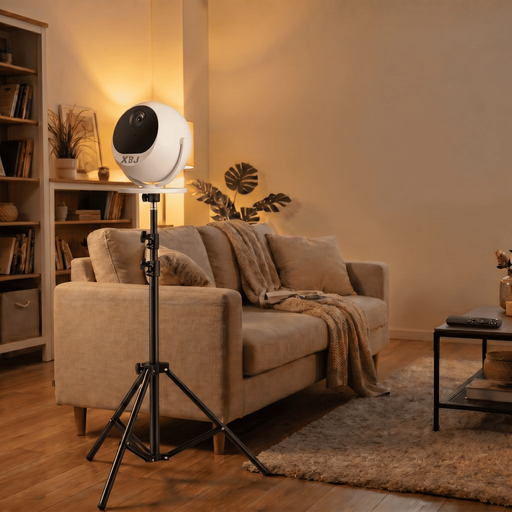
Why it stands out: This is a powerful home cinema projector with specs aimed at the demanding user. The combination of a native 1080p resolution, high brightness, and advanced automatic settings makes this a very user-friendly and high-quality model.
Pros:
Who is it for? For the tech enthusiast looking for a premium, flexible, and powerful all-in-one solution. Suitable for serious movie nights, big-screen gaming, office presentations, and outdoor use.
The world of projectors is broad and diverse. Besides home cinema models, there are also specialised options for other applications.
For more specific choices, such as projectors for a child's room, check out our full collection of crib mobile projectors.
What is the difference between a regular projector and a smart projector? A smart projector has a built-in operating system (like Android TV) and includes a projector with Wi-Fi and Bluetooth. This allows you to install apps and stream content directly from the internet without needing to connect a laptop, Chromecast, or other external device. A regular projector functions purely as an external display.
How many ANSI lumens do I need for an outdoor projector? For outdoor use at dusk or on a cloudy day, a higher brightness output is recommended. A model with at least 200 ANSI lumens is a good starting point. For a bright and vibrant image, even with some ambient light, models with 500 ANSI lumens or more perform significantly better.
Can I watch Netflix directly on any smart projector? Not always. While many smart projectors support streaming apps, there can be issues with the direct playback of apps like Netflix due to copyright restrictions (HDCP). Some models have certified systems that do support it. It's wise to check the product description for this information. An alternative is to use an external streaming stick (like a Google Chromecast or Amazon Fire TV Stick) for guaranteed compatibility.
Joybuy Product Recommendation Officer
