
Vandaag of morgen in huis

Kwaliteit gegarandeerd

Welkomstaanbiedingen ontgrendelen: GRATIS bezorging | Tot 80% korting | Gratis 30 dagen JoyPlus-proefperiode
Download de app
A smart plug with an energy monitor seems like a simple purchase. You plug it into the wall, connect an appliance, and get instant insight into your power consumption. However, there are pitfalls that can turn your purchase into a disappointment. Many models on the market are advertised with features that work poorly in practice or are missing entirely.
Before you invest in a smart outlet, it's helpful to recognize the most common marketing traps. This will prevent you from wasting money on a gadget that becomes useless after a few months.
app-controlled plug is only as smart as the software behind it. Cheaper models often come with poorly maintained apps, are full of bugs, or stop working after an update. The result: your smart plug becomes nothing more than an expensive piece of plastic.energy monitoring outlet feature is why many people choose this type of plug. Unfortunately, the measurements on many budget plugs are inaccurate. A deviation of 20% or more is not uncommon, making the data useless for serious energy savings.To avoid a bad buy, it's important to check a few technical specifications. These determine the reliability, safety, and ease of use of your smart plug.
Most smart plugs operate via Wi-Fi. A Wi-Fi plug connects directly to your home network without needing an extra device (a hub). This makes installation simple: plug in the socket, download the app, and follow the steps. This is ideal if you're just starting with smart home products. Also, check if the plug is compatible with systems you already use. A good Google Home plug or one that works with Amazon Alexa can be easily controlled with your voice.
Not every smart plug is suitable for every appliance. The maximum power, expressed in Watts (W) or Amps (A), indicates how much current the plug can safely handle. A standard plug with a 10A limit (around 2300W) is fine for lamps, televisions, or chargers. For heavy-duty appliances like a kettle, electric heater, or tumble dryer, you need a model that can handle 16A (around 3680W). Using an underpowered plug for a high-draw appliance is a serious fire hazard.
In the EU and other regions, electronic devices must meet safety standards. Look for the CE marking, which indicates that the product complies with European regulations. Additional certificates like T?V or GS are a further sign of quality and safety. A good smart plug also has child safety features and is made from fire-retardant material.
Not everyone has the same needs. That's why we've highlighted a few products that fit different user profiles, based on their specifications.
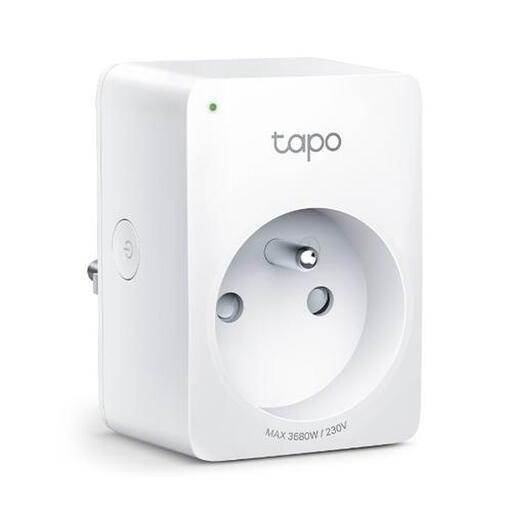
Why This Fits Their Persona: This user wants to know exactly which appliances are the energy hogs in their home. The Tapo P110 offers detailed, real-time, and historical data on energy consumption via the reliable Tapo app. Ideal for tracking down phantom loads and cutting costs.
TP-Link's Tapo app is stable and well-maintained, avoiding the unreliable app pitfall. Energy measurement is a core feature from a reputable brand, which reduces the risk of inaccuracy.
Detailed energy monitoring, a high maximum power rating of 3680W (16A), and seamless integration with Google Assistant and Alexa for voice control.
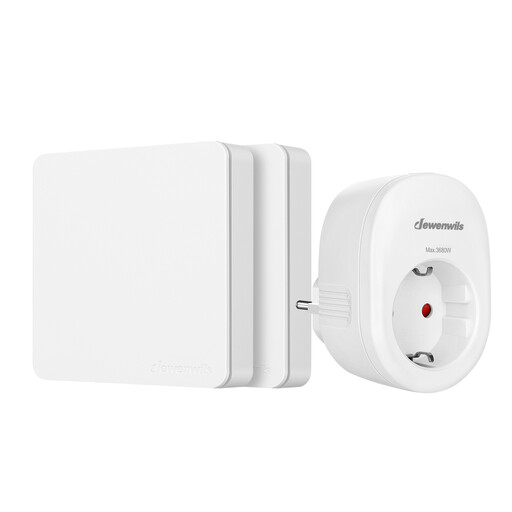
Why This Fits Their Persona: This user doesn't need apps, Wi-Fi, or energy monitoring. The goal is simple: to turn a hard-to-reach lamp or Christmas lights on and off with a physical button. Convenience and simplicity are paramount.
This product completely bypasses all software-related pitfalls. There's no app, no Wi-Fi, and no cloud dependency. It works via a simple and reliable RF frequency, ensuring it functions every time.
Extremely simple plug-and-play installation and a high maximum power rating of 3680W (16A). Operation via the physical remote is instant and reliable, even through walls.
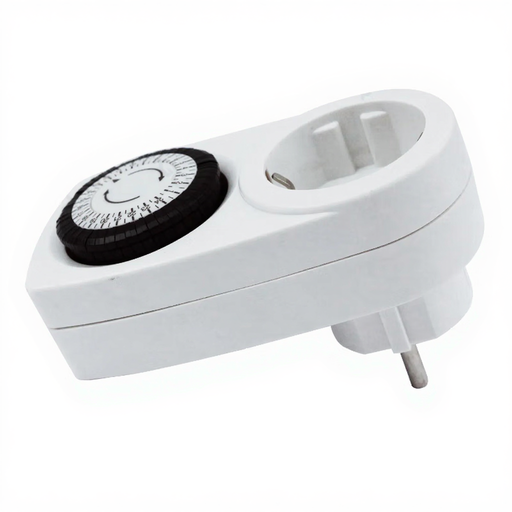
Why This Fits Their Persona: This user wants basic automation at a low price. Think of an aquarium light that turns on and off at the same time every day, or a lamp that switches on while you're on vacation. No need for remote control, just a fixed, repeating schedule.
This mechanical timer is immune to software bugs, cloud outages, and privacy concerns. It's a purely mechanical device that performs one task and continues to do so reliably, without depending on external factors.
Very low purchase price and completely offline operation. The 24-hour cycle is easy to set with physical pins. This plug also supports a high power rating of 16A.
We have compiled a complete, up-to-date list of products that fully meet these strict selection criteria and safety standards.
A common concern is the smart plug's own power consumption. Fortunately, this usage is minimal. Most modern smart plugs consume less than 1 Watt in standby mode. The savings you achieve by completely switching off devices with high phantom load (like televisions or game consoles) are almost always significantly greater than the consumption of the plug itself.
No, for a Wi-Fi plug, you do not need a separate hub or bridge. These plugs connect directly to the 2.4 GHz band of your existing Wi-Fi router. This makes the installation highly accessible and is one of the reasons this type of smart plug is so popular for those just starting to automate their home.
That depends on the plug's specifications. Always check the maximum power rating, expressed in Watts (W) or Amps (A). A standard plug (10A / 2300W) is unsuitable for appliances like washing machines, dryers, or electric heaters. For these, you need a model rated for at least 16A / 3680W, such as the TP-Link Tapo P110. To be safe, always check the power rating of the appliance you want to connect before using a smart plug.
