Published on: 2026-06-06
The market is saturated with smart plugs, which can make choosing the right one for your needs feel overwhelming. Choosing the wrong one can lead to compatibility issues with your existing smart home setup, an inability to handle the power demands of high-wattage appliances like your coffee maker, or a simple lack of desired features. This guide will help you make an informed decision based on key specifications and your specific needs.
Buyer's Guide: How to Select a Smart Plug
Before making a purchase, it's essential to understand the key specifications that determine a smart plug's functionality, safety, and user-friendliness.
- Connectivity: Most smart plugs operate via your home network. A Wi-Fi plug connects directly to your 2.4 GHz Wi-Fi router, with no separate hub or bridge required. Some models use a radio frequency (RF) signal, which is ideal for locations without a stable Wi-Fi connection.
- Maximum Power: One of the most important safety features. The maximum power, expressed in Watts (W) and Amperes (A), indicates which appliances you can safely connect. A standard plug supports up to 3680W (16A), suitable for most household appliances like washing machines or electric kettles. Always check the power rating of the appliance you intend to connect.
- Features:
- Energy Monitoring: A smart plug with an energy monitor provides insights into the power consumption of the connected device via an app. This helps identify phantom power draw and reduce energy costs.
- Scheduling: Lets you automatically power devices on and off at specific times, acting as an advanced outlet timer.
- Away Mode: Simulates presence by turning lights on and off at random intervals, which can help deter break-ins.
- Control:
- App: The most common method, allowing you to control the plug from anywhere in the world.
- Voice Assistant: Compatibility with platforms like Google Home or Amazon Alexa enables control via voice commands, a key feature for any Google Home smart plug.
- Physical Remote Control: A plug with a remote control is a simple solution for users who don't want to use a smartphone or for situations where an app is impractical.
- Application: Determines where you can use the plug. An outdoor smart plug has an IP rating (e.g., IP44) indicating it is protected against splashing water and suitable for use in the garden or on a balcony. Indoor plugs do not have this protection.
Our Top Smart Plug Recommendations for 2026
Based on the criteria above, we've selected models with distinct features tailored to specific use cases.
1. TP-Link Tapo P110: For Energy Consumption Insights
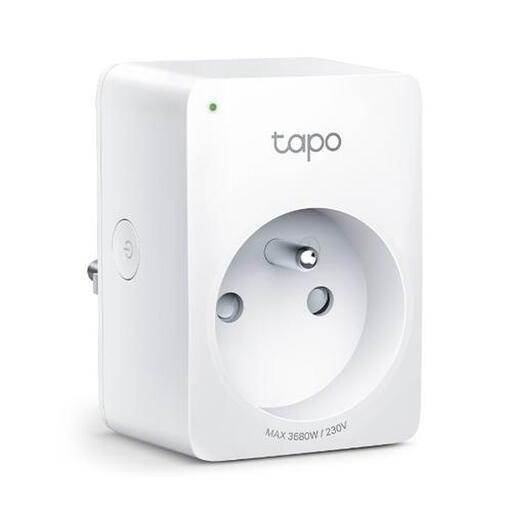
- Why this product: The TP-Link Tapo plug is designed for users who want to actively manage their energy consumption. Its core feature is the built-in energy monitor, which provides real-time power consumption insights via the Tapo app. According to TP-Link, this allows you to identify high-consumption devices and save on costs by scheduling them more intelligently.
- Pros:
- Energy Monitoring: Track live and historical power consumption.
- Schedules and Timers: Automate devices based on your routine.
- Voice Control: Works with Amazon Alexa and Google Assistant.
- Compact Design: Its 72 x 51 x 40 mm size doesn't block adjacent outlets.
- No Hub Required: Connects directly to your Wi-Fi network.
- Who it's for: Homeowners looking to reduce energy costs and gain insight into the consumption of individual appliances. It's also practical for users already invested in the Google Home or Alexa ecosystems.
2. Dewenwils Plug with Remote Control: For Simple Operation
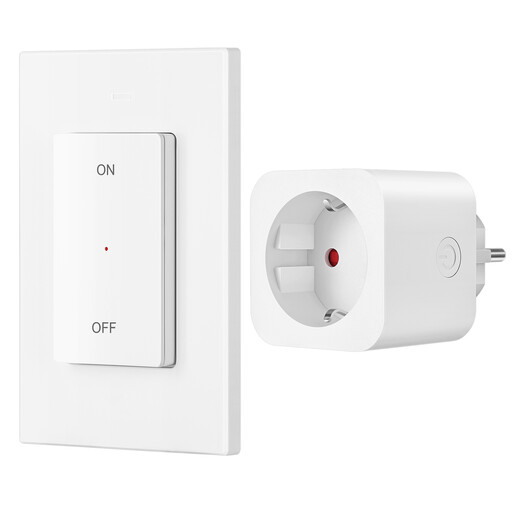
- Why this product: This model focuses on simplicity and reliability, independent of Wi-Fi or apps. It's a plug with a remote control that operates via a strong 433.92 MHz RF signal. This signal penetrates walls and furniture, offering a range of up to 30 meters. The set is pre-programmed and ready to use straight out of the box.
- Pros:
- Ready to Use Instantly: No installation, app, or Wi-Fi required.
- Powerful RF Signal: Reliable control up to a 30-meter range.
- Flexible Switch: The remote is magnetic and can be mounted on a wall plate or used as a standalone remote.
- High Power Rating: Supports appliances up to 3680W (16A).
- Low Standby Consumption: The plug's own standby power consumption is just 0.6W.
- Who it's for: Users seeking a simple on/off solution without a smartphone. Ideal for the elderly, for controlling hard-to-reach outlets, or in locations with a weak or non-existent Wi-Fi signal.
3. Dewenwils Outdoor Smart Plug: For Gardens and Patios
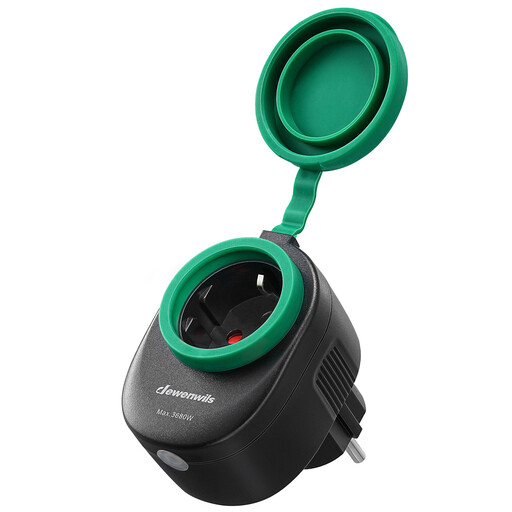
- Why this product: This outdoor smart plug is specifically built to withstand the elements. Its IP44 waterproof rating means the housing and seals protect against water splashes from any direction, making it a safe choice for automating outdoor lighting or a pond pump.
- Pros:
- IP44 Water-Resistant: Designed for safe outdoor use, with protective rubber covers.
- Smart Control: Works with the Smart Life app, Alexa, and Google Home for voice control and scheduling.
- No Hub Required: Connects directly to a 2.4 GHz Wi-Fi network.
- Robust Power Rating: Suitable for appliances up to 3680W.
- Automation: Set schedules for garden lights, holiday lighting, or fountains.
- Who it's for: Anyone who wants to automate and remotely control electrical devices in the garden, on the balcony, or on the patio, regardless of the weather.
Can't Find the Right Match? Explore More Options
The models listed above offer solutions for the most common scenarios: energy management, simple control, and outdoor use. If your situation requires different specifications—such as a power strip with multiple smart outlets, a model with a dimming function, or a different design—more options are available.
Explore our full range of outlet plugs for a broader overview of available models and features.
Frequently Asked Questions about Smart Plugs (FAQ)
1. How much power does a smart plug itself consume? A smart plug's own power consumption in standby mode is very low, typically under 1 Watt. For example, the Dewenwils RF model specifies a consumption of 0.6W. This is significantly lower than the phantom power draw of many older appliances you can switch off with it.
2. Do I need a special hub or bridge for a smart plug? For most modern Wi-Fi plugs, like the TP-Link Tapo and the Dewenwils outdoor plug, no separate hub is needed. They connect directly to your Wi-Fi router's 2.4 GHz band, which significantly simplifies installation. Only older systems or those running on different protocols (like Zigbee or Z-Wave) require a central hub.
3. Can I use a smart plug as a timer for my lights? Yes, this is one of its core functions. You can set detailed schedules via the companion app. For instance, you can schedule the living room lights to turn on at 7:00 PM and off at 11:00 PM every day. This makes a smart plug a flexible and modern replacement for a traditional timer switch.
Joybuy Product Recommendation Officer
An objective, practical shopping assistant focused on facts and product parameters, without the marketing hype.


