
Vandaag of morgen in huis

Kwaliteit gegarandeerd

Welkomstaanbiedingen ontgrendelen: GRATIS bezorging | Tot 80% korting | Gratis 30 dagen JoyPlus-proefperiode
Download de app
A smart plug might seem like a simple purchase, but real-world experience often proves otherwise. Many people get home with a product that doesn't work with their Wi-Fi network, requires a separate, expensive hub, or becomes useless after a few months due to an impractical design. Before you invest in automating your home, it's crucial to know what to look for.
We've outlined the three most common pitfalls to help you avoid a bad purchase and make the right choice for your situation right away.
smart plug that turns out to be incompatible with your Google Home or Alexa, or it only operates on an outdated 2.4 GHz Wi-Fi band while your modern router primarily uses 5 GHz.To avoid the problems above, there are a few technical specifications you should always check. These determine whether a plug is practical and safe for your needs.
Not every remotely controlled plug is "smart." The technology determines its capabilities and ease of installation.
google home outlet or alexa plug for voice control.wifi outlet is more practical.Always check the maximum power rating, expressed in Watts (W) and Amperes (A). A standard smart plug in the UK and Europe should handle at least 10A, but for high-consumption appliances (like electric heaters, kettles, or tumble dryers), 16A (approximately 3680W) is the recommended standard. A power rating that is too low can lead to overheating and a fire hazard.
Do you want not only convenience but also to save on your energy bill? Then choose a smart plug with an energy monitor. The companion app allows you to see exactly how much power a connected device is using, both in real-time and historically. This helps you identify "power hogs" in your home and combat standby power consumption.
Based on these criteria, we have selected a few products that suit different user profiles.
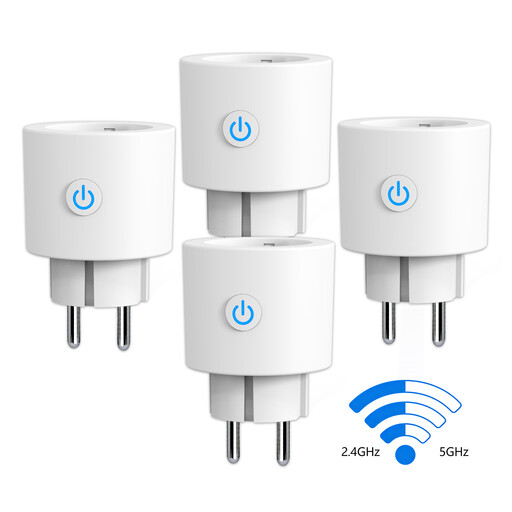
Why This Fits Their Persona: Perfect for those who want to make multiple devices smart at once. This set works with Google Home and Alexa, includes an energy monitor, and is easy to pair with modern routers thanks to its dual-band Wi-Fi support.
This plug requires no separate hub, and its support for both 2.4 and 5 GHz Wi-Fi prevents the most common connectivity issues.
Built-in energy monitor for consumption insights. High power rating of 16A (3680W), suitable for most household appliances.
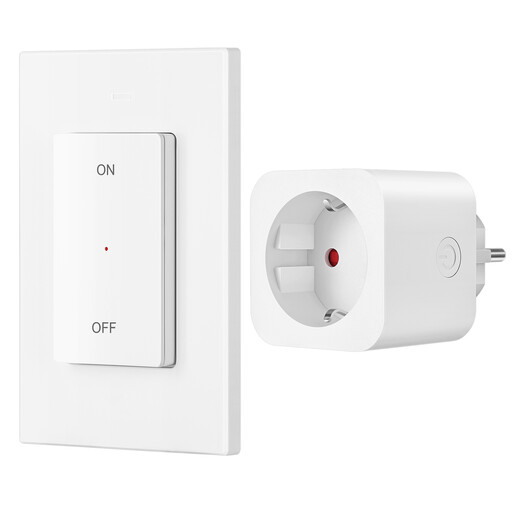
Why This Fits Their Persona: For those who don't need apps or voice control but want a simple and reliable solution. Ideal for controlling lamps behind the sofa or holiday lights without getting up.
This is a plug-and-play RF system. It requires no Wi-Fi, no app, and no hub. The set is pre-programmed and works straight out of the box.
Strong RF signal with a 30-meter range that passes through walls. The remote is magnetic and can be attached to the wall mount or any metal surface.
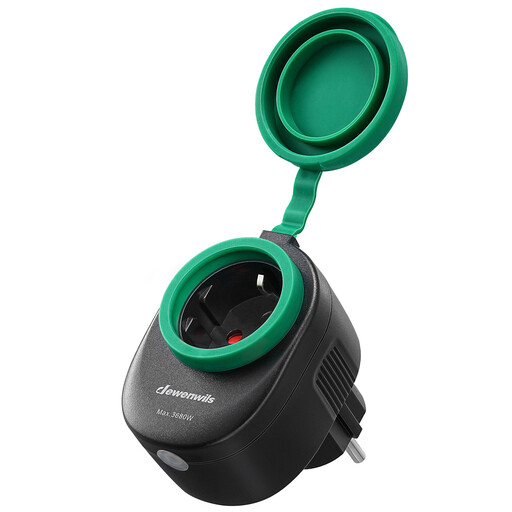
Why This Fits Their Persona: Specifically designed for controlling garden lights, a pond pump, or party lighting. This plug is weatherproof and can be controlled via the app or your voice, even when you're inside.
Prevents the mistake of using an indoor plug outdoors. The IP44 certification guarantees it is protected against splashing water, which is essential for safe outdoor use.
Works directly on 2.4 GHz Wi-Fi without a hub. Compatible with Alexa and Google Home for hands-free control and setting schedules for your outdoor equipment.
Sometimes a smart plug isn't the solution, and what you really need is a simple in-line cord switch. We've compiled a complete list of products that meet strict selection criteria and safety standards.
Not always. Most modern smart plugs are wifi outlets that connect directly to your home network. You only need a hub if you choose a system that operates on protocols like Zigbee or Z-Wave. Always check this in the product description.
A smart plug connects to Wi-Fi and is controlled via an app or a voice assistant (like Google or Alexa). This offers advanced features like timers, schedules, and energy monitoring. A remote-controlled outlet works via a radio frequency (RF) signal with a physical remote. It's a simpler on/off solution without an app or internet connection.
Yes, in two ways. First, a smart plug with energy monitoring lets you see exactly which devices consume a lot of power. Second, you can set timers and schedules to automatically turn off devices when not in use, which effectively combats standby power consumption.
