
Vandaag of morgen in huis

Kwaliteit gegarandeerd

Welkomstaanbiedingen ontgrendelen: GRATIS bezorging | Tot 80% korting | Gratis 30 dagen JoyPlus-proefperiode
Download de app
A smart plug, also known as a Wi-Fi outlet, seems like a simple purchase. You plug it into the wall, connect a device, and control everything with an app. Yet, things go wrong more often than you'd think. Many people come home with a product that doesn't work with their other devices, is unsafe for the washing machine, or starts to malfunction after just a few months.
As a Joybuy Product Recommendation Officer, I see where things go wrong every day. Before you invest in convenience, it's wise to be aware of the most common pitfalls.
By paying attention to a few key specifications, you can easily avoid these problems and choose a smart plug that truly suits your needs.
To avoid a bad purchase, you don't need to pore over a technical manual. Pay attention to the following three points, and you're guaranteed to make a better choice.
This is the most critical point. A smart plug is only smart if it can communicate with the devices you already own.
Not every plug is suitable for every appliance. The maximum power, expressed in Watts (W) and Amperes (A), is crucial for safety.
Modern smart plugs can do more than just turn on and off. Two features are particularly useful:
To help you make the right choice, we have selected a number of products that fit different needs and situations.
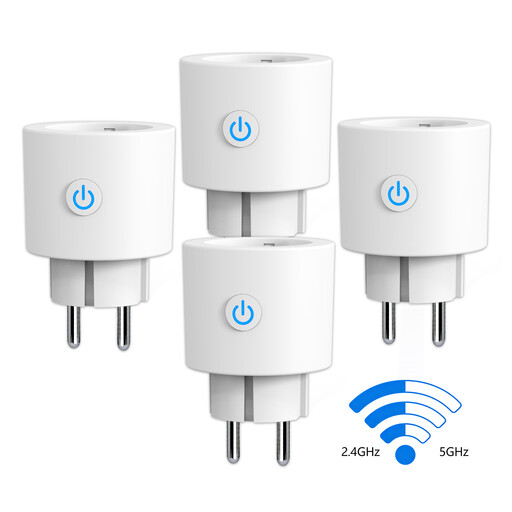
Why This Fits Their Persona: Ideal for those who want immediate insight into the energy consumption of multiple devices. This set of four makes it easy to tackle the phantom load from devices like the TV, computer, and chargers.
This plug bypasses the compatibility trap by supporting both 2.4 GHz and 5 GHz Wi-Fi, which significantly simplifies installation. No separate hub is required.
The real-time energy monitoring feature via the Smart Life app provides instant insight into your consumption and helps save costs. Works with Alexa and Google Home.
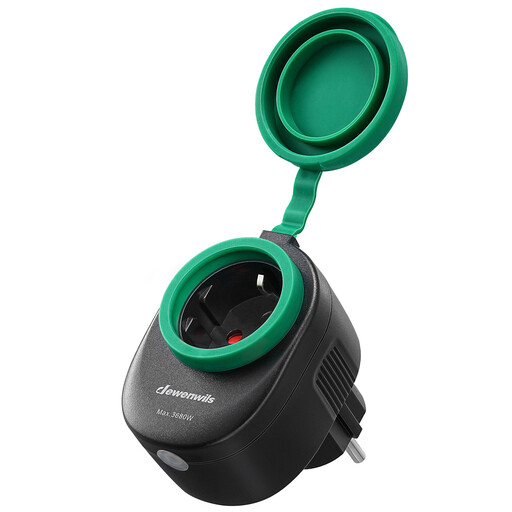
Why This Fits Their Persona: Perfect for controlling garden lights, a pond pump, or Christmas lighting. This plug is built for the Dutch weather and can be controlled remotely or via schedules.
This isn't an indoor plug being used outdoors. The IP44 rating and rubber covers ensure safe operation in damp conditions, preventing short circuits.
Direct connection to 2.4 GHz Wi-Fi without a hub. Full compatibility with Alexa and Google Home for voice control and integration with IFTTT for advanced automation.
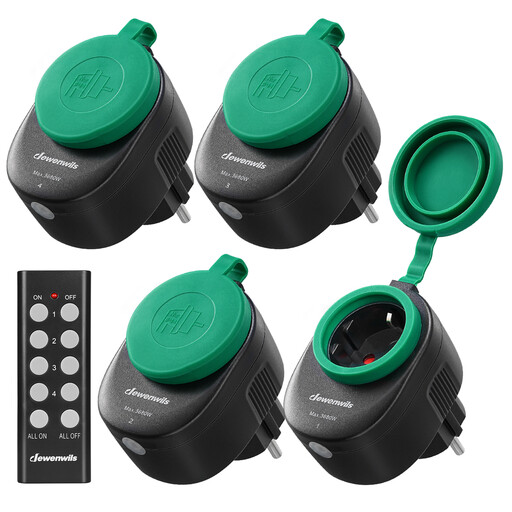
Why This Fits Their Persona: For those who want convenience but can't be bothered with apps, Wi-Fi settings, or voice assistants. Ideal for the elderly or anyone who wants a simple remote on/off button for indoor or outdoor devices.
This system bypasses the entire connectivity pitfall. It works via a radio frequency (RF) signal and is pre-paired. You don't have to install anything; it works right out of the box.
Extremely simple operation with a physical remote control. The sockets are IP44 water-resistant and have a range of up to 30 metres, even through walls.
We have compiled a complete, up-to-date list of products that fully meet these strict selection criteria and Dutch safety regulations.
No, not always. Most models are Wi-Fi outlets and require a stable internet connection for remote control and smart features. However, alternatives exist, such as the Dewenwils set mentioned above, which work with a simple radio frequency (RF) remote control. These are ideal if you don't have a stable Wi-Fi signal in the desired location or if you prefer a solution without an app.
A smart plug also consumes a small amount of power to stay connected to the network. This standby power consumption is typically very low, usually around 0.5 to 1 Watt. While this may cost a few euros per year, the savings you achieve by completely turning off devices instead of leaving them on standby are almost always greater. Models with energy monitoring can help you gain insight into this.
This is generally not recommended. Washing machines, dryers, and dishwashers are appliances with high peak power and complex motor loads. Although a plug with a power rating of 16A / 3680W can technically handle the load, the electronic switches in many smart plugs are not designed for the inductive loads of large motors. This can shorten the lifespan of the plug or lead to malfunctions. Always check the recommendations of the smart plug manufacturer. For these types of appliances, it is safer to plug them directly into the wall socket.
