
Vandaag of morgen in huis

Kwaliteit gegarandeerd

Welkomstaanbiedingen ontgrendelen: GRATIS bezorging | Tot 80% korting | Gratis 30 dagen JoyPlus-proefperiode
Download de app
Turn on a lamp from your couch, preheat the coffee maker while you're still in bed, or simply gain insight into your devices' power consumption. A smart plug makes it all possible. You place this small device between a wall outlet and an appliance's plug, allowing you to control and automate it remotely.
But the selection is vast. Do you need a Wi-Fi-enabled socket, a model for outdoor use, or a simple wireless switch? This guide will help you make the right choice based on specifications and practical applications, without the marketing fluff.
Before you decide, it's wise to consider a few key features. This ensures you choose a model that perfectly fits your needs.
The way you control the plug is a major differentiator.
Not every smart plug is suitable for outdoor use. For devices in the garden, on the balcony, or in the shed, you'll need an outdoor smart plug. These models have a specific IP rating, such as IP44, which indicates they are protected against splashing water and weather conditions. Never use an indoor plug for outdoor applications.
Some smart plugs offer more than just on/off control. A popular feature is the built-in energy meter. A smart plug with energy monitoring provides precise insights into the connected device's power consumption via the app. This allows you to identify devices with high standby power and strategically save on your energy bill. Additionally, most Wi-Fi plugs offer the ability to set schedules and timers, so devices automatically turn on and off at fixed times.
Based on functionality and application, we've highlighted a few popular choices for you.
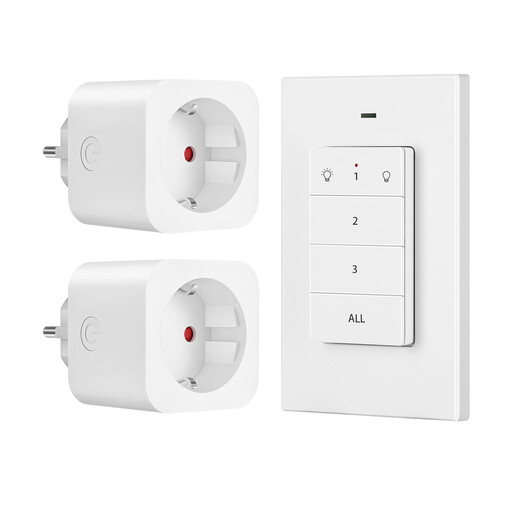
Why It Stands Out: This set is the definition of simplicity. No Wi-Fi, no app, no setup. You plug it in and control it instantly with the included wireless switch.
Pros:
Who is it for? For anyone seeking a simple and reliable on/off solution for hard-to-reach appliances, without depending on a smartphone or Wi-Fi network.
View the Dewenwils Wireless Sockets
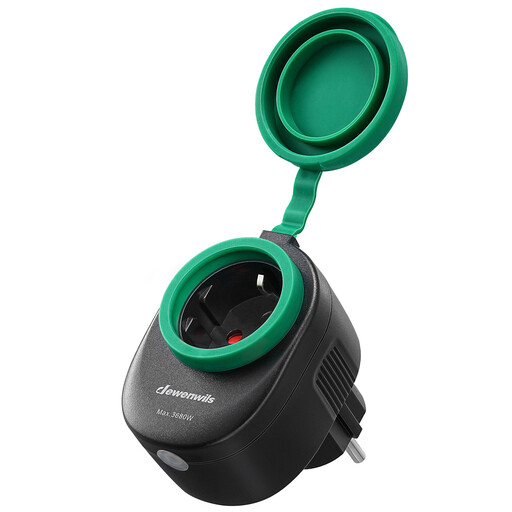
Why It Stands Out: This smart plug is specifically designed for outdoor use. Thanks to its IP44 waterproof rating and protective rubber covers, it can withstand rain and moisture.
Pros:
Who is it for? Ideal for automating outdoor equipment like garden lighting, Christmas decorations, a pond pump, or a patio heater.
View the Dewenwils Outdoor Smart Socket
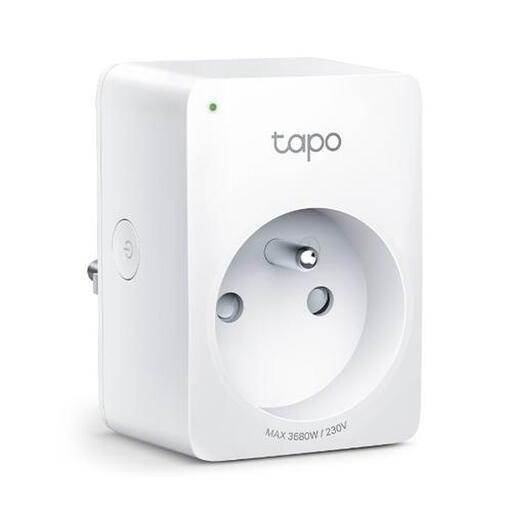
Why It Stands Out: This compact plug from TP-Link not only offers smart control but also features a built-in energy meter. Through the Tapo app, you can track live power consumption and monitor costs.
Pros:
Who is it for? For the energy-conscious user who wants control over their devices while gaining insight into power consumption to reduce costs.
Is none of these options quite what you're looking for? Perhaps you need a specific form factor, like an extra-flat plug to fit behind a cabinet. For more specialized plug solutions, you can browse our category.
See more low-profile plug sockets
Do I need a hub for a smart plug? Usually not. Most modern Wi-Fi smart plugs, like the Dewenwils and TP-Link models mentioned above, connect directly to your Wi-Fi network. A separate hub is mainly required for systems that use other protocols like Zigbee or Z-Wave.
How much power does a smart plug consume itself? The self-consumption (standby power) of a smart plug is very low, often less than 1 watt. The savings you achieve by completely turning off devices instead of leaving them on standby are almost always greater than the consumption of the plug itself.
Can I use a smart plug for any device? You can use a smart plug for most household appliances, as long as you do not exceed the maximum power rating. This is always clearly stated on the product, for example, 3680W (16A). They are less suitable for devices with a very high inrush current, such as heavy-duty motors or certain air conditioning units. To be safe, always check the specifications of both the plug and the device you want to connect.
By: Joybuy Product Recommendation Officer
