The world of smart lighting is vast, and it's not always immediately clear which product is right for your needs. A poor purchase can lead to frustration: bulbs that won't connect to your Wi-Fi, disappointing light colours, or an installation process that's more complicated than expected. This article provides an overview of the key factors to consider and presents a selection of products for various applications, based on their specifications.
What to Consider When Purchasing Smart Lighting?
To make an informed decision, it's helpful to look at a few technical features. These parameters determine the functionality and suitability for your space.
- Connectivity and Control: Most smart bulbs operate via Wi-Fi and can be controlled with a smartphone app. Check whether the product connects directly to your router or if it requires a separate hub or bridge. Many systems also offer compatibility with voice assistants like Google Assistant, Alexa, or Siri, enabling control through voice commands.
- Light Specifications:
- Lumen (lm): This indicates brightness. More lumens mean brighter light. For functional lighting, such as in a kitchen or office, a higher lumen value is desirable. For ambient lighting, a lower value is often sufficient.
- Kelvin (K): This describes the colour temperature of white light. A low value (around 2,700 K) produces warm, yellowish light, similar to a traditional incandescent bulb. A high value (around 6,500 K) provides cool, bluish daylight, which can aid concentration.
- RGB: Stands for Red, Green, Blue. RGB lighting can produce millions of colours, ideal for creating a specific atmosphere or for gaming lighting.
- Type of Lighting and Application: The form of the lighting determines its use. A standard bulb with an E27 fitting will fit most existing fixtures. An LED strip is flexible and can be used to accent objects or contours in a room. A monitor light bar is specifically designed as desk lighting to illuminate your workspace without causing screen glare.
Our Top Picks for Smart Lighting in 2026
Below is a selection of products, each suited for a specific application. The choices are based on product features and intended use cases.
Philips Wiz - 2 LED Smart Bulbs and Remote Control
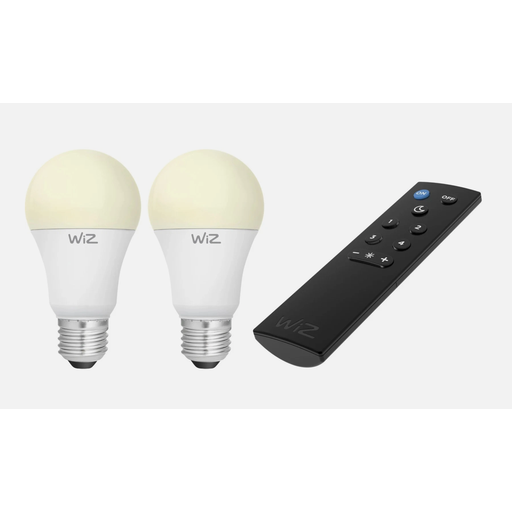
- Why we chose it: This starter kit from Philips Wiz is an accessible entry point into smart lighting. The bulbs connect directly to your Wi-Fi network, so no separate gateway is required. The included remote control offers an alternative to app control, which is practical for family members without a smartphone.
- Key Features:
- Fitting: Standard E27 base.
- Light Specifications: 2 x 9W LED, 810 lm, warm white (2,700 K).
- Control: Works with the WiZ app, voice assistants, and the included remote.
- Extra Functionality: The manufacturer states that the bulbs support SpaceSense technology for motion detection without additional sensors.
- Best for: Users looking to replace existing bulbs in their living room or bedroom with a simple, smart solution. Ideal for those who want functional and atmospheric warm white light without a complex setup.
VIVREAL LED Strip Lights 5V 9.84 FT RGB
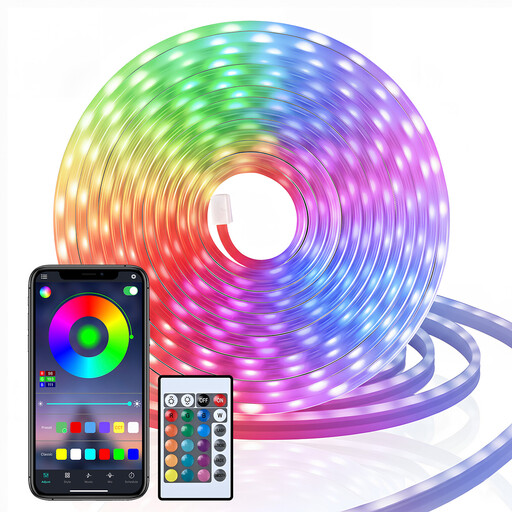
- Why we chose it: This LED strip is designed for creating a dynamic atmosphere. Its built-in microphone syncs the light effects with music or other ambient sounds, creating an immersive experience. The strip's flexibility allows for creative applications.
- Key Features:
- Type: RGB lighting with a wide colour palette.
- Length: 9.84 ft / 3 m.
- Functionality: Music sync, timer functions, and customisable light effects via app and remote control.
- Safety: Operates on a low 5V DC voltage.
- Best for: Gamers looking to enhance their setup with reactive gaming lighting, or anyone wanting to add vibrant, customisable ambient lighting to a room, bar, or TV stand.
ochama Monitor Light Bar
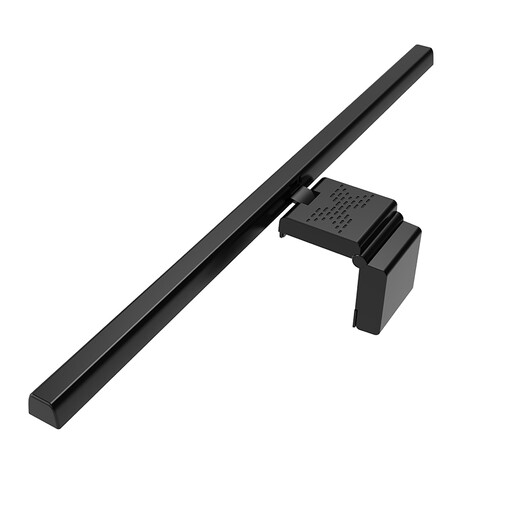
- Why we chose it: This monitor light bar is a functional solution to a common problem: poor workspace lighting. Its design directs light onto the desk and keyboard while preventing screen glare. This can help reduce eye strain.
- Key Features:
- Design: Asymmetrical light design that minimises screen glare.
- Adjustability: Three colour temperatures (warm, neutral, cool) and a 60-degree rotation angle.
- Installation: Simple clamp mount on top of the monitor, taking up no desk space.
- Best for: Remote workers, students, and anyone who spends long hours at a computer. This form of desk lighting is specifically designed to support productivity and visual comfort.
Haven't Found What You're Looking For? Explore More Options
The products listed above represent specific solutions for common scenarios. However, the range of LED lighting is much broader. Countless other types of smart bulbs, panels, and fixtures are available that might better suit your unique needs.
For a complete overview of available smart lights, you can browse our LED Lamps category.
Frequently Asked Questions About Smart Lighting
1. Do I need a special hub or bridge for smart lighting? Not always. Many modern smart bulbs, like those from Philips Wiz, connect directly to your Wi-Fi network. Other systems, particularly those using protocols like Zigbee, do require a central hub. Always check this in the product description under 'Connectivity'.
2. What is the difference between warm white, cool white, and RGB? Warm white (approx. 2,700 K) has a yellowish, cosy glow and is suitable for relaxation areas. Cool white (approx. 6,500 K) is bright and bluish, similar to daylight, and is often used for workspaces. In addition to white, RGB bulbs can display millions of other colours, which is ideal for setting a specific mood.
3. Can I control smart lighting with my voice? Yes, most smart lighting products are compatible with voice assistants like Google Assistant, Amazon Alexa, and Siri Shortcuts. This allows you to turn the lights on or off, dim them, or change their colour with a voice command. Compatibility is typically listed on the product page.
Written by the Joybuy Product Recommendation Officer Date: June 6, 2026


