
Vandaag of morgen in huis

Kwaliteit gegarandeerd

Welkomstaanbiedingen ontgrendelen: GRATIS bezorging | Tot 80% korting | Gratis 30 dagen JoyPlus-proefperiode
Download de app
A smart AI robot can help with entertainment, training, garden maintenance, education or professional automation. However, choosing one isn’t always straightforward. Product pages often mention features such as autonomous navigation, AI vision and intelligent interaction, while the practical differences between models can be significant.
So don’t focus only on the number of features. Think about where you’ll use the robot, how you’ll control it and what safety features it has.
A robot with cameras or an app isn’t automatically fully autonomous. Check which tasks it can perform independently and which features require a remote control, smartphone, Wi-Fi connection or additional charging stations.
For example, autonomous navigation may only be available on a particular version of a humanoid robot. A robotic lawn mower may need RTK signals, a reference station or a stable internet connection to work as described.
The stated operating time usually applies under specific conditions. Fast movement, slopes, heavy loads and intensive camera processing can drain the battery more quickly. So a humanoid robot with a stated operating time of around two hours won’t necessarily run for two hours at maximum load.
Also check:
An intelligent robot may be larger and heavier than you expect. According to the product information, the Unitree Go2 Pro weighs around 15 kg, including the battery. The AGIBOT X2 weighs around 35 kg. These systems aren’t suitable for use in a small living room without proper preparation.
Take care around moving joints, rotating parts, blades and launch openings. Products such as robotic dogs, humanoid robots and tennis robots are generally not toys. Keep children at a safe distance, make sure there’s enough clear space to work and follow the instructions.
Sensors are crucial for an autonomous robot. A product may use:
More sensors don’t automatically mean a robot will work safely or flawlessly in all conditions. Check the recommended surface, slope, lighting conditions and outdoor temperature.
For a robotic arm or humanoid robot, DOF, or degrees of freedom, is relevant. More degrees of freedom can offer a wider range of movement, but they don’t tell you everything about how practical the robot is. Also check the maximum torque, payload and reach.
The AGIBOT X2 has 27 degrees of freedom, while the X2 Ultra version has 31. However, the stated maximum payload depends on the robot’s position. According to the product information, it’s lower across the full range of movement than in specific positions.
Voice control is handy if you want to keep your hands free while using a robot. App control is useful for settings, maps, training programmes and firmware updates. Check that the app is available for your phone, and whether certain features require an account or an internet connection.
Also check whether custom development is supported. For education, research and professional use, SDK/API access may be more important than a large number of pre-set movements.
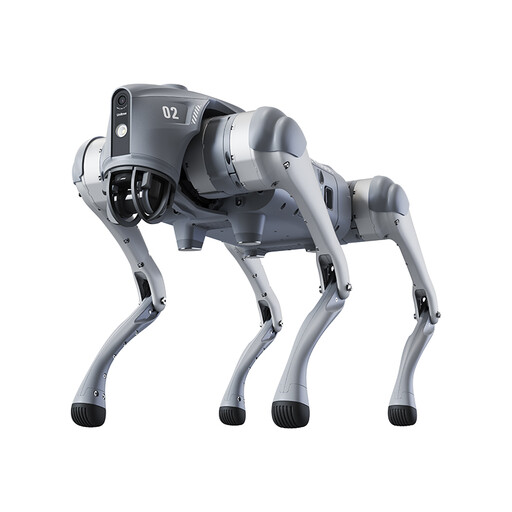
Why it suits this user: This model is aimed at people who want to try out a robotic dog, app control and movement features without investing in a humanoid platform straight away.
The product information gives specific details, including an 8000 mAh battery, a camera, LiDAR, a remote control and an operating time of around one to two hours. This makes it easier to compare with other models than a vague AI promise would.
360° LiDAR according to the product description, voice recognition, app features and a stated top speed of up to 3.5 m/s.
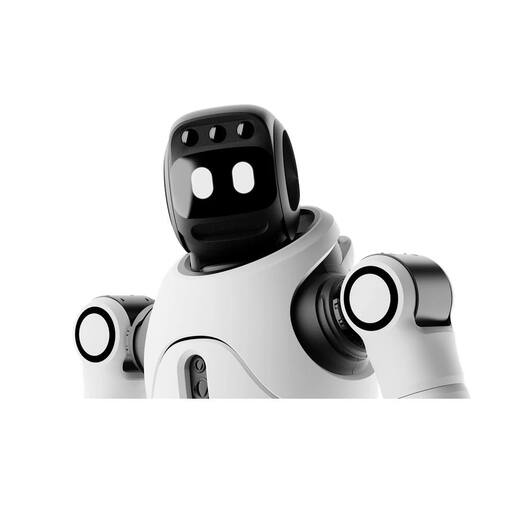
Why it suits this user: A good choice for organisations and experienced users who need multimodal interaction, autonomous navigation and scope for further development.
The specifications distinguish between the X2 and X2 Ultra versions. LiDAR, an RGB-D camera, 4G/5G and automatic charging are available with the Ultra version and require a compatible charging station.
31 degrees of freedom, LiDAR, RGB-D perception, app support and support for further development, according to the product details.
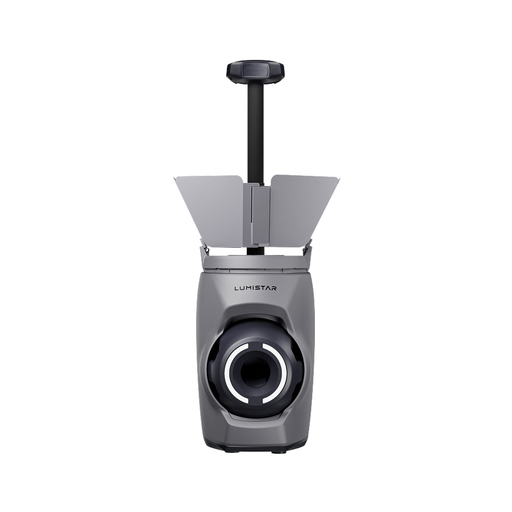
Why it suits this user: For tennis players who want to practise on their own, with adjustable speed, spin, direction and training modes.
Its controls are backed up by more than marketing claims: the product information gives specific figures, including 20–140 km/h, 259 drills, app control and a battery life of up to four hours.
Voice control via a wristband, three AI modes, adjustable spin and a portable design. The main unit weighs around 9.96 kg.
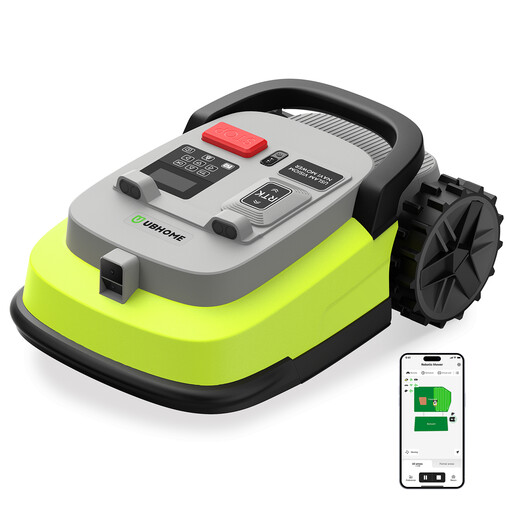
Why it suits this user: A practical choice for larger or divided lawns where wireless mapping and zone management matter.
The product specifications spell out key requirements, including a reference station, support for up to 15 zones, the ability to handle slopes of 55% and an IPX6 rating for the mower.
RTK and AI vision positioning according to the product description, app control, zone management and a stated noise level of 52 dB.
We’ve put together a complete, up-to-date list of products that meet these strict selection criteria and comply with the applicable European safety regulations.
The price depends on the application and the hardware. A chess robot or tennis robot will be in a different price bracket from a humanoid robot with LiDAR, multiple cameras and powerful actuators. Also factor in ongoing costs for batteries, maintenance, charging stations, accessories and any software services.
It depends on the model. A compact chess robot can be used on a stable table. A robotic dog or humanoid robot needs more open space and can move with considerable force. Always check the safety warnings, age limits, dimensions and weight before choosing a robot for your home.
Its lifespan depends on charging cycles, storage, maintenance and operating conditions. Avoid moisture if the product isn’t designed to withstand it, use the original charger and regularly check cables, sensors, wheels and moving joints. A clear instruction manual, available firmware updates and a warranty you can verify are all important things to consider when buying.
