
Miniature maker working with fine details
You want to show texture, a signature or small finishing touches in close-up. Compare both the magnification and the available working distance of a suitable lens.


Start by considering the size of your sculptures and the details you want to fill the frame: a suitable phone may be enough for overview shots, while a mirrorless camera with an appropriate close-up or macro lens gives you more options for magnification and composition. A separate macro lens is not necessarily included in a camera kit, and deep relief may call for extra work, such as focus stacking, editing and a stable setup. Remember to consider lighting and reflections too: changing the camera body alone will not solve these issues.
You want to show texture, a signature or small finishing touches in close-up. Compare both the magnification and the available working distance of a suitable lens.
You want to get several planes of a piece in focus, and can set aside time for a stable setup and, if needed, a focus stack.
You want to create consistent product images without buying a complete macro setup straight away. First, compare what your current phone or a camera kit could do for your work.
| Key consideration | What to look for when buying | Who should pay particular attention? |
|---|---|---|
| Capturing small details | Compare the magnification of the exact lens and the space between the lens and your subject. Canon lists a maximum magnification of 1:2 for the RF 35mm F1.8 MACRO IS STM; Nikon and OM SYSTEM list 1:1 for separate macro lenses. | If I sell miniatures, I want to show texture or a small signature clearly. Around 26% of consumers prioritise capturing small details. |
| Sharpness throughout the depth | Check whether your chosen camera supports focus bracketing and how to combine the images. Canon lists focus bracketing for the EOS R50; Nikon describes focus stacking, where images are combined using software. | For deep relief, I want to show more than one plane in focus, and I’m prepared for extra shots and editing. Around 21% of consumers prioritise sharpness throughout the depth. |
| Lighting and how materials appear | Test where the camera, sculpture and light will fit in your setup; if space is limited, check whether anything might obstruct the light. Canon describes separate macro lighting for close-ups. | For glossy or highly textured pieces, I want to control shadows and reflections. Around 21% of consumers prioritise lighting and how materials appear. |
| Cost of the complete setup | Check exactly what is included in the kit and whether the supplied lens can achieve the framing you want. The Canon EOS R50 kit includes the RF-S 18–45mm; the RF 35mm macro lens is sold separately. | As a beginner, I want to find out whether my current phone can take usable images before choosing a camera body and lens together. Around 16% of consumers prioritise the total cost of a working setup. |
| A repeatable workflow | Decide whether one shot per angle is enough or whether you’ll regularly need focus bracketing and image stacking. Check the features and lens compatibility for the exact model. | When photographing a range of products for my online shop, I want an approach I can repeat every time. Around 16% of consumers prioritise a repeatable shooting and editing workflow. |
A kit lens and a separate macro lens are not automatically the same combination. Canon lists a maximum magnification of 1:2 for the RF 35mm MACRO, while the EOS R50 kit reviewed here includes an RF-S 18–45mm.
Compare the magnification and the contents of the exact combination, rather than looking only at the camera or lens name.
The focusing distance doesn’t tell you how much clear space will be left between the front of the lens and your subject. For the XF30mm at 1:1, Fujifilm specifies a working distance of 1.2 cm from the front element.
Check that the lens, sculpture and lighting will all fit in your setup.
A series of shots taken at different focus points is not the same as automatically combining those images. Nikon describes focus stacking using software; focus bracketing on the Canon EOS R50 does not, by itself, confirm that the camera also combines the images.
Check the shooting feature separately, and find out how you can combine the series with your chosen setup.
Combining images may take extra time and require software.
An EOS R50 kit for overview shots, with the option to choose a separate close-up lens later.
A Z system with the separately available Z MC 50mm f/2.8 for those looking for 1:1 macro photography.
According to OM SYSTEM, the OM-5 Mark II offers Focus Stacking. The separate M.Zuiko 60mm Macro is an option to consider for detailed shots.
An X system where the separate XF30mmF2.8 R LM WR Macro is an option for capturing very small details.
A way to start with a phone you already own, if you’re not ready to buy a separate camera.
These product options range from compact cameras to mirrorless cameras with kit zoom lenses. For small sculptures, check in particular whether the supplied lens can focus close enough and whether you’ll need a separate macro lens for the details you want to capture.
 No image available
The listed optical zoom may help you adjust the framing from different distances; the zoom specification alone says nothing about macro magnification.
The product title lists 12× optical zoom and 4K; the description mentions Wi-Fi.
 No image available
The product title positions this model as a vlogging camera; first consider whether a video-focused camera is right for your product photography.
The title lists a 1-inch CMOS sensor, 4K/120fps video and 3-axis stabilisation.
 No image available
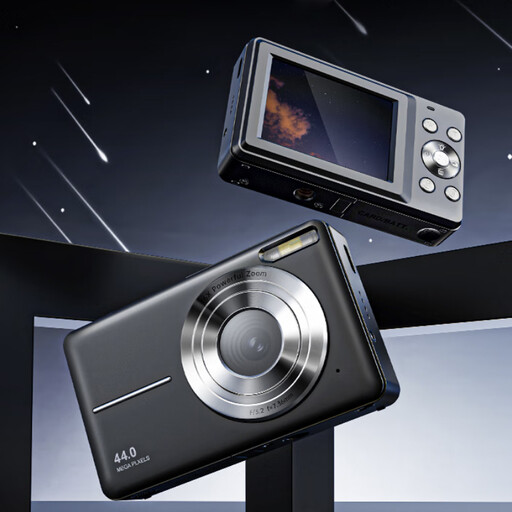
A compact camera may be worth considering if you’re looking for a separate device for photos and videos; check that its focusing capabilities suit the size of your sculptures.
The product title lists 4K, 44 MP and 16× zoom. The description mentions autofocus and a removable memory card.
 No image available
The kit zoom offers a range of focal lengths for framing; check separately whether the lens can focus close enough to capture the details you want.
The title lists a 16–50mm zoom lens. The product description mentions an APS-C sensor and 24.2 MP.
 No image available
The supplied zoom lens is a starting point for overview shots; check the close-up capabilities of this exact lens before relying on it for macro details.
The product description lists a 24.2 MP APS-C sensor, autofocus and an electronic viewfinder, along with a 16–50mm kit lens.
No, it depends on the framing you want and the capabilities of your current device or lens. Apple describes a macro mode on supported iPhones; for a mirrorless camera kit, check the magnification of the exact lens included. Several manufacturers offer separate 1:1 macro lenses for capturing very small details.
First, check that your setup is stable and whether a single shot will give you the depth of field you want. You can also take shots at different focus points and combine them; Nikon describes this workflow using software. Canon lists focus bracketing for the EOS R50, but check separately which shooting and image-stacking features your chosen setup supports.
Check exactly what is included in the kit and the terms that apply to a business purchase. According to Business.gov.nl, the 14-day statutory cooling-off period for online consumer purchases does not apply when a business buys for commercial purposes, so don’t assume you have the same returns rights as a consumer.
An online shop must not mislead consumers about the products it sells. The Netherlands Authority for Consumers and Markets explains that information can be misleading if it gives the wrong impression or leaves out important details. So make sure your photos, editing and product description together give an accurate impression of what the customer is buying.