First, measure the distance between the lens and the wall, then decide what image width will look comfortable from your seat. A short-throw projector may suit you if there’s still some space in front of the wall; if the projector needs to sit close to the wall, an ultra-short-throw model is worth considering. Then compare the light source, connections, audio options and support for 4:3 if your film source uses that aspect ratio.
Who is this buying guide for?
For viewers with limited space to set up
You want a film-sized picture without placing the projector behind your seats. The throw ratio and the distance between the lens and the wall will help you work out whether a model will fit your room. BenQ and Optoma list these details for each model.
For viewers in a room with ambient light
You don’t always watch in a darkened room and want to know what brightness will suit your viewing conditions. Compare brightness figures alongside their measurement standards, as manufacturers don’t always use the same one.
For viewers who want to get started easily
You want to connect a film source or watch films using built-in apps. Check the connections, audio outputs and aspect ratios for each model, as these features vary.
What should you look for when choosing?
Short-throw projector
Choose this option if: you can place the projector in front of the seating area, but a standard throw distance won’t work.
Bear in mind: a short throw still needs space between the lens and the wall, so work out the distance required for your preferred image size.
Ultra-short-throw projector
Choose this option if: the projector needs to sit close to the wall. For the Optoma Photon Go, the manufacturer specifies a throw distance of 0.26–0.40 m and an image size of 60–100 inches.
Bear in mind: Optoma lists the Photon Go as having a fixed zoom and a maximum battery life of 1.5 hours. Check that the image size and power supply will suit your film night.
Portable projector with a standard throw distance
Choose this option if: you want to move the projector around and have enough distance from the wall. Philips lists built-in apps and a rotating stand for the NeoPix 230 Smart.
Bear in mind: a rotating stand doesn’t reduce the throw distance required, so check the distance you’ll need for your preferred image size.
| What to consider |
What should you check? |
Who is this important for? |
| Image size when space is limited |
Measure the distance from the lens to the wall and the available wall width. Compare these with the throw ratio and throw-distance range of the exact model. |
If I have limited space, I want to know in advance whether I can achieve my preferred image size where I plan to set up. Around 33% of consumers prioritise finding a suitable place for their projector. |
| Ambient light |
Decide whether you’ll usually darken the room, and compare brightness only alongside the relevant measurement standard. |
If I often watch with light in the room, I want a projector that suits those conditions. Around 27% of consumers prioritise viewing with ambient light. |
| Film source and sound |
Check the apps and connections you need, the audio output and whether the projector supports your source’s aspect ratio. |
If I watch classic films from my own source, I want to know whether the aspect ratio and audio will suit my set-up. Around 20% of consumers prioritise playback and clear dialogue. |
| Maintenance and additional requirements |
Check the type of light source, the specified operating mode and what you’ll need for your preferred set-up. |
If I want to avoid surprises about extra requirements or maintenance, I want to weigh these things up in advance. Around 20% of consumers prioritise running costs and aftercare. |
Things to watch out for when buying
-
Assuming the maximum image size is achievable at any distance
The distance required varies by model and image width. A stated maximum image size alone doesn’t tell you whether it will work in your room.
Measure the distance between the planned lens position and the wall, then compare it with the throw ratio or throw-distance range of the exact model.
-
Assuming built-in apps and speakers will always be enough
Apps, HDMI connections and audio outputs vary by model. A speaker specification doesn’t necessarily tell you whether dialogue will be clear in your room.
Check that your film source will work with the available apps or connections, and which audio connection will suit your set-up.
-
Treating the stated lifespan as a guarantee of maintenance-free use
Manufacturers give lifespan specifications for particular light sources and operating modes. These don’t predict exactly when your projector will need maintenance.
Compare the light source type and operating mode for the exact model, and refer to the relevant manual.
Brands and models to consider
BenQ
The TH671ST is a short-throw option if you can place the projector in front of the seating area.
- BenQ lists Full HD, a throw ratio of 0.69–0.83, two HDMI inputs and a 3.5mm audio output for the TH671ST.
- The TH671ST uses a lamp. BenQ lists different lifespans for each operating mode, so check which image size will suit your throw distance too.
Optoma
The GT2000HDR and Photon Go are separate models with different throw distances and light sources.
- Optoma lists a throw ratio of 0.496:1 and 4:3 support for the GT2000HDR. For the Photon Go, the manufacturer specifies a ratio of 0.18:1.
- According to Optoma, the Photon Go has a fixed zoom and a stated maximum battery life of 1.5 hours. Its specifications are not interchangeable with those of the GT2000HDR.
Philips
The NeoPix 230 Smart is designed for flexible positioning and playback through built-in apps, provided you have the required throw distance.
- Philips lists native Full HD, LuminOS and a rotating stand.
- The rotating stand doesn’t reduce the throw distance required. Philips states a minimum distance of 70 cm in the manual; also check the distance required for your preferred image size.
Epson
The EH-TW7000 is a home cinema model for a set-up with plenty of space and a need for flexibility when aligning the image.
- Epson lists lens shift, optical zoom, two HDMI ports and 3,000 lumens for both white and colour light output.
- Epson states a lamp life of 5,000 hours in eco mode. Check the throw distance for your preferred image size; don’t assume this model is short throw without checking.
Projectors at Joybuy
This selection includes models for short distances, portable use and streaming films. Compare the required throw distance and connections with your room and film source.
 No image available
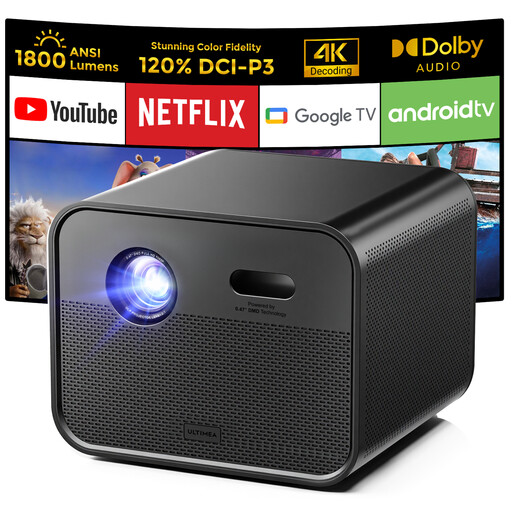
Ultimea Poseidon E100 native Full HD projector
Worth considering if you’re looking for a film projector with built-in Google TV. Its listed throw ratio is 1.2:1, so check the distance required for your preferred image size.
Native 1920 × 1080; 1,800 ANSI lumens; two built-in 10 W speakers.
View at Joybuy
 No image available
Optoma H117ST short-throw DLP projector
A short-throw model to consider if the projector needs to sit relatively close to the wall. Work out the distance required for your preferred image size.
WXGA resolution; 3,800 ANSI lumens; 0.52:1 throw ratio; 4:3 support; stated throw distance from 0.4 m; built-in speaker.
View at Joybuy
 No image available
Yaber L2 projector
Worth considering if you want built-in Google TV and automatic focus. Check that its stated throw ratio will suit your available distance.
Native 1080p; 520 ISO lumens; 1.17:1 throw ratio; two 5 W speakers; 360° rotating gimbal.
View at Joybuy
 No image available
Blackview PV1000 Max Grey projector
Worth considering if you want to connect an HDMI device and adjust the projection direction with flexibility.
Native 1080p; stated image size of 40–150 inches; 360° rotating design; HDMI connection.
View at Joybuy
 No image available
Portable Android 13 projector, 1080p
Worth considering if you want to watch films using built-in streaming apps. Check that the apps you want and your network connection will suit the way you plan to use it.
1080p; Wi-Fi 6; Bluetooth 5.0; 360° rotating stand.
View at Joybuy
Frequently asked questions
How can I tell whether a projector will fit in my small viewing space?
Measure the distance from where you plan to place the lens to the wall, as well as the available image width. Compare these with the throw ratio and throw-distance range of the exact model. Even a short-throw projector needs some space in front of the wall.
Can I watch an older film in a 4:3 aspect ratio?
That depends on the aspect ratio settings on your source and projector. Optoma lists 4:3 support for the GT2000HDR; check the specifications of the model you’re considering and make sure your source won’t stretch the image unintentionally.
What should I bear in mind when maintaining a projector?
Check the light source type and operating mode in the manual for the exact model. BenQ lists different lamp lifespans for each mode on the TH671ST; Optoma specifies a laser light source for the GT2000HDR. These specifications don’t guarantee when your projector will need maintenance at home.
Am I only entitled to a standard two-year legal guarantee in the Netherlands?
No. According to the Dutch government, there is no fixed statutory guarantee period in the Netherlands: you’re entitled to a product that works as it should, and the retailer is your point of contact if there’s a problem. A manufacturer’s guarantee may be available in addition.
Can I return a projector bought online if it doesn’t fit in my room?
For many purchases made remotely from a business, the Dutch government says you have a 14-day cooling-off period, with some exceptions. Read the applicable returns policy before buying, and don’t assume the same rules apply when buying from a private seller.


