What should you look for when choosing?
First, measure the space available for your keyboard and mouse. Then compare the layout and operation of the keys you use for slides, and choose a suitable connection.
| What to consider |
What should you check? |
Who is this important for? |
| Space for your keyboard and mouse |
Measure the available desk space and compare it with the width of the exact version. Remember to leave room for your mouse too. |
I want to fit my keyboard and mouse on a small desk without placing the mouse too far away. Around 33% of consumers say space is their main consideration. |
| Slide layout and controls |
Compare the supplied layout with the keys you use in your presentation software. Microsoft Support notes that key positions may differ from the US layout used as the basis for its shortcut documentation. |
If I often move between slides, text or objects, I want to find the keys I normally use easily. Around 27% of consumers prioritise slide controls. |
| Connection and compatibility |
Check Bluetooth support, the operating system and any ports or receivers required for the exact version. |
I want to use the keyboard with my computer and perhaps switch between devices, without choosing a connection that won’t work with them. Around 20% of consumers give device connectivity top priority. |
| Typing feel and sound |
Look at the key shape and, if possible, try the typing feel and sound for yourself. Treat descriptions such as ‘quiet’ as manufacturer claims, not comparative measurements. |
If I type a lot or work in a shared space, I want to know whether the key feel and sound suit me. Around 20% of consumers consider this their top priority. |
Keyboards at Joybuy
This selection includes compact keyboards for a small workspace, with both wired and wireless versions. When choosing, check the layout, connection and space required by the exact version.
 No image available
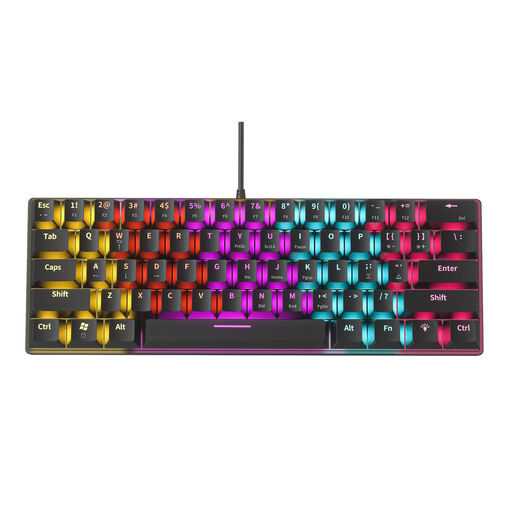
NAXSIR Mini Mechanical Keyboard, 61 keys (04-49486816)
This compact version may suit you if you have limited desk space and want a wired connection.
61 keys; the product name lists 12 RGB lighting effects. According to the product information, the blue mechanical switches have an audible click, so they may not be the best choice if you’re looking for quiet keys.
Joybuy
 No image available
NAXSIR Foldable Wireless Bluetooth Keyboard, Grey
A foldable Bluetooth version may suit you if you’re looking for a compact keyboard for mobile devices. Check that it fits on your desk when unfolded.
The product name describes a rechargeable version with a magnetic stand, aluminium casing and quiet keys. Check that Bluetooth and the keyboard layout are compatible with your device.
Joybuy
 No image available
AULA F75 MAX, 75%, QWERTY US layout, Gradient Grey, Reaper Switch
The 75% layout may suit you if you’re looking for a compact keyboard with navigation keys. Check that the US QWERTY layout works for you.
The product name lists wired, Bluetooth and 2.4 GHz connections. Check which connection types your devices support.
Joybuy
 No image available
AULA WIN60HE, 60%, wired keyboard
The 60% layout may suit you if you’re looking for a compact, wired keyboard. Check that the smaller layout includes the keys you use for presentations.
The product name lists Hall effect magnetic switches. Check the product variant and keyboard layout before choosing.
Joybuy
Frequently asked questions
Which keys are useful when you create lots of slides?
First, check where the keys you use most are positioned. For example, Microsoft Support lists Ctrl+M as the shortcut for a new slide in PowerPoint on Windows. Its shortcut documentation is based on a US keyboard layout, so key positions may differ on other layouts.
How do you connect a keyboard if you switch between a laptop and tablet?
Choose a connection that both devices support. For the 350 reviewed, HP lists Bluetooth and the ability to switch between up to three devices; for the KW 9200 MINI, CHERRY lists Bluetooth, receiver and wired connection options. Follow the instructions for the exact version.
What should you look for when it comes to batteries and charging?
Check whether the version uses replaceable batteries or a rechargeable battery. HP lists two included AAA batteries for the 350 reviewed, while CHERRY describes the KW 9200 MINI as having a rechargeable battery. Also check what’s included with the version you’re buying.
What are your rights if you don’t like the keyboard or it breaks too soon?
For online consumer purchases, you generally have 14 days from delivery to change your mind, subject to legal exceptions, according to ACM ConsuWijzer. You’re also entitled to a product that, under normal use, meets the expectations you could reasonably have of it. Contact the seller if there’s a problem.
What should you look for in the CE marking on a wireless keyboard?
Equipment sold in the Netherlands must meet the applicable European product requirements; wireless equipment must also meet the relevant requirements for radio equipment. The Dutch Authority for Digital Infrastructure states that products sold in Europe must carry a CE marking. Check the marking and the exact version.


