
Reader with hardly any room for a mouse
Are there books or notes next to your keyboard, and would you like to move the pointer without moving the mouse itself? A stationary trackball may be worth considering.


If you have hardly any room to move a mouse, start by looking at a stationary trackball. If you prefer pointing in the familiar way and spend a lot of time scrolling through titles, compare compact mice for their scroll controls, connectivity and fit. An angled mouse is another option if hand position is your priority, but like a regular mouse, it needs room to move. No type of mouse is a substitute for a suitable workstation or taking breaks from prolonged screen use.
Are there books or notes next to your keyboard, and would you like to move the pointer without moving the mouse itself? A stationary trackball may be worth considering.
Do you often scroll through titles and pages, select text or switch between devices? The controls and connectivity may matter more than having the smallest possible casing.
Do you spend long periods working at a screen and want to think carefully about your mouse’s shape and position? Consider the fit alongside your workstation set-up; an ergonomic shape is not a treatment for discomfort.
When editing a reading list at a small desk, your choice largely depends on what is most restrictive for you: room to move the mouse, navigation, hand position or connectivity.
| Buying consideration | What should you check? | Who is this for? |
|---|---|---|
| Room to move | Measure the clear space next to your keyboard and compare it with the room needed for the mouse casing and your hand. | With books and notes covering my desk, I want to move the cursor without sliding the mouse sideways. Around 36% of consumers prioritise having limited room to move a mouse. |
| Scrolling and selecting | Check the scroll controls and sensitivity settings, and find out whether the buttons can be customised on the system you use. | When organising titles, I want to move quickly through lists while still being able to select a specific line. Around 29% of consumers prioritise navigation and precise selection. |
| Hand position | Check the shape, fit and correct handed version; also consider where the mouse will sit next to your keyboard. | When I work at a screen for longer periods, I want to take my hand position and workstation set-up into account. Around 21% of consumers prioritise hand position during extended use. |
| Quiet operation and connectivity | Check the connection protocol, what is included in the box and compatibility with your computer. | In a quiet workspace, I don’t want click noise or a USB port being in use to dictate my choice. Around 14% of consumers give quiet operation or connectivity top priority. |
A regular mouse still needs to move across the desk. A stationary trackball works differently, but its casing and your hand also take up space.
First work out whether your main constraint is the clear space to move the mouse or the space available for the device itself.
The standard Logitech MX Anywhere 3S does not include a Logi Bolt receiver. The CHERRY MW 4500 LEFT is a separate version.
Before buying, check the full model name, which hand it is designed for, the connection type and what is included in the box.
A mouse’s shape alone does not mean that it will prevent or relieve individual discomfort. Your workstation set-up and taking breaks from screen work also play a part.
Consider the fit alongside your workstation set-up. If work-related discomfort is starting, speak to a specialist if needed.
Kensington’s Orbit trackballs offer a stationary way to control the cursor when you have little room to move a mouse.
The standard MX Anywhere 3S is a compact conventional mouse for anyone who does a lot of scrolling and wants to use Bluetooth.
The Trust Yvi+ Multi-Device combines a compact conventional shape with quiet buttons and several connectivity options.
The CHERRY MW 4500 is a conventional angled mouse for anyone who wants to consider hand position and still has room to move the device.
This Joybuy selection includes conventional mice for use at a small desk, with options for quiet operation, scrolling, wireless connectivity and a different hand position. The room needed to move a regular mouse is still something to consider.
 Image unavailable
Worth considering if quiet clicks and connecting to multiple devices are important to you; this is not a stationary trackball.
The product name lists 2.4 GHz and Bluetooth. The description mentions DPI settings and connection to up to three devices.
 Image unavailable
A conventional option if you’re looking for quiet clicks and a scroll wheel, and have enough room to move the mouse.
The product information lists a USB receiver, 1600 DPI and an optical sensor. This version is described as right-handed.
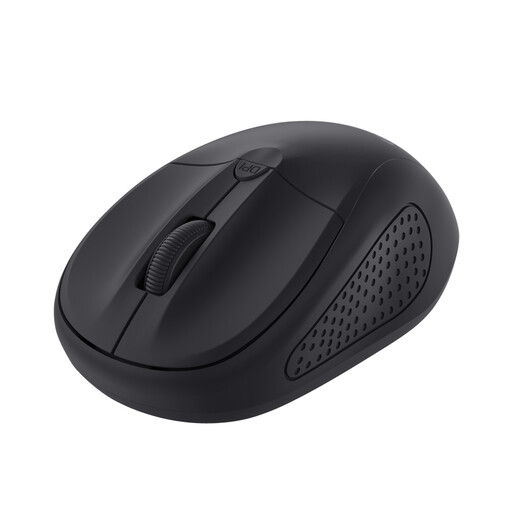 Image unavailable
A compact conventional mouse to consider if space for the casing is limited and you can still move the mouse.
The product information lists wireless optical operation, 1600 DPI and use with either hand.
 Image unavailable
An angled conventional mouse for anyone who wants to compare a different hand position and has enough room to move it.
The product description lists a 57° angle, SmartWheel and connectivity via Bluetooth or USB receiver. This version is right-handed and described as suitable for small to medium-sized hands.
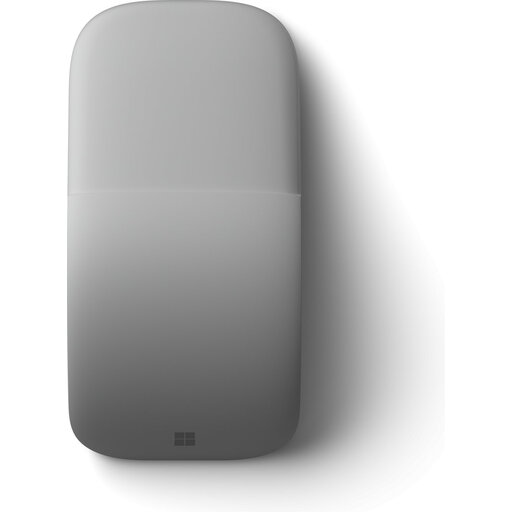 Image unavailable
A conventional mouse with a flat, foldable design to consider if easy storage is important; you’ll still need to move the mouse to move the cursor.
The product information lists Bluetooth and a touch surface for two-way scrolling. Your computer must support Bluetooth 4.0 or later.
No. The difference on a crowded desk is that you don’t need to move a trackball to move the cursor. Still, check how much room the casing, your hand and any wrist rest will take up.
Not if you use the standard version with compatible Bluetooth. Logitech says a Logi Bolt receiver is compatible but not included; check the connection and box contents for the exact version.
You can’t tell from the shape alone. Compare the fit and position of the mouse with your workstation set-up; Arboportaal also recommends varying your posture and tasks, and taking short breaks when working at a screen.
For eligible online consumer purchases, you generally have a 14-day cooling-off period, subject to legal exceptions, as explained by the Dutch Government. If a mouse breaks earlier than you could reasonably expect during normal use, ACM ConsuWijzer says the seller is responsible for providing a free remedy under the legal guarantee; in the Netherlands, this does not have a fixed term of exactly two years.
Keep the mouse within easy reach, vary your posture and tasks, and take short breaks. This workstation advice from Arboportaal is not a promise that any particular mouse model will prevent discomfort.