If you still have room to move a mouse on your small desk, a compact model could work well. If paper gets in the way, a trackball that stays in one place may be more practical. Also check that it feels comfortable in your hand and that your computer supports the Bluetooth or USB connection used by your chosen model.
Who is this relevant to?
Flashcard maker with limited room to move a mouse
If cards and paper take up some of your desk, your choice comes down to whether you have enough space to move a regular mouse or would prefer a trackball that stays in place while you use it. Kensington describes the Orbit Optical Trackball as a model with a fixed operating position; Logitech also offers compact mice.
Flashcard maker who studies for long periods
During longer sessions, grip, reach and posture may matter more than simply choosing a small size. TNO identifies mouse use as a risk factor when working at a screen; a mouse’s shape does not guarantee that it will be comfortable for everyone.
Student working in a shared space
If you don’t want to disturb others, you may want to consider how loud the clicks are. Also check whether your computer supports Bluetooth or has a suitable spare USB port for a mouse with a receiver. Logitech describes the Pebble Mouse 2 M350s as having quiet clicks; HP specifies Bluetooth for the HP 240.
What should you look for when choosing?
Start by checking how much space your hand and the mouse need to move. Then consider the grip, click noise and your computer’s connections.
| What to consider |
What should you check? |
Who should pay particular attention? |
| Room for paper and cursor movement |
Measure the free space with your keyboard and flashcards in their usual positions. Allow room to move a regular mouse; a trackball needs a fixed spot. |
If my desk is already full, I want to know whether I can still move the mouse freely or whether a fixed operating position would be better. Around 33% of consumers cite space as their main concern when buying. |
| Hand comfort during longer sessions |
Consider the grip and keep the mouse within comfortable reach. If you’re considering a trackball, check that it suits your hand. |
For long sessions, I want to choose a shape I can hold comfortably, not just the smallest casing. Around 27% of consumers put hand comfort first. |
| Click noise while studying |
Check whether quiet clicks are specified for the exact version; a claim about reduced noise says nothing about whether the fit is right for you. |
If I study in a shared or quiet space, I want to take click noise into account without overlooking grip or desk space. Around 20% of consumers cite quiet operation as their main concern when buying. |
| Connection to your computer |
Check for Bluetooth support and available USB ports. Also see whether a receiver is needed and included with the version you’ve chosen. |
Before choosing a mouse, I want to know whether it will connect to my computer: Bluetooth and a USB receiver require different capabilities. Around 20% of consumers cite connection compatibility as their main concern when buying. |
Common pitfalls
-
Choosing only by the smallest casing
A compact mouse still needs room to move. A trackball doesn’t move across the desk, but it does need a fixed spot of its own.
Set up your keyboard and flashcards as you normally would, then measure the space available for using the mouse.
-
Assuming wireless always means no USB port is needed
A Bluetooth mouse and a mouse with a USB receiver use different connections. If your computer doesn’t have the right connection, your chosen mouse may not connect as you’d like.
Check the connection used by the exact model, as well as your computer’s Bluetooth support or available ports.
If the connection isn’t suitable, you may need an adapter or a different mouse.
-
Treating an ergonomic claim as a personal guarantee
A product’s shape doesn’t prove that it will be comfortable for your hand or posture. TNO identifies mouse use as a risk factor for shoulder, arm, wrist and hand complaints when working at a screen.
Assess the grip and reach in your own set-up, and take breaks from prolonged, repetitive work.
Brands to consider
Logitech
Logitech offers both compact Bluetooth mice and models with a USB nano receiver, such as the Pebble Mouse 2 M350s and the M185.
- According to Logitech, the Pebble Mouse 2 M350s can switch between three devices; the manufacturer describes its clicks as quiet.
- The M185 uses a USB nano receiver. The two models therefore connect in different ways and aren’t interchangeable.
Kensington
The Orbit Optical Trackball K64327WW is a wired trackball that lets you control the cursor without sliding the body of the device across your desk.
- Kensington specifies ambidextrous use and a USB connection for this model.
- Kensington says it is suited to medium to large hands and notes a limitation for Windows computers with an ARM processor. Check that these requirements suit your situation.
HP
The black HP 240 Bluetooth Mouse, product number 3V0G9AA#ABB, is a Bluetooth version that doesn’t come with a USB receiver.
- For this version, HP specifies Bluetooth 5.1, one AA battery and dimensions of 107 × 60,5 × 29,31 mm.
- This mouse will only work if your computer supports the required Bluetooth connection.
Trust
According to Trust, the Trust Ozaa Compact lets you choose between a 2,4GHz USB receiver and Bluetooth.
- The different connection options may be useful if your study devices have different types of connection.
- Check which connections are available for the exact version and what’s included in the box.
Joybuy products
These mice are worth comparing if quiet clicks matter to you; check the connection and available desk space for each model.
 No image available
HP 285 Silent Wireless Mouse
Worth considering if quieter clicks matter where you study.
The product information specifies a 2,4GHz connection with a USB dongle and dimensions of 109,5 × 40,3 × 70,8 mm. You’ll need a suitable USB port.
Joybuy
 No image available
HOFOTEK M311 2.4G+BT Silent Office Mouse
This version is worth considering if you want quiet operation and would like to compare both 2.4G and Bluetooth connections.
To connect via a receiver, you’ll need a suitable spare USB port.
Joybuy
 No image available
DELL Pro Compact Silent Mouse MS355
A compact version to compare if limited storage space and quieter operation matter to you.
The product information lists RF or Bluetooth connectivity. RF requires a suitable USB port.
Joybuy
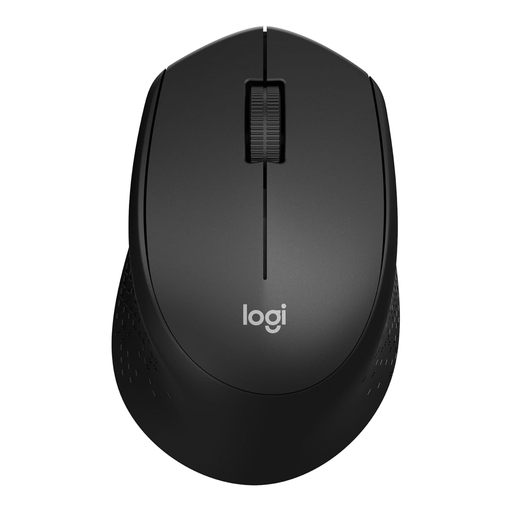 No image available
Logitech M330 Silent Plus Wireless Mouse, black
Worth considering if quiet clicks and a wireless connection via a receiver suit your set-up.
According to the product information, this model uses a USB nano receiver, so you’ll need a suitable spare USB port.
Joybuy
 No image available
Trust Yvi+ Wireless Mouse Multi-Device, quiet buttons, black
A compact mouse to consider if quiet buttons matter and you’re looking for a model with a USB receiver.
To connect via the receiver, you’ll need a suitable spare USB port.
Joybuy
Frequently asked questions
When is a trackball more useful than a small regular mouse?
A trackball may suit you if your flashcards leave little room to move a regular mouse. The Kensington Orbit Optical Trackball K64327WW stays in place while you control the cursor, but it still needs a fixed spot on your desk, a USB port and a size that suits your hand.
How can I connect a mouse if I don’t have a spare USB port?
A Bluetooth mouse can connect without a USB receiver if your computer supports the required Bluetooth connection. The HP 240 uses Bluetooth, while the Logitech M185 uses a USB nano receiver. Check the connection used by the exact model and your computer.
What should I check about power and maintenance?
Check what powers the model you’ve chosen. According to HP, the black HP 240 uses one AA battery; Kensington says the wired Kensington Orbit doesn’t need batteries. If you take your mouse with you, keep its USB receiver in a dedicated place.
What cooling-off period applies to an online purchase?
According to the Dutch government, online purchases are usually covered by a 14-day cooling-off period. The exact rules depend on the legal requirements and exceptions that apply.


