
Sorting photos with little room to move
If you select photos at a small desk, you could compare a compact mouse with a trackball that stays in one place. Your choice depends on how much room you have beside your keyboard.


If there’s room to move a mouse beside your keyboard, a compact standard mouse could be a practical choice. If there’s hardly any room at all, consider a trackball that stays in one place. For long photo-sorting sessions, the controls, connection and fit matter too. A vertical mouse changes your hand position, but still needs room to move.
If you select photos at a small desk, you could compare a compact mouse with a trackball that stays in one place. Your choice depends on how much room you have beside your keyboard.
When working through batches of photos, scroll controls and customisable buttons may be worth considering. Logitech describes two scroll modes on the MX Anywhere 3S and customisable buttons on the MX Ergo S.
If you work for long periods, consider the shape and how well it fits your hand. Logitech says the Lift is suited to small to medium-sized hands; Arboportaal also emphasises varying your activities during computer work.
First, work out how much room you have to move the mouse. Then compare the controls, fit and connection to find what suits your computer and photo software.
Choose this option: if there’s still a usable area beside your keyboard and you’d like a smaller mouse.
Bear in mind: a compact mouse still needs to move across your desk.
Choose this option: if there’s hardly any room to move the mouse itself; you control the ball with your thumb or fingers.
Bear in mind: it can take time to get used to the controls, and the ball needs to be kept clean.
Choose this option: if hand position and fit are important to you, and you have enough room to move the mouse.
Bear in mind: a vertical shape doesn’t make the mouse stationary; also check that it’s the right size and for the correct hand.
| What to consider | What to look for | Who is this important for? |
|---|---|---|
| Room to move | Compare the space beside your keyboard with the room the mouse needs to move; a trackball stays in place. | If I’m selecting photos at a small desk, I want to know whether there’s enough room to move the mouse. Around 28% of consumers cite room to move as their main concern. |
| Controls in a fixed position | Compare thumb and finger control, and check that the trackball’s base fits on your desk. | When I have hardly any room to move the mouse, I’m looking for a pointing device that stays in one place. Around 22% of consumers say this is their main concern. |
| Scrolling and selecting | Check the scrolling options and whether customisable buttons work with your computer and photo software. | When working through long batches of photos, I want to navigate quickly without assuming that extra buttons will automatically do what I need. Around 22% of consumers do a lot of selecting and scrolling. |
| Fit | Check the recommended hand size and whether it’s for left- or right-handed use; try the shape yourself if possible. | If I’m working for long periods, I want a shape that suits my hand, without assuming an ergonomic design will prevent discomfort. Around 17% of consumers put fit first. |
| Connection | Check the supported connection, available ports and included accessories for the exact version. | Before choosing, I want to make sure the mouse can connect to my computer and suits my workspace. Around 11% of consumers consider the connection a key requirement. |
Even a small standard mouse needs a surface to move across; a trackball stays in place while you point.
Measure the usable space beside your keyboard and compare it with both the mouse’s dimensions and the room it needs to move.
The Lift and MX Ergo S have different recommended fits. An ergonomic design alone doesn’t tell you whether a mouse will suit your hand or prevent discomfort.
Consider your own hand and workspace, and vary your tasks rather than relying on the ergonomic label alone.
Connections and versions vary. Kensington says the Orbit Trackball with Scroll Ring is currently not supported on computers running Windows on ARM.
Before ordering, check the full product version, included accessories, available ports and supported systems. If a compatible connection or a required accessory is missing, you may need to make an extra purchase.
For this type of use, Logitech offers a compact mouse, a thumb-controlled trackball and a vertical mouse.
The Orbit Trackball with Scroll Ring is a wired, finger-operated option for anyone looking for a fixed position for their mouse.
The Ozaa Compact is a compact mouse that lets you choose between Bluetooth and a USB receiver.
This selection includes a trackball, compact standard mice and a vertical mouse for sorting photos at a small desk.
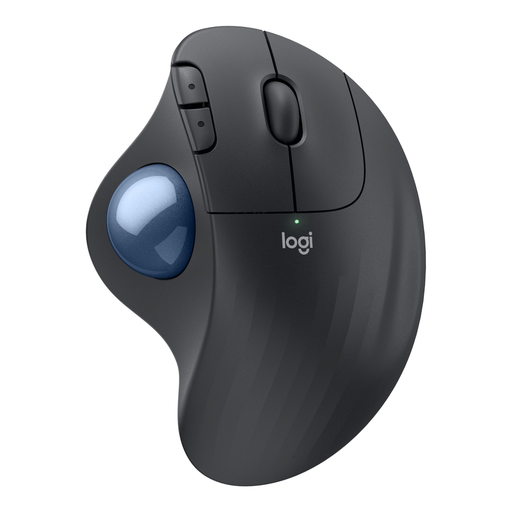 No image available
A trackball that lets you control the pointer without moving the body of the mouse, for a workspace with little room to move.
Connects via Bluetooth or a Logi Bolt receiver; has three customisable buttons. The trackball needs regular cleaning.
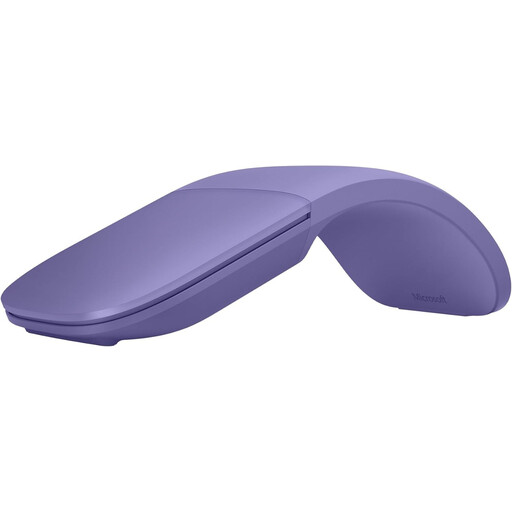 No image available
A standard mouse with a slim, foldable design for anyone who wants to put away a compact mouse and still has room to move it.
Folds flat and supports vertical and horizontal scrolling. You’ll need to move the mouse across the work surface while using it.
 No image available
A compact standard mouse for a desk where there’s still room to move the mouse itself.
The product description lists quiet operation, adjustable DPI and an RF or Bluetooth connection. Check which connection suits your computer.
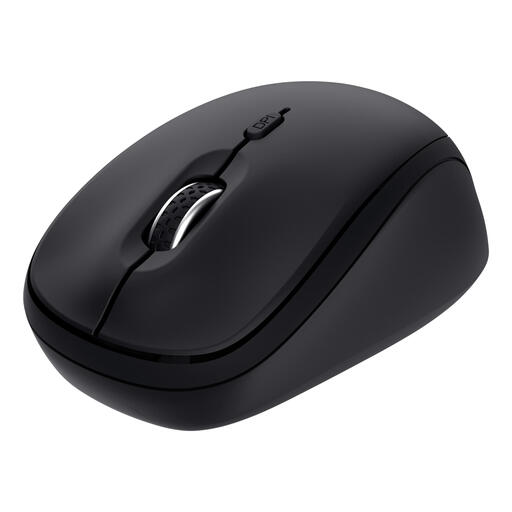 No image available
A compact standard mouse for anyone with room to move it who wants a wireless connection.
The product description lists quiet buttons, adjustable DPI and connections to up to three devices via Bluetooth or a receiver. You’ll need to move the mouse across the work surface.
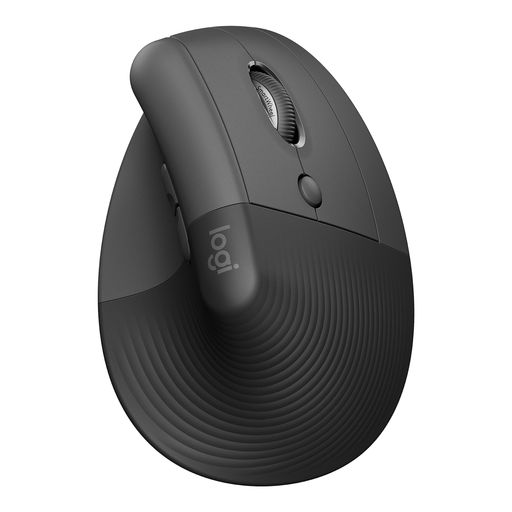 No image available
A vertical mouse for anyone who prioritises hand position and fit and has enough room to move the mouse.
This is the right-handed version, designed for small to medium-sized hands. The product description lists Bluetooth or a USB receiver, quiet clicks and four customisable buttons.
Not necessarily. If you still have room to move a mouse, you could consider a compact standard mouse; a trackball is most useful when there’s hardly any room to move one. Also check that the trackball itself will fit on your desk.
That depends on your photo software, computer and settings. Logitech lists customisable buttons on the MX Ergo S, but check whether you can assign the actions you want to those buttons in your software.
Check the exact version, available ports and supported connection. The Kensington Orbit mentioned here is wired; Trust lists Bluetooth and a USB receiver for the Ozaa Compact. Kensington says the Orbit Trackball with Scroll Ring is currently not supported on Windows on ARM.
Vary your tasks and avoid prolonged, intensive mouse use when you can. Arboportaal recommends taking extra care with computer work when software increases the risk of discomfort; this doesn’t prove that a particular mouse model prevents it.
For distance purchases from a business, you’ll often have a 14-day cooling-off period, according to the Dutch government. Before buying, check the information about the cooling-off period and any extra costs. If a product breaks within the first year, the Dutch government says the seller must prove that the consumer is at fault.