Who is this guide for?

Sim racer with limited desk space

You want to practise track manoeuvres without the monitor stand taking up room for your controls and keyboard. Compare the overall dimensions, including the stand, and check the adjustment options. For example, GIGABYTE lists the dimensions of the GS24F14A with its stand.

Sim racer who needs track data

You want a clear view of tracks, instruments and interfaces, and have enough room for a larger screen. Philips lists a QHD resolution of 2560 × 1440 pixels for the Evnia 27M2N3500NF/00; also check that the monitor will fit on your desk.

Sim racer who values smooth motion

You want to match the refresh rate and synchronisation to your computer and connection. GIGABYTE lists a standard refresh rate of 144 Hz and an overclocked rate of 175 Hz for the GS24F14A. AMD describes FreeSync for compatible graphics cards and monitors.

What should you look for when choosing?

Compact 23.8-inch Full HD

Choose this option: when the available width and depth on your desk are the main priorities. GIGABYTE lists the GS24F14A as 537.7 mm wide and 152 mm deep with the stand.

Bear in mind: Full HD has fewer pixels than QHD. Also, 175 Hz is an overclocked rate for the GS24F14A, compared with a standard maximum of 144 Hz.

27-inch QHD

Choose this option: when extra pixels for track data and interfaces matter more than a compact set-up. Philips lists a resolution of 2560 × 1440 pixels and a refresh rate of 144 Hz for the Evnia 27M2N3500NF/00.

Bear in mind: measure the full set-up and check that your computer can deliver the resolution and refresh rate you want. Philips warns that Smart MBR limits brightness control and may cause flickering.

QHD with adjustable positioning

Consider this option: if you want to adjust the screen height or if a monitor arm would suit your set-up. The Dell G2724D is an example of a QHD model with height adjustment and VESA mounting.

Bear in mind: check the VESA size, weight capacity and space available for mounting an arm. Dell lists the G2724D as 20,02 cm deep with the stand.

Key consideration What should you check? Who is this important to?
Fit on your desk Measure the available width and depth, then compare them with the dimensions including the stand. Leave room for cables and controls. I need space for my keyboard and controls without the stand taking over my work area. Around 36% of consumers prioritise how well a monitor fits.
Room for detail Compare the native resolution and overall dimensions, and check readability from your usual viewing distance. I want a clear view of tracks, instruments and interfaces, even if a larger screen takes up more space. Around 29% of consumers prioritise room for detail.
Refresh rate and synchronisation Check the standard and overclocked rates, the capabilities of each connection and compatibility with your graphics system. I want to match motion to my computer’s frame rate, rather than choosing based solely on a high maximum rate. Around 21% of consumers prioritise motion performance.
Screen position Check the height adjustment and tilt options. If you’re using an arm, check the VESA size and mounting position too. I want to adjust the screen position to suit my desk and sessions. Around 14% of consumers prioritise adjustability.

Buying pitfalls

  • Measuring only the screen diagonal

    The screen may seem small enough based on its diagonal measurement, but the stand could take up too much depth and leave too little room for your controls.

    Compare the manufacturer’s dimensions, including the stand, with the space available. Check height adjustment and VESA size separately before choosing a monitor arm.

  • Assuming an overclocked rate or Smart MBR figure is guaranteed performance

    175 Hz is an overclocked rate for the GIGABYTE GS24F14A; its listed maximum standard refresh rate is 144 Hz. Philips warns that Smart MBR limits brightness control and may cause flickering.

    Check the standard refresh rate, the connection you’re using and the conditions for motion blur reduction modes. Don’t compare advertised figures as if they were independent test results.

  • Confusing an extended warranty with your statutory rights

    A paid-for warranty doesn’t replace your statutory right to a product that works as it should. According to the Government of the Netherlands, the retailer is your point of contact if there’s a problem with a product.

    Check what cover and terms an additional warranty package offers before choosing it.

Brands and relevant models

GIGABYTE

The GS24F14A is a compact 23.8-inch Full HD option. GIGABYTE lists its dimensions as 537.7 mm wide and 152 mm deep with the stand.

  • GIGABYTE specifies an IPS panel, DisplayPort 1.4, two HDMI 2.0 ports and VESA 75 × 75 mm.
  • The listed 175 Hz requires overclocking; the standard maximum is 144 Hz. The supplied stand isn’t height-adjustable.

Philips Evnia

The models mentioned offer a compact Full HD option with the 24M2N3200NF/00, and a 27-inch QHD option with the 27M2N3500NF/00.

  • Philips lists a refresh rate of 144 Hz for both models. The 27M2N3500NF/00 has a QHD resolution of 2560 × 1440 pixels.
  • Philips warns that Smart MBR on the 27M2N3500NF/00 limits brightness control and may cause flickering.

Dell

The G2724D shows the positioning options available on a 27-inch QHD monitor with height adjustment and VESA mounting.

  • Dell specifies 165 Hz via DisplayPort and 144 Hz via HDMI, plus a depth of 20,02 cm with the stand.
  • The refresh rate depends on the connection, so check the ports available on your computer.

LG UltraGear

The 27GR75Q-B is an example of a 27-inch QHD model with height adjustment, tilt and pivot.

  • LG specifies a refresh rate of 165 Hz and a depth of 291,2 mm with the stand for this model.
  • The stand’s depth is worth considering if you have a small desk. LG Netherlands marks this specific model as discontinued; this doesn’t mean the whole UltraGear range has been discontinued.

Joybuy product picks

These Joybuy picks focus on compact monitors for a small desk set-up. Check the connection and support for your preferred refresh rate for each model.

Dell SE2425HG 24-inch gaming monitor

Dell SE2425HG 24-inch 200Hz monitor

The 24-inch Full HD format is a good fit for a compact gaming set-up.

IPS panel; 200 Hz is listed via DisplayPort. The refresh rate may be lower via HDMI, depending on the source device.

View at Joybuy

KTC H24B9S 24-inch Full HD gaming monitor

KTC H24B9S 24-inch Full HD gaming monitor

The 24-inch Full HD format suits anyone looking for a compact gaming monitor.

An IPS panel, 144 Hz and Adaptive Sync are listed; connections: HDMI and DisplayPort.

View at Joybuy

Philips 24E1N1100A 24-inch Full HD monitor

Philips 24E1N1100A 24-inch Full HD monitor

The 24-inch Full HD format is a compact option for a small desk set-up.

An IPS panel, 100 Hz and built-in speakers are listed.

View at Joybuy
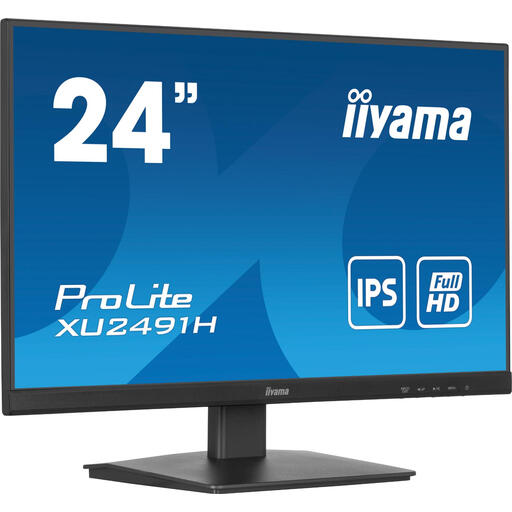
iiyama ProLite 24-inch IPS monitor with 100 Hz

iiyama ProLite 24-inch IPS monitor

The 24-inch format may suit a compact desk set-up; check the overall dimensions against your available space.

An IPS panel and 100 Hz are listed.

View at Joybuy

Thunderobot CF25F300L 24.5-inch Full HD monitor

Thunderobot CF25F300L 24.5-inch Full HD monitor

The 24.5-inch Full HD format is a good fit for a compact gaming set-up.

320 Hz, 450 nits and adjustable positioning are listed. Check that your computer and connection support the refresh rate you want.

View at Joybuy

Frequently asked questions

How can I check whether a monitor will fit on my desk?

Measure the available width and depth where you plan to place the monitor, then compare them with the manufacturer’s dimensions, including the stand. For example, GIGABYTE lists the GS24F14A as 537,7 × 414,5 × 152 mm with the stand. Remember to leave room for cables and controls too.

Why don’t I automatically get the advertised maximum refresh rate?

Check whether the figure is for a standard or overclocked mode, and whether your computer, cable and connection support the resolution and refresh rate you want. GIGABYTE lists a standard maximum of 144 Hz and 175 Hz when overclocked for the GS24F14A. Philips recommends using a graphics card that can handle your chosen combination for optimum performance.

What can I check if FreeSync doesn’t seem to be available?

Check that your graphics hardware and monitor are compatible, and that the feature is enabled for the picture mode you’ve selected. AMD notes that certain monitor settings can disable FreeSync; AMD Software instructions apply to a compatible AMD set-up.

What are my rights when buying online or if a product is faulty?

When you buy online from a business, you generally have 14 days to change your mind, according to the Government of the Netherlands. You’re also entitled to a product that works as it should in the Netherlands. There is no set statutory warranty period for all products, and the retailer is your point of contact if there’s a problem. Check any additional warranty terms separately.

How do I choose between Full HD and QHD for track data?

A compact Full HD monitor may be a better fit when desk space is the limiting factor; QHD gives you more pixels when you need extra room for information. If you choose QHD, check that the monitor fits and that your computer can handle the resolution and refresh rate you want.
