
Player with a small desk
Wants the monitor, stand, keyboard and mouse to fit together. Compare the dimensions, including the stand, before screen size or speed becomes the deciding factor.


Start by measuring the available desk space, including the monitor stand, then check whether text and cards are comfortable to read from your usual viewing distance. A 23.8-inch Full HD screen is a compact starting point; a 27-inch QHD screen offers more pixels but needs more space. For turn-based card games, the highest refresh rate isn’t necessarily essential. Also consider the other games you play, the connections you need and your setup.
Wants the monitor, stand, keyboard and mouse to fit together. Compare the dimensions, including the stand, before screen size or speed becomes the deciding factor.
Considers readability, screen settings and resolution, and weighs up whether a larger QHD screen is worth the extra desk space.
Wants one monitor for both turn-based and faster games. Alongside a suitable size, refresh rate and connections are worth considering.
Start with the factor that determines what will work in your setup: available space, readability, connections or use with other games.
| What to consider | What should you check? | Who is this important for? |
|---|---|---|
| Space for the screen and stand | Measure the available width and depth, leaving room for your keyboard and mouse. LG lists dimensions of 540.8 × 408.9 × 180.5 mm for the 24GS60F-B, including its stand. | If my desk is shallow, I want to know how much room the stand takes up before choosing a screen. Around 33% of consumers give available desk space top priority. |
| Readability of cards and text | Check how text looks from your intended viewing distance, and consider resolution, reflections and adjustment options. Arboportaal identifies small symbols, reflections and poor lighting as factors that can reduce readability. | If small card text is difficult to read, I want to assess text size from my usual viewing distance. Around 33% of consumers put readability first. |
| Connections and screen position | Check the ports you need and the adjustment options for the exact model. LG lists HDMI, DisplayPort, VESA 100 × 100 mm and a tilt-adjustable stand for the 24GS60F-B; USB-C isn’t listed. | If I want to connect my existing device or position the screen differently, the monitor and any arm need to work with my setup. Around 20% of consumers give connectivity and positioning top priority. |
| Use with fast-paced games | Check which refresh rates are available through your chosen connection and device. AOC and LG list up to 180 Hz for the 24G4X and 24GS60F-B; this doesn’t prove an advantage for turn-based card games. | If I play fast-paced games as well as deck-building games, refresh rate may matter for those other games. Around 14% of consumers put versatility for faster games first. |
The diagonal measurement doesn’t tell you how much desk space the stand takes up. LG lists a depth of 180.5 mm for the 24GS60F-B, including its stand.
Measure the space available and compare it with the external dimensions of the exact model. If you’re using a monitor arm, also check the VESA size and whether the arm and desk are suitable.
A suitable monitor arm may mean extra expense and will also need space on or behind your desk.
Listed speed ratings are product specifications, not independent measurements of any advantage in deck-building games. Their relevance also depends on which other games you play and what your device supports.
First, consider space, readability and connections. Give a high refresh rate more weight if you also regularly play fast-paced games.
A manufacturer’s warranty is not the same as your statutory rights if a product isn’t as it should be. ACM ConsuWijzer points out that statutory warranty in the Netherlands doesn’t simply end after a fixed period of two years.
Keep your proof of purchase and report any fault to the seller. Consider any additional warranty separately from your statutory rights.
The AOC 24G4X is a 23.8-inch Full HD model from AOC’s compact gaming range. AOC lists a Fast IPS panel and a refresh rate of up to 180 Hz.
The LG UltraGear 24GS60F-B is a 23.8-inch Full HD IPS model. LG lists dimensions including the stand, as well as connection and mounting details.
The Philips Evnia 24M2N3200A/01 is a 23.8-inch Full HD gaming model. Philips lists a refresh rate of up to 180 Hz for this version.
The Dell G2725D is an example of a 27-inch QHD gaming monitor for anyone who values more pixels over maximum compactness.
This selection includes 24- to 24.5-inch screens for comparing compact Full HD options, including models suited to faster games. Screen size alone won’t tell you whether the stand will fit your desk, so check the dimensions of the exact model.
 No image available
A compact Full HD option to compare if you’re looking for a screen for a small workspace.
The description lists a 23.8-inch screen, 1920 × 1080 pixels, a VA panel, 100 Hz, and HDMI and VGA connections.
According to the product description, the charger isn’t included as standard and must be bought separately.
 No image available
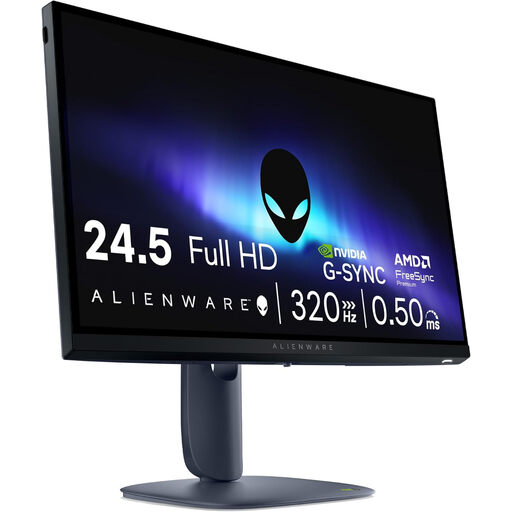
This screen size is worth comparing if you’re looking for a compact gaming monitor.
The title lists 24.5 inches and 1920 × 1080 pixels; the product description specifies a Fast IPS panel and 320 Hz.
 No image available
A 24-inch option to consider alongside compact Full HD models if you also play fast-paced games.
The product information lists 1920 × 1080 pixels, an IPS panel, 200 Hz and FreeSync Premium.
 No image available
This 24-inch Full HD model is worth comparing if you’re looking for a compact screen for gaming.
The title lists an IPS panel and 144 Hz. The product description mentions HDMI, DisplayPort and a tilt range of -5° to 15°.
 No image available
A 24-inch Full HD option to compare if you’re looking for a compact screen for casual gaming.
The product information lists an IPS panel, 1920 × 1080 pixels, 100 Hz, and HDMI and VGA connections.
No, 180 Hz isn’t a general requirement when buying a monitor for deck-building games. Slay the Spire 2 is described, among other things, as a turn-based card game. The 180 Hz listed for some monitors is mainly worth considering if you also play other, faster games.
Measure the available width and depth for the screen and stand, leaving room for your keyboard and mouse. If you’re using a monitor arm, check the VESA size for the exact model and make sure the arm and desk are suitable; LG lists VESA 100 × 100 mm for the 24GS60F-B.
Compare the EU energy labels and model information for the screens you’re considering. The European Commission says that energy labels for electronic displays use a scale from A to G and also show information about HDR performance.
For a standard online consumer purchase in the Netherlands, you generally have a statutory 14-day cooling-off period from delivery; check which exceptions and returns conditions apply. If a product is faulty, the seller is responsible for the statutory guarantee. There’s no general fixed two-year time limit: according to ACM ConsuWijzer, what you could reasonably expect from the product also matters.
No, the display-screen work regulations described by Arboportaal are aimed at employers and employees. They don’t automatically set legal dimensions for every home gaming desk. Readability and an adjustable screen position can still be worth considering when setting up your space.