
Photo uploader with a slow connection
You want to find out whether a long upload is caused by your internet connection or by Wi-Fi. ACM ConsuWijzer points out that the minimum upload and download speeds for a fixed connection must be stated.


A different router will only help if Wi-Fi or your home network is slowing uploads down. So first, test the connection using Ethernet and Wi-Fi where you upload the photo album. If the wired connection is slow too, check your internet connection’s upload speed. If Wi-Fi is the main problem, look at the router’s position or consider adding Wi-Fi access points. If coverage is good but housemates are online at the same time, compare the ports and management features of routers that suit your setup.
You want to find out whether a long upload is caused by your internet connection or by Wi-Fi. ACM ConsuWijzer points out that the minimum upload and download speeds for a fixed connection must be stated.
Your upload spot is behind walls or on another floor. In that case, router placement and possibly an extra Wi-Fi access point may matter more than the advertised top speed alone. The Consumers’ Association notes that walls and ceilings can disrupt the signal.
You manage the connection for your housemates and consider simultaneous use, ports, compatibility and updates. ACM ConsuWijzer stresses that your own network equipment must be kept up to date.
Choose this if: the wired upload speed is good enough and Wi-Fi is usable at your upload spot after moving the router to a better, more central position.
Bear in mind: moving the router may require a longer network cable, and it won’t always solve problems caused by walls or floors. If you have a provider-supplied modem, check what you’re allowed to move first.
Choose this if: one well-positioned Wi-Fi access point reaches the rooms you use, or you can run a network cable to the problem area.
Bear in mind: one access point won’t extend coverage from a second location. Also check that the router or access point mode works with your existing modem, and decide who will manage updates.
Choose this if: the wired connection is good but Wi-Fi remains weak in several rooms, and you can position or connect extra access points appropriately.
Bear in mind: check how many access points are included, how they connect to each other and whether Ethernet backhaul is supported. Mesh won’t increase your broadband plan’s upload speed.
Choose this if: the wired upload speed is also too slow for the photo album.
Bear in mind: check the upload speed available for your address and contract before spending money on a router.
| What to consider | What should you check? | Who should consider this? |
|---|---|---|
| Upload speed | Compare an upload speed test over a wired connection with one over Wi-Fi at your upload spot. Also check the stated upload speed of your internet connection. | If I want to know why my photo album is uploading slowly, I first compare the connection with and without Wi-Fi. Around 36% of consumers put upload speed at the top of their list when buying. |
| Coverage in rooms | Test in the places where people upload. If you’re considering mesh, check how many units are included and whether Ethernet backhaul is supported. | If I upload from a room behind walls or on another floor, I want Wi-Fi that works there. Around 29% of consumers put room coverage first. |
| Simultaneous use | Check the Wi-Fi standard supported by the router and your devices, the number of Ethernet ports and the management options for the exact model. | If my housemates use Wi-Fi at the same time, I want to know whether the equipment suits our shared setup. Around 21% of consumers put simultaneous use at the top of their list when buying. |
| Connection and management | Check the modem and router setup, any provider settings and how firmware updates are installed. | If I manage the household Wi-Fi, I want to make sure the connection is compatible and updates aren’t forgotten. Around 14% of consumers put connection and management first. |
A router’s wireless speed is not the same as your internet connection’s upload speed. ACM ConsuWijzer distinguishes between the stated upload and download speeds for a fixed connection.
First, compare an upload speed test over a wired connection with one over Wi-Fi where you upload the album.
A new router could be an unnecessary expense if the connection itself is the limiting factor.
Distance and obstacles can weaken Wi-Fi. A single router in the same position won’t automatically provide a second transmission point. The Consumers’ Association lists walls and ceilings as possible obstacles to the signal.
Test the connection in the room and compare moving the router, adding a wired access point and using mesh before you decide.
If coverage is still poor, you may need an extra Wi-Fi access point or network cable after all.
The contents of the package determine how many access points you can position and how they connect to each other. TP-Link says that Deco X50 units can connect wirelessly or via optional Ethernet backhaul.
Check how many units are included, where they can be positioned and how they connect in the exact model you’re buying.
You may need extra units, electricity or network cables.
A manufacturer’s warranty does not replace your statutory rights against the seller. ACM ConsuWijzer distinguishes between the two.
Keep your proof of purchase and contact the seller about any fault as well.
The Archer AX55 is an example of a standalone Wi-Fi 6 router, while the Deco X50 is a mesh range with multiple access points.
According to the Dutch specifications, the RT-AX58U can be used as a router, access point or AiMesh node.
FRITZ! says the FRITZ!Box 4060 is designed to connect to an existing modem and can work with other FRITZ! devices in a mesh network.
This selection includes standalone routers and mesh systems for shared Wi-Fi. Before buying, check that the exact model supplied carries the required CE marking. The Dutch Authority for Digital Infrastructure says this marking must be displayed on the equipment.
 No image available
Suitable for a setup where one centrally positioned Wi-Fi access point reaches the rooms you use.
The product description lists Wi-Fi 6, OFDMA, MU-MIMO, one WAN port and three Gigabit Ethernet ports. The product name specifies dual-band (2.4 GHz and 5 GHz).
 No image available
Suitable when you need Wi-Fi in several places and can position three units appropriately.
The product description lists Wi-Fi 6, OFDMA, MU-MIMO and Gigabit Ethernet ports on each unit.
 No image available
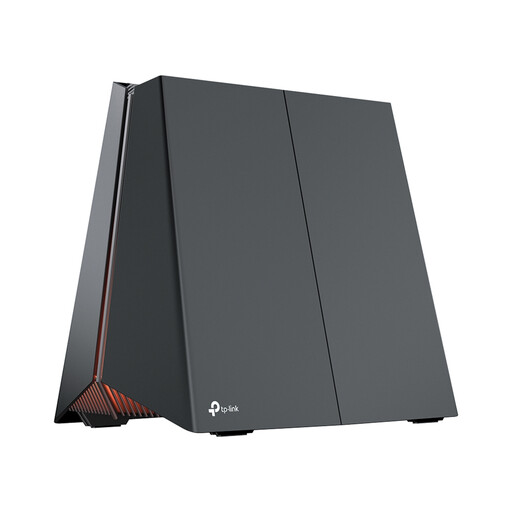
Suitable for a router setup where one Wi-Fi access point reaches the rooms you use and the ports work with your equipment.
The product listing specifies Wi-Fi 7, tri-band (2.4 GHz, 5 GHz and 6 GHz), QoS and 2.5 and 5 Gbps Ethernet ports. EasyMesh is listed as an expansion option.
 No image available
Suitable when you need multiple Wi-Fi access points. Check that the number of units and their placement will work for your rooms.
The product description lists mesh and Wi-Fi 6E across the 2.4, 5 and 6 GHz bands, three Gigabit Ethernet ports per unit and guest access.
 No image available
Suitable when you can position two Wi-Fi access points where you need them.
The product description lists Wi-Fi 6, OFDMA, MU-MIMO and three Gigabit Ethernet ports per unit.
Only if Wi-Fi or your home network is part of the problem. First, compare a wired speed test with one over Wi-Fi where you upload the album, and check your fixed internet connection’s upload speed.
Not necessarily. ACM ConsuWijzer explains that you can choose your own device as long as it meets the relevant requirements. Check that the router or access point mode and settings work with your existing connection.
First, test the connection in the places where people upload. A more central, higher position with fewer obstacles may help. If you use multiple access points, they also need a reliable connection to each other. Check whether a wired connection is possible.
Agree who will manage firmware updates and login details. VeiligInternetten recommends updating your router and using a strong password. ACM ConsuWijzer also points out that your own equipment must be kept up to date.
According to the Dutch Authority for Digital Infrastructure, home Wi-Fi is licence-free and there is no notification or registration requirement. Use the designated frequencies and comply with the relevant conditions, and set the correct country in your settings.
No. ACM ConsuWijzer distinguishes between a manufacturer’s or seller’s warranty and your statutory rights. If a product does not perform as you could reasonably expect during normal use, the seller is responsible for providing an appropriate solution.