If you mainly film your sketchbook pages from one position, choose a mirrorless camera with a lens that can focus at your shooting distance. If you need to switch between viewpoints, a compact gimbal camera could be a good fit, but DJI states that the Osmo Pocket 3 focuses from 20 cm. In a noisy workshop, clear explanations call for a suitable microphone setup: stabilisation does not reduce background noise. Keep other people who can be recognised out of shot if you cannot carefully assess whether recording and any subsequent publication are appropriate. The Dutch Data Protection Authority distinguishes between personal use and sharing with a wider audience.
Who is this choice relevant to?
Maker filming pages from above
Wants to frame drawings and notes clearly from a fixed workspace. The Consumers’ Association recommends a tripod if you mainly film in one place at home; also check that the lens and focusing distance suit the details you want to capture.
Maker demonstrating as they talk
Switches between explaining and showing the sketchbook, so the microphone setup needs to suit the level of background noise. DJI lists three microphones for the Osmo Pocket 3, but that number alone does not tell you how clearly your recording will come across in your workshop.
Maker with limited space to set up
Wants to move or mount the camera easily without taking up too much room around a shared workbench. A compact camera may be suitable, but for close-ups, check the shooting distance and whether you will need any accessories.
What should you look for when choosing?
Mirrorless camera with interchangeable lens
Best for: a fixed overhead setup where you want to tailor the framing or lens choice to the page and level of detail.
Consider: check the included lens and microphone setup separately. Being able to change lenses does not guarantee that a kit lens will capture small details sharply from your chosen distance.
Compact gimbal camera
Best for: switching between shooting positions and capturing movement in a cramped workshop.
Consider: the integrated lens limits your choice of angle of view and shooting distance; DJI gives the Osmo Pocket 3 a minimum focusing distance of 20 cm.
Action camera on a fixed mount
Best for: a compact mounted viewpoint for an overview or to capture a work process.
Consider: for close-ups, GoPro lists the separate Macro Lens Mod for the HERO13 Black. Check which lens and mount your shoot requires.
| Consideration |
What to check |
Who is this important for? |
| Clear pages and details |
Measure the distance from the lens to the page and check the focusing distance, framing and included lens. |
If I want to show both a whole page and small drawings, the camera needs to focus at my shooting distance. Around 31% of consumers in this situation prioritise clearly visible details. |
| Clear explanations |
Check the audio input or compatible microphone, then listen to a short test recording in your workspace. |
If I explain things while other people are working in the same room, I want to check in advance that my voice comes through clearly. Around 31% of consumers prioritise clear commentary. |
| Space to set up and viewpoint |
Decide where a support or tripod can be placed safely and whether you will mainly film from one position. |
If the workbench is shared, I want to be able to position or move my camera without taking up unnecessary workspace. Around 25% of consumers give top priority to minimising setup space. |
| Recording other people |
Check what will be in shot and how you plan to share the video. If the GDPR applies, processing requires a valid legal basis. |
If other people are present in the workshop, I want to avoid capturing them in a recognisable way or make sure the processing is properly arranged in advance. Around 13% of consumers prioritise control over recording and publication. |
Common pitfalls
-
Confusing 4K with sharp close-ups
Video resolution does not tell you whether a lens can focus on a small detail on the page from your shooting distance.
Measure the distance between the camera and sketchbook, then check the focusing range of the exact camera-and-lens combination.
The Macro Lens Mod is a separate accessory for the HERO13 Black; also check which mount suits your setup.
-
Assuming stabilisation will solve workshop noise
A gimbal stabilises the camera. Audio recording and microphone connections are separate considerations.
Make a test recording of your voice in the workshop and check that your chosen camera and microphone are compatible.
An external microphone may require a different setup; check that the camera has the connection you need.
-
Sharing a private recording publicly without checking first
According to the Dutch Data Protection Authority, the exception for personal or household use does not apply when footage is shared more widely.
Keep other people out of shot if necessary, and before publishing, check whether anyone is recognisable and what legal basis applies to the processing.
Brands to consider
Sony
The ZV-E10 and ZV-E10 II are mirrorless cameras with interchangeable lenses for a fixed filming setup. Sony specifies an E-mount for the ZV-E10 II.
- An interchangeable lens gives you a choice of framing; Sony lists an APS-C sensor for the ZV-E10 II.
- Check whether a lens is included with each version and whether it suits your shooting distance; specifications are not an independent real-world test.
Canon
Canon describes the EOS R50 V as a video-focused mirrorless camera with an RF mount for a dedicated workspace.
- Canon specifies autofocus and 4K video features for this model.
- Canon does not list in-body image stabilisation; according to the specifications, stabilisation depends on the lens or digital processing. Check your chosen lens and video mode.
DJI
The Osmo Pocket 3 is a compact gimbal camera for anyone who changes filming position.
- DJI specifies a mechanical gimbal, three microphones and focusing from 0.2 m.
- The lens is integrated. Check that its minimum focusing distance suits small sketchbook details; the number of microphones does not test how they will sound in your workshop.
GoPro
The HERO13 Black may suit a compact mounted viewpoint for filming a work process.
- GoPro offers a separate Macro Lens Mod with adjustable focusing for this model.
- The short focusing distance GoPro specifies for this combination applies when using the accessory, not automatically with the standard lens.
Joybuy products for this shoot
This selection includes PC webcams for computer-based recording, compact gimbal cameras and a Sony mirrorless camera with a zoom lens. For each model, check that the shooting distance, audio setup and available space suit your sketchbook review.
 No image available
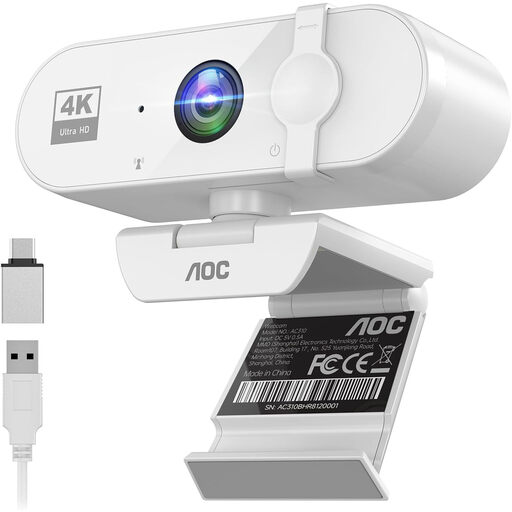
AOC 4K PC webcam with microphone
A PC webcam to consider if you are recording your review on a computer.
The product title lists 4K, a 99° field of view, plug and play, and a privacy shutter. Check whether a computer-based setup works for showing your sketchbook.
View on Joybuy
 No image available
DJI Osmo Pocket 4 Standard Combo
A compact gimbal camera to consider if you change viewpoint while filming.
The product title lists 3-axis stabilisation, 2× lossless zoom, 107 GB of built-in storage and a 2-inch rotating screen. Check whether the integrated lens suits the distance to your sketchbook.
View on Joybuy
 No image available
DJI Osmo Pocket 3 Creator Combo
A compact camera option for moving shots and spoken commentary.
The product title lists 4K/120fps, 3-axis stabilisation and an included microphone. DJI gives the Osmo Pocket 3 a minimum focusing distance of 20 cm; check that this works for the detail shots you want.
View on Joybuy
 No image available
Sony ZV-E10 + 16-50mm Zoom Black
A mirrorless camera with a zoom lens to consider if you want to switch between a full-page view and other framings.
The product title lists a 16–50 mm zoom lens. According to the product information, a memory card and adapter/charger are not included; check that the kit has everything you need for filming.
View on Joybuy
 No image available
Insta360 Link 2C Standard Bundle Graphite Black
A webcam option to consider if you want to record your review on a PC or Mac.
The product title lists 4K, HDR, automatic framing and a microphone with AI noise cancellation. Check whether a webcam setup gives you the camera angle you want above the sketchbook.
View on Joybuy
Frequently asked questions
How can I check whether small drawings will look sharp on camera?
First, measure the distance between the lens and the page, then decide whether you want to film a whole page or focus on details. DJI specifies that the Osmo Pocket 3 focuses from 20 cm; with a mirrorless camera, check the focusing range of your chosen lens.
Is a tripod useful if I film in one place?
Yes. The Consumers’ Association recommends a tripod if you mainly film in one place. Also check that the setup leaves the shared workbench clear, and test your framing before you start.
Do I need a separate microphone or macro lens?
That depends on the camera and shooting distance. The Consumers’ Association lists an external microphone as an option for audio recording; GoPro describes the Macro Lens Mod as a separate accessory for the HERO13 Black. Check the contents of the package and compatibility for the exact version.
Who should I contact if a product bought in the Netherlands is faulty?
According to the Dutch government, if a problem arises under the statutory guarantee, the seller—not the manufacturer—must provide a solution. Any manufacturer’s guarantee is in addition to your statutory rights.
Can I film other people in the workshop and post my review online?
Not without further consideration. According to the Dutch Data Protection Authority, the exception for personal or household use does not apply when footage is shared more widely, for example on a public page. If the GDPR applies, processing requires a valid legal basis; consent is one possible basis. Keep other people out of shot if you cannot arrange this carefully.


