
Maker filming overhead
You mainly film open sketchbook pages at a fixed table. Start by considering framing, working distance and mounting: together, these determine whether the whole page will fit in shot and stay in focus.


If you mainly film open sketchbook pages on a table, start with a stable overhead setup and check that the camera can capture the whole page in focus from your working distance. A compact camera keeps your setup simple, while a mirrorless camera gives you a choice of lenses. A gimbal camera is better suited to moving footage of your process. Whichever option you choose, you’ll still need to tailor the framing, lighting and editing to your needs.
You mainly film open sketchbook pages at a fixed table. Start by considering framing, working distance and mounting: together, these determine whether the whole page will fit in shot and stay in focus.
You want to show lines, materials and colour choices. The lens and lighting need careful consideration; make sure you also set the white balance for the light you’re filming in.
You switch between shots of the page and spoken or moving footage. Check the microphone options, and look for stabilisation if you plan to film handheld.
A good fit if: you want a simple setup for pages and spoken commentary, and the fixed lens gives you the framing you need from your mounting height.
Bear in mind: you can’t replace the lens later, so check the framing and focusing on your paper size before you buy.
A good fit if: you want to take close-ups as well as shots of your pages, and are happy to choose the lens, mount and complete setup separately.
Bear in mind: the camera body alone won’t determine the angle of view or working distance; these also depend on your chosen lens and mounting setup.
A good fit if: as well as filming pages, you mainly want moving footage of your creative process.
Bear in mind: stabilisation for moving shots doesn’t replace a stable overhead mount; check that the fixed angle of view suits your sketchbook.
| What to consider | What to check before buying | Who is this important for? |
|---|---|---|
| Full, sharp overhead shot | Measure your open book and the available distance between the lens and the table. Check the angle of view, focusing range and mount. | I want the whole open sketchbook in sharp focus, without the edges being cut off. Around 36% of consumers prioritise a full, sharp overhead shot. |
| Details and true-to-life colours | Compare a test shot with the original under your usual lighting. Consider the framing, lens and white balance. | I want lines, materials and colour choices in my portfolio to be easy to assess. For around 29% of consumers, detail and colour are the top priorities. |
| Commentary and process footage | Decide where you’ll be speaking in relation to the camera, and check the microphone connection on the exact model or bundle. | I want to alternate my commentary with footage of the creative process. Around 21% of consumers give clear commentary and process footage top priority. |
| A complete setup that’s easy to use | Check what’s included with each version, as well as the memory card type, mounting options and any microphone or power options. | I want to be able to record without having to work out lots of separate components or choices. Around 14% of consumers prioritise a straightforward complete setup. |
A high video resolution doesn’t tell you whether the whole page will fit in shot or stay in focus from your mounting height.
First, check the angle of view, focusing range and stability of the setup. Then decide which resolution you need.
Canon lists a stand and tripod mount for the PowerShot V10. That doesn’t automatically mean you can use them to suspend the camera safely above your work surface.
Before you buy, check which mount you need to position the camera securely above your sketchbook.
With a mirrorless camera, the lens you choose also affects your shots. Memory card types vary between models too.
Compare the exact version and check which lens, card, mount and audio equipment you’ll need for your setup.
Sony lists the ZV-1 II as a separate model with an 18–50 mm-equivalent zoom. Similar model names don’t necessarily mean they have the same lens or configuration.
Check the camera’s full model name and the specifications provided with it.
The PowerShot V10 is a compact option with a fixed lens, while the EOS R50 has interchangeable lenses.
The ZV-1 is a compact camera with a fixed lens. The ZV-1 II is a separate model.
The Z 30 is a mirrorless camera for makers who want to record other compositions or spoken footage as well as pages.
The Osmo Pocket 3 is a compact gimbal camera for moving footage of your process, alongside any static shots of the page.
This selection focuses on compact video and vlog cameras for filming pages and capturing your creative process. For a fixed overhead shot, always check that the framing, focusing distance and mounting options suit your sketchbook.
 No image available
Could suit you if you want to capture moving footage of your creative process as well as pages; check that the angle of view and focusing distance work for your overhead setup.
 No image available
Could suit you if you’re looking for a compact vlog camera with a rotating lens; test whether its angle of view captures the whole page from above.
The product name specifies 2K video and a 360° rotating lens.
 No image available
Could suit you if you’re looking for a compact camera with a rotating lens; take a test shot to check that the framing and focus work for your page.
The product name specifies 4K, 64 MP, a lens that rotates through 330° and a 1.72-inch touchscreen.
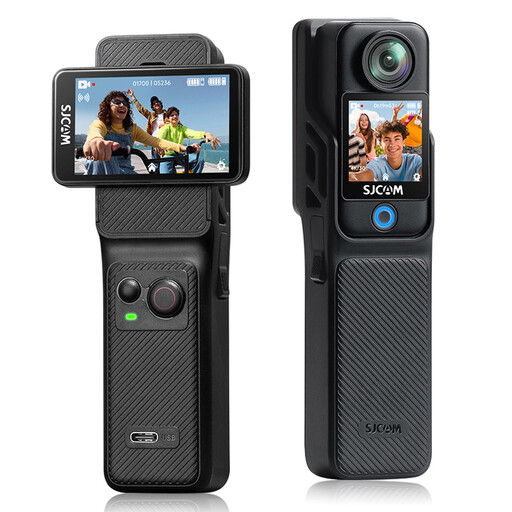 No image available
Could suit you if you want to film vlog footage as well as pages; check whether the stated angle of view is right for your paper size and mounting distance.
The product name specifies 4K, dual touchscreens and a 154° angle of view.
 No image available
Could suit you if you’re looking for a compact camera for spoken commentary; check that the lens can capture the whole page from your available mounting height.
First, measure your open book and the available distance from the lens. Then take a test shot with the camera secured firmly above the table, and check that the edges remain visible and the text and lines are in focus. Canon lists a tripod mount for the PowerShot V10, but that doesn’t mean a suitable overhead arm is included.
Keep the lighting as consistent as possible while you record, and compare a test shot with the original. Canon describes custom white balance as a way to adjust the camera to the lighting in the scene; check how to use this setting on your chosen model.
Check the memory card type, mounting options and any microphone or power options for the exact version. Canon lists microSD for the PowerShot V10 and DJI lists microSD for the Osmo Pocket 3; this doesn’t tell you whether a card is included with a particular offer.
When you buy as a consumer, you’re entitled to a product that works as it should, and the seller is your point of contact if something goes wrong. According to the Dutch government, there’s no fixed statutory guarantee period in the Netherlands; a manufacturer’s guarantee is in addition to your statutory rights.
Check the relevant privacy rules before publishing. The Dutch Data Protection Authority treats identifiable people in footage as personal data; the exception for personal or household use doesn’t apply to public sharing or business use. In these situations, you need a lawful basis under the GDPR, often consent. A video showing only your own pages doesn’t raise this specific issue.