First, check that the controller works with your console or PC and your skateboarding game. Then choose between a USB cable and wireless play. Wired play uses an available USB port and doesn’t need a separate controller charger, but limits how far away you can sit. Wireless gives you more freedom to move, but you’ll need batteries or time to recharge.
Who should consider this choice?
Player with limited sockets
You want to know if you can play or charge through an existing USB port, without an extra mains charger. For example, PlayStation describes charging through a PS5’s USB-C port, while Microsoft describes USB connection options for Xbox controllers.
Console skater
You’re looking for a controller that suits your PlayStation or Xbox generation, not just a gamepad with a similar button layout. Check the platform list for the exact model.
PC skater
You want a controller supported by your skateboarding game, then need to weigh cable reach against the freedom to move around wirelessly. Electronic Arts lists DualShock 4, DualSense and Xbox controllers among the options for skate. on PC.
What should you look for when choosing?
Wired USB controller
Choose this if: you have a spare USB port, the cable reaches your seat and you don’t want to use batteries or a separate charger.
Bear in mind: the cable limits how far away you can sit and takes up a USB port.
Wireless with AA batteries
Choose this if: you want to play wirelessly on a supported Xbox system or PC and are happy to keep AA batteries handy.
Bear in mind: you’ll need to replace or charge the batteries separately. A USB-C port doesn’t mean it can charge AA batteries.
Wireless with a built-in battery
Choose this if: you want to play wirelessly and can charge the controller through an available USB port on your console or PC.
Bear in mind: you’ll need to allow time for charging and keep a port free. Also check which accessories come with the exact version you’re buying.
| Concern |
What should you check? |
Who should pay particular attention? |
| Compatibility |
Check the platform list for the exact model and your game’s controller requirements. For skate. on PC, EA lists various DualShock and DualSense models, as well as Xbox controllers. |
If I want to play on my console or PC, both the system and the game need to support the controller; around 36% of consumers make compatibility their top priority. |
| Power without an extra socket |
Check whether you have a spare USB port, whether the cable will reach far enough and which type of battery the wireless version uses. |
I want to play or charge without using an extra mains socket, so I look at USB power or batteries I already have; around 29% of consumers prioritise power options. |
| Cable reach and controls |
Measure the distance between your seat and the USB port. Only look for customisable buttons if you want to use that feature. |
If my seat is further from the port or I want to customise the button layout, ease of use matters; around 21% of consumers focus most on cable reach or controls. |
| Running costs and aftercare |
Check which batteries and charging accessories come with the version you’re buying, and keep your proof of purchase in case you need to make a complaint to the retailer. |
I want to know what I’ll need while using the controller and who to contact if it develops a fault; around 14% of consumers make running costs and aftercare their main priority. |
Common buying mistakes
-
Assuming an Xbox-style button layout means Xbox compatibility
The 8BitDo Ultimate Wired Controller for Xbox is listed as compatible with Xbox and Windows. The separate Ultimate 2C Wired is listed for Windows and Android, so the two models don’t have the same platform list.
Before buying, compare the full model name with the official compatibility information for your console or PC.
-
Assuming USB-C charges AA batteries
A USB-C port doesn’t automatically mean that AA batteries inside a wireless controller will be charged. The Xbox Elite Series 2 has a built-in rechargeable battery, making it a different version from the standard controller.
Check the battery type, charging method and box contents for the exact model you’re choosing.
-
Choosing a wired controller without measuring the distance
The stated cable length will only be enough if it reaches from the spare USB port to your seat. Manufacturers list a 2.5 m cable for the 8BitDo controller mentioned and a 3 m cable for the PowerA controller.
Measure the route before buying and position the cable so it won’t be a trip hazard.
-
Confusing a manufacturer’s warranty with your full statutory rights
ACM ConsuWijzer distinguishes between statutory guarantees and a commercial guarantee offered by the retailer or manufacturer. A stated manufacturer’s warranty period doesn’t replace your statutory rights.
If a product develops a fault after normal use, contact the retailer and explain what’s wrong and how you’ve used it.
Brands to compare
Xbox / Microsoft
Microsoft describes Xbox Wireless Controllers for supported Xbox systems and PC, with wireless or USB connectivity.
- The standard controller and Elite Series 2 have different power options: check whether the version uses AA batteries or a built-in battery.
- The Elite Series 2 and Core versions don’t include the same charging accessories; Microsoft states that the Core doesn’t include a charging dock.
PlayStation / Sony
DualSense is designed for PS5. Electronic Arts also lists DualSense as a controller option for skate. on PC.
- PlayStation describes charging through a PS5’s USB-C port.
- Being compatible with PS5 doesn’t mean the same DualSense controller will work with a PS4 console.
8BitDo
The Ultimate Wired Controller for Xbox and the Ultimate 2C Wired are wired models with different listed platforms.
- 8BitDo lists the Ultimate Wired Controller for Xbox as compatible with Xbox and Windows, with a 2.5 m cable.
- The Ultimate 2C Wired is listed for Windows and Android, not Xbox consoles.
PowerA
PowerA describes the Enhanced Wired Controller for Xbox Series X|S as a wired controller for the Xbox systems listed and Windows.
- PowerA lists a detachable 3 m USB cable and two mappable buttons.
- You’ll need a spare USB port, and the cable must reach your seat safely.
GameSir
According to GameSir, the G7 SE is a wired option for Xbox and PC.
- GameSir lists Hall Effect sticks for this model.
- The manufacturer’s claim about the sticks isn’t an independent test result for skateboarding games. Also check the compatibility and cable requirements for the exact version.
Joybuy products for this use case
These product picks include a wireless controller with a built-in battery, as well as wired Xbox and PC models. Always check compatibility with your own game and system for the specific version you’re considering.
 No image available
PS5 DualSense wireless controller V3, Cosmic Red
For anyone who wants to play wirelessly and can charge the controller through an available PS5 port.
PS5 model with a built-in battery; PlayStation describes charging through a PS5’s USB-C port.
View at Joybuy
 No image available
GameSir G7 SE wired controller, Dynamic Blue
For anyone who wants to play wired on a supported Xbox system or Windows PC, without a separate controller charger.
The product information lists Xbox Series X|S, Xbox One and Windows, a USB cable and two programmable rear buttons. The cable needs a spare USB port and limits how far away you can sit.
View at Joybuy
 No image available
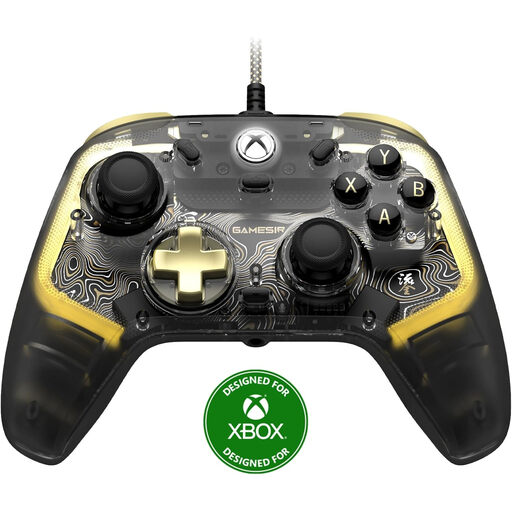
GameSir Kaleid Flux wired controller, smoke transparent RGB
For anyone looking for a wired controller for the Xbox systems listed or Windows.
The product title lists Xbox Series X|S, Xbox One and Windows. The wired connection needs a spare USB port and limits how far away you can sit.
View at Joybuy
 No image available
GameSir T7 wired Xbox controller
For anyone who wants to play wired on the Xbox systems listed or a Windows PC and can route the cable to their seat.
The product information lists Xbox Series X|S, Xbox One, Windows 10/11 and Steam, plus a detachable 3 m USB-C cable. The cable needs a spare USB port.
View at Joybuy
 No image available
GameSir G7 Pro Tri-Mode, Shadow Ember
For anyone who wants to play wired on a supported Xbox system and also wants to explore the listed wireless options for PC or mobile.
The product title lists a wired connection for Xbox Series X|S and Xbox One, plus wireless options for PC and mobile. Check which connection type works with your chosen platform.
View at Joybuy
Frequently asked questions
Do you need a controller to play skate. on PC?
Yes. Electronic Arts lists a controller as a requirement for skate. on PC and includes DualShock 4, DualSense, Xbox One and Xbox Series X|S controllers among the options. This applies to this game; check the requirements for other skateboarding games separately.
Can you charge a DualSense without using an extra mains socket?
Yes, if you have a spare USB-C port on your PS5. PlayStation describes charging through that port with a USB-C cable.
Can a standard Xbox controller charge AA batteries through USB-C?
Don’t assume so. Microsoft describes AA batteries and a separate Xbox rechargeable battery with a USB-C cable; the Elite Series 2 has a built-in rechargeable battery.
Who can help if a controller develops a fault too soon after normal use in the Netherlands?
According to ACM ConsuWijzer, the retailer is responsible for the statutory guarantee if the product doesn’t meet what you could reasonably expect. A commercial manufacturer’s warranty doesn’t replace your statutory rights.
What should you look for to check an electronic controller is safe?
The Dutch government states that electronic devices sold on the EU market must carry a CE marking. Check the product information and who the retailer is when you buy; a product listing alone doesn’t confirm that a particular item meets the requirements.


