First, choose a controller that the official compatibility information confirms works with your platform and game. Then compare the stick layout, grip, connection and any extra buttons. Electronic Arts says you need a controller to play skate. on PC, but that requirement doesn’t automatically apply to other skateboarding games. A different controller won’t fix screen glare: Arboportaal recommends adjusting your screen position and using window shading to reduce distracting daylight.
Who is this guide for?
Skaters who want to check platform compatibility first
You want a controller that works with both your console or PC and the skateboarding game you play. Electronic Arts lists PC, PlayStation and Xbox as platforms for skate.; EA also states that a controller is required for the PC version.
Players who rely on the sticks
You’re comparing the stick layout, grip and any programmable buttons to find what suits the way you play. Extra features are only useful if your game and platform support them.
Skaters playing in a bright room
You want to play comfortably and avoid mistaking screen glare for a controller problem. Arboportaal recommends adjusting your screen position and using window shading to reduce distracting daylight.
What should you look for when buying?
Start by checking that the game and platform work together, then compare the controls and connection. Treat distracting screen reflections as a separate issue from your controller.
| What to consider |
What should you look for? |
Who is this important for? |
| Compatibility |
Check the exact game, platform and connection against the official compatibility information. EA lists PC, PlayStation and Xbox for skate.; a controller is required on PC. |
If I want to be sure my game works with my console or PC, I check that combination before comparing extra features. Consumers who put compatibility first are estimated to make up around 36%. |
| Stick controls and layout |
Compare the stick and button layout with what you’re used to, and check whether your game supports button remapping. EA describes skate. as using Flick-It controls. |
If I use the sticks a lot when pulling off tricks, I want to know whether the layout and buttons feel right for the way I play. Consumers who put stick controls and layout first are estimated to make up around 29%. |
| Bright gaming setup |
Check for screen reflections at the time you usually play. Arboportaal recommends adjusting your screen position and using window shading; grip and screen visibility are separate things to consider. |
If daylight makes the screen difficult to read, I want to improve visibility first and assess controller comfort separately. Consumers who mainly consider a bright gaming setup are estimated to make up around 21%. |
| Connection and power |
Check whether the exact model works with your platform by cable, Bluetooth or dongle, and which connection or charging option you need. For example, manufacturers list USB-C for the wired GameSir G7 SE, and 2.4 GHz or a cable for the 8BitDo Ultimate 2C on Windows. |
If I want to sit wherever I like without a cable, I compare wireless connections and how the model is powered. A cable may be a better fit if the connection is nearby. Consumers who prioritise freedom of movement and power are estimated to make up around 14%. |
Pitfalls to avoid when buying
-
Assuming ‘wireless’ means ‘works wirelessly with every console’
According to 8BitDo, the Ultimate 2C Wireless has different connection options depending on the platform: Bluetooth for Android, and 2.4 GHz or a cable for Windows.
Check the exact version and which connection your platform supports.
-
Expecting DualSense features in every PC skateboarding game
PlayStation says that haptic feedback depends on the game and requires a USB connection on PC. Don’t assume that haptic feedback or adaptive triggers are available in every game.
Before choosing a controller for these features, check that your game supports them and confirm which connection you need.
-
Buying a controller to fix screen glare
A different stick layout or grip won’t stop distracting daylight from reflecting off your screen.
First, check your screen position and window shading. Choose a controller separately, based on its controls and compatibility.
-
Confusing paid extra cover with your statutory rights in the Netherlands
The Dutch government says that the seller must provide a solution if a product is faulty. Additional cover doesn’t replace your statutory rights.
Before paying for extra cover, compare its terms with your statutory rights.
Brands to consider
Xbox
A good option for playing on Xbox and Windows PC; also check that your game supports the controller.
- Xbox lists Bluetooth, button mapping and a textured grip for the Xbox Wireless Controller.
- According to Xbox Support, Bluetooth reliability also depends on the device’s Bluetooth card.
PlayStation
The DualSense is designed for PS5 and can also be used with supported PC games.
- PlayStation lists a built-in battery, haptic feedback and adaptive triggers.
- On PC, feature availability depends on the game; PlayStation says haptic feedback on PC requires USB.
GameSir
The G7 SE is a wired option for Xbox and Windows.
- The GameSir manual lists Hall Effect sticks, Hall Effect triggers and two lockable rear buttons for the G7 SE.
- The wired connection limits how far you can sit from your device, so your game and gaming setup need to accommodate a cable.
8BitDo
The Ultimate 2C Wireless is an option for Windows users considering a 2.4 GHz connection via dongle.
- 8BitDo lists Hall Effect sticks and a 2.4 GHz or wired connection for Windows.
- Bluetooth is listed for Android; the name Wireless doesn’t mean the controller works wirelessly with every console.
Nintendo
Nintendo controllers are worth considering for skateboarding games available on a compatible Switch system.
- Nintendo lists mappable GL and GR buttons for the Switch 2 Pro Controller.
- Check the game separately: Electronic Arts doesn’t list Switch as a platform for skate.
Controllers at Joybuy
This selection includes wired Xbox and Windows models, as well as controllers listed for PS4 and PC or with a PS5 layout. Before buying, check that the exact controller and connection will work with your game and platform.
 No image available
Black wireless Dualshock game controller for PS4 and PC
The product name lists PS4 and PC; check compatibility with your specific game and device.
The product description lists a touchpad, gyroscope, vibration motors and a 3.5 mm jack. A USB cable is mentioned for the initial pairing.
View at Joybuy
 No image available
VIELLAN wireless controller with Hall Effect joysticks, 255-level Hall triggers and programmable rear buttons
The product name lists PC and a PS5 layout; a layout description alone doesn’t confirm compatibility with a PS5 console.
Listed features include RGB lighting, a 1000 mAh battery and USB-C.
View at Joybuy
 No image available
GameSir G7 SE wired Xbox controller, Dynamic Blue
The product name lists Xbox Series X/S, Xbox One and Windows 10/11. The controller is wired, so bear in mind how far you’ll be from the connection.
The product description lists Hall Effect joysticks and triggers, two programmable rear buttons, a detachable USB cable and a 3.5 mm jack.
View at Joybuy
 No image available
Hyperkin DuchesS wired controller for Xbox and Windows, black
The product name and description list Xbox Series X|S, Xbox One and Windows 10/11. The wired connection is only suitable if a cable works for your gaming setup.
The product description lists Hall Effect sticks, dynamic impulse triggers, a headset jack and a detachable 3-metre USB-C cable.
View at Joybuy
 No image available
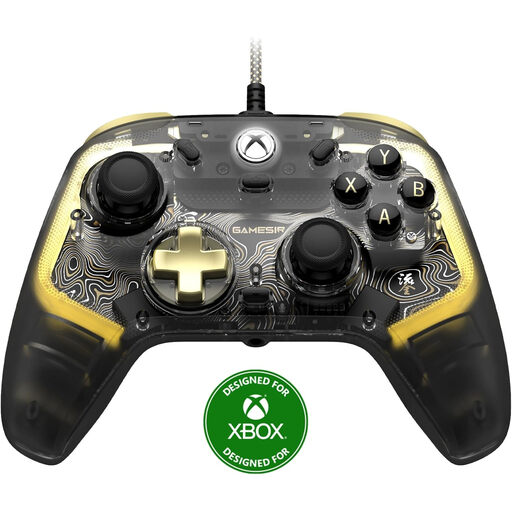
GameSir Kaleid Flux wired Xbox controller, smoke transparent RGB
The product name lists Xbox Series X/S, Xbox One and Windows 10/11. The controller is wired, so check that you can connect the cable from where you plan to play.
View at Joybuy
Frequently asked questions
Do I need a controller to play skate. on PC?
Yes. Electronic Arts says that a controller is required to play skate. on PC. Check the requirements for other skateboarding games separately; this requirement doesn’t automatically apply to them.
Can I fix screen glare in a bright room by using a different controller?
No, a controller won’t fix screen glare. Check the position of your screen in relation to the window and consider using window shading; Arboportaal recommends these measures to reduce distracting daylight.
How do I connect a DualSense to my Windows PC?
According to PlayStation, you can connect it via USB-C or Bluetooth on supported Windows versions. Then check whether your game supports the controller and the features you want; PlayStation says haptic feedback on PC requires a USB connection.
Which accessories and connections should I check before buying?
Check that the connection and port are suitable for your platform and gaming setup, and see whether the required cable, dongle or charging option is included. A wired model needs a connection within reach; a wireless model may need charging or batteries.
What statutory rights apply when buying online in the Netherlands?
For online purchases from a business, consumers generally have a 14-day cooling-off period, although there are exceptions; purchases from private sellers aren’t covered by the same rules. The Dutch government also says there is no fixed statutory guarantee period in the Netherlands and that the seller must provide a solution if a product is faulty.


