First, choose a controller that works with your console or PC and the game you want to play. Then decide whether wireless play or a cable suits your setup. Electronic Arts describes using the left and right sticks to control skate., but extra buttons or haptics won’t automatically give you an advantage in every skateboard game.
Which players have different priorities?
Console player on the sofa
You play on PlayStation or Xbox and want to check in advance that the controller works with both your console and your game. Microsoft and Sony describe controllers for their own consoles, so check whether your specific game supports the controller.
PC player in front of the TV
You play on a Windows PC with a big screen or stream the picture to your TV. Check where the game runs, how the controller connects to it and whether your network connection could affect streaming. Steam recommends a wired connection for your PC if you have network problems.
Player focused on trick controls
You want to know how the sticks and any extra buttons suit the way you play. For skate., Electronic Arts describes steering with the left stick and performing flip tricks with the right stick. Don’t assume other games use the same controls.
What should you look for when choosing?
First check that your platform and game support the controller. Then consider how it connects and whether the connection suits your setup, as well as which controls you’ll actually use.
| What to consider |
What should you check? |
Who is this important for? |
| Platform and game |
Check the full model name, whether your console or operating system is supported, and whether the game you’ve chosen supports the controller. |
I want to play on my own console or PC and check first that both the device and the game support the controller. Around 31% of consumers prioritise platform and game compatibility. |
| Connection from your seat |
Check whether the controller uses Bluetooth, a specific USB receiver or a cable, and whether that connection works with your host device. If you’re choosing a wired controller, measure the distance from your seat. |
I want to play wirelessly from the sofa, or check that a cable will reach my seat without trailing awkwardly across the room. For around 25% of consumers, the connection from their seat is the top priority. |
| Sticks and trick controls |
Check the stick layout and the game’s control settings. For skate., Electronic Arts describes steering with the left stick and performing flip tricks with the right stick. |
For tricks, I want to use both sticks comfortably and only consider extra buttons if the game supports them. Around 25% of consumers prioritise stick and trick controls. |
| Power and aftercare |
Check how the version you’ve chosen is powered, and read the terms for help if it develops a fault and for any additional cover. |
I want to know in advance how the controller is powered and who to contact if it’s faulty, without paying for extra cover that offers no added benefit. Around 19% of consumers put power and aftercare first. |
Pitfalls to avoid
-
Assuming ‘wireless’ means Bluetooth on every device
For the Ultimate 2C Wireless, 8BitDo lists a 2.4GHz receiver or cable for Windows, and Bluetooth for Android. The connection method therefore depends on the version and the device.
Check the full model name, the device you play on and whether the controller comes with the receiver you need.
-
Assuming extra features work in every game
Sony says that DualSense features on PC vary by game and device. According to Sony, haptic feedback on PC requires a USB connection.
Check whether your game supports haptics, triggers or extra buttons before making them a deciding factor.
-
Choosing a wired controller without measuring the cable route
For the Advantage Wired controller in question, PowerA lists a 10 ft cable. Whether that’s long enough depends on the distance and the route to your seat.
Measure the route from the controller to where you play, and take walkways into account.
-
Confusing the manufacturer’s warranty with your statutory rights
The Dutch government distinguishes between statutory consumer rights and a manufacturer’s warranty or additional cover. According to the Dutch government, if a product is faulty, the seller must provide a solution.
Before paying for additional cover, compare its terms with the rights you already have.
Brands to consider
Microsoft Xbox
Microsoft describes the Xbox Wireless Controller as suitable for Xbox consoles and Windows PCs. Consider it if you play on one of these devices.
- Microsoft lists Bluetooth, button mapping and a textured grip.
- Check the connection with your device and whether the game supports the controller. The specifications don’t prove it offers an advantage for trick precision.
Sony PlayStation
Sony describes DualSense as a PS5 controller and says it can be used via USB or Bluetooth with supported PCs.
- Sony lists haptic feedback and adaptive triggers.
- According to Sony, PC features vary by game and device; haptic feedback on PC requires USB. Don’t assume your skateboard game makes use of these features.
8BitDo
According to 8BitDo, the Ultimate 2C Wireless works with Windows via 2.4GHz or cable, and with Android via Bluetooth.
- 8BitDo lists Hall effect sticks, extra mappable bumpers and an included USB-A receiver.
- The listed Windows connections are the receiver or cable. Don’t assume the name Wireless means it supports Bluetooth on Windows or consoles.
PowerA
PowerA lists the Advantage Wired Controller for Xbox Series X|S with Hall Effect as compatible with the specified Xbox consoles, Xbox One and Windows 10/11.
- PowerA lists Hall effect sticks, two mappable buttons and a 10 ft cable.
- The manufacturer’s specifications don’t guarantee that an individual unit will never develop a fault. Also check that the cable suits your setup.
Controllers at Joybuy
These product options are listed for different consoles and PCs. Before buying, check that the controller works with your device and skateboard game, and that its connection suits your setup.
 Image unavailable
Xbox Wireless Controller for Xbox Series/PC - Ice Breaker Special Edition
For anyone looking for a controller for Xbox Series or a Windows PC: the product description lists Xbox Wireless, Bluetooth and USB-C.
The description also mentions mappable buttons. Check which connection works with your device and game.
Joybuy
 Image unavailable
PlayStation 5 DualSense Controller, Starlight Blue
This version is identified by its DualSense name and Starlight Blue colour. The product information lists PS5, Bluetooth, haptic feedback and adaptive triggers.
Sony says that features on PC vary by game and device; haptic feedback on PC requires USB.
Joybuy
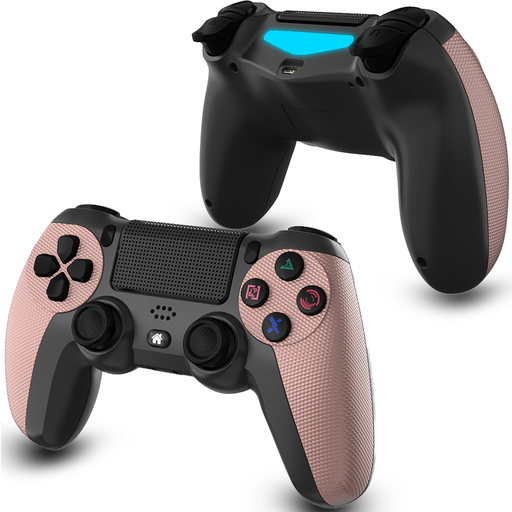 Image unavailable
VIELLAN Wireless Bluetooth Gamepad for PS4/PC, Rose Gold
The product information lists PS4 and PC compatibility, two analogue sticks and a touchpad.
The description gives a wireless range of up to 10 m. Check that the connection and game support suit your device.
Joybuy
 Image unavailable
Game controller with dual vibration and gyroscope for Switch and PC
The product information lists support for Switch and PC, as well as a Bluetooth connection.
The description mentions dual vibration, a 6-axis gyroscope and a wireless range of more than 10 m. Check that your game supports it.
Joybuy
 Image unavailable
VIELLAN Wireless Controller with Hall Effect Joysticks, 255-level Hall Triggers, PC & PS5 Layout
The product information lists PC compatibility, Hall effect sticks and programmable buttons on the back.
The description mentions a 1000 mAh battery and USB-C. The words PS5 Layout in the product name don’t, by themselves, confirm PS5 compatibility.
Joybuy
Frequently asked questions
Do all skateboard games use the same controller layout?
No, controls vary from game to game. For skate., Electronic Arts describes steering with the left stick and performing flip tricks with the right stick, and mentions customisable control presets. For other games, check their own controller support and settings.
How do I connect a controller if my PC game is showing on the TV?
First, work out where the game is running and which device the controller needs to connect to. Sony describes USB and Bluetooth connections for supported PCs; for the Ultimate 2C Wireless on Windows, 8BitDo lists a 2.4GHz receiver or cable. If you’re streaming and having problems, Steam also recommends checking your PC’s network connection.
What should I do if my controller develops a fault, and do I need extra cover?
According to the Dutch government, if a product is faulty, you should be able to contact the seller for a solution. The Netherlands has no set statutory warranty period. Before paying for additional cover, compare its terms with the rights you already have.
Do I have a cooling-off period for a controller bought online in the Netherlands?
According to the Dutch government, purchases made at a distance from a business are generally covered by a 14-day cooling-off period. This doesn’t automatically apply to purchases from a private seller, so check who the seller is and which terms apply to your purchase.


