
Vandaag of morgen in huis

Kwaliteit gegarandeerd

Welkomstaanbiedingen ontgrendelen: GRATIS bezorging | Tot 80% korting | Gratis 30 dagen JoyPlus-proefperiode
Download de app
A sit-stand workstation can be a practical way to alternate between sitting and standing while working. Yet many people buy a solution they are less satisfied with after a few weeks. The cause is usually not the concept itself, but an unsuitable size, insufficient load capacity or an awkward adjustment mechanism.
Whether you work from home, game or want to adapt an existing office, look beyond terms such as “ergonomic” and “professional”. Above all, check the product specifications and make sure they suit your desk, monitors and everyday use.
A desk converter may look compact, but you need space for a monitor, laptop, keyboard and mouse. So don’t just check the overall width: make sure the keyboard will fit on a separate tray too. A screen positioned too close to your eyes or a mouse that is partly hanging off the work surface will make the setup less practical.
A specification such as 15 kg indicates how much weight the product is designed to support. It does not automatically mean that every surface is suitable or that the workstation will remain stable with multiple monitor arms. A desk converter should be placed on a flat, sturdy and stable table. Also check the combined weight of your monitors, laptop, docking station and accessories.
A high maximum setting is not enough. The lowest setting must suit your seated posture, while the highest setting should work with your height and desk height. With an height-adjustable desk or desk converter, a wide adjustment range and simple operation are more important than one impressive maximum figure.
First, measure your existing desk. Take note of the available depth, the space behind the desk and the position of your cables. Two monitors will often require a wider work surface than a single laptop.
One example is the Neomounts NS-WS300BLACK. The upper display shelf measures 95 x 40 cm, while the keyboard tray measures 95 x 30 cm. According to the product description, it has room for two monitors or a monitor and laptop. This makes it suitable for a permanent home-working setup, provided your equipment fits within the stated dimensions.
Consider the total weight the structure needs to lift. With a gas-spring desk converter, the mechanism is designed to move the work surface and equipment up and down. Keep cables clear of the moving parts and do not exceed the stated capacity.
According to the product specifications, the Neomounts NS-WS300BLACK has a load capacity of 15 kg and stepless height adjustment from 11 to 50.5 cm. Do not place your body weight on the workstation, and keep your fingers away from moving parts while adjusting it.
A gas-spring desk converter is a good option if you want to switch quickly between two positions without replacing your entire desk. With a complete desk featuring an adjustable desk frame, you will generally have more flexibility over the desktop size and layout, but assembly and cable management require more attention.
An electric sit-stand desk or electric frame is particularly practical if you change height regularly or use a heavier setup. Check the number of motors, whether memory settings are included, the desired desktop size and the amount of space beneath the desk.
The following selection links different products to recognisable usage scenarios. The assessment is based on the listed product specifications and not on unsubstantiated health claims.
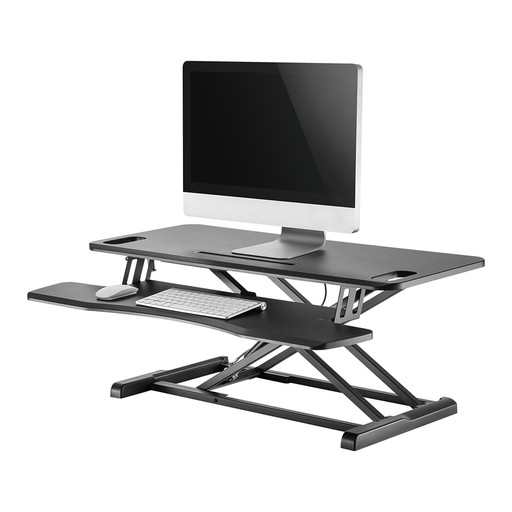
Why it suits this profile: This workstation is placed on an existing desk and, according to the product description, is ready to use without assembly. It is therefore suitable for anyone looking to adapt an existing home-working setup.
The separate dimensions for the display surface and keyboard tray make it easy to check the layout in advance. The stated load capacity is 15 kg.
Stepless adjustment from 11–50.5 cm, gas-spring assistance and a 95 x 40 cm work surface.
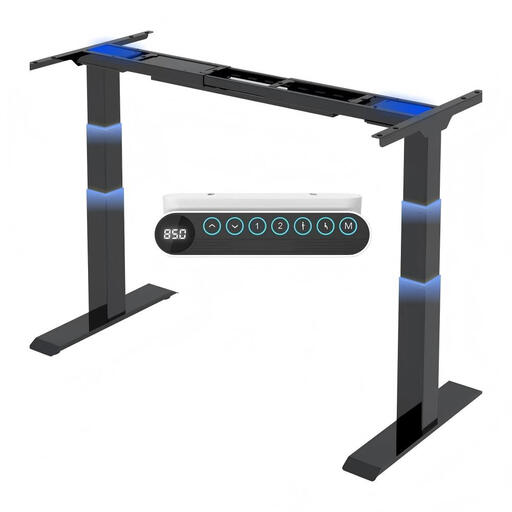
Why it suits this profile: This electric desk frame is designed for anyone who wants to use their own desktop and values electric operation, multiple height settings and a higher stated load capacity.
The specifications list two motors, three-stage adjustable legs and four memory settings. Check that your desktop and mounting dimensions are suitable before buying.
Electric height adjustment, four memory presets, USB and a stated load capacity of up to 160 kg.
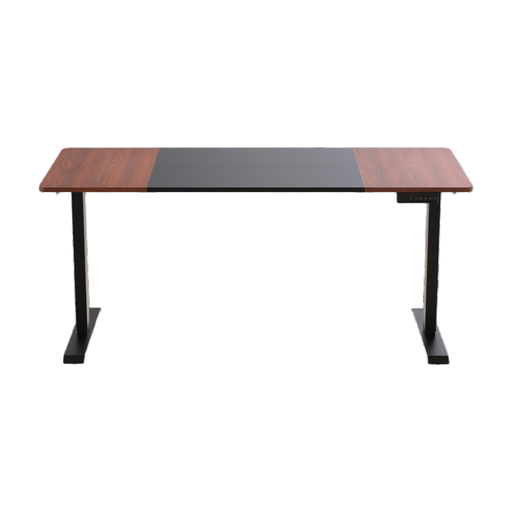
Why it suits this profile: This set combines an electric frame with a desktop measuring approximately 160 x 70 cm. It is suitable for a permanent office or gaming setup requiring a spacious workstation.
The desktop dimensions are clearly stated. Check the available floor space beforehand and plan your cables around the electric adjustment mechanism.
Dual-motor frame, control panel with memory settings and a laminated desktop in a cherry finish.
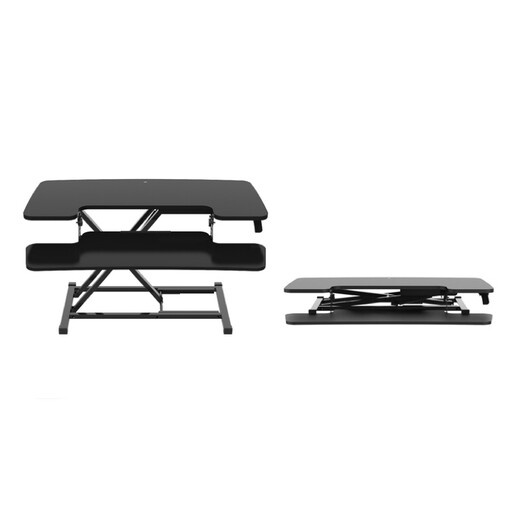
Why it suits this profile: The 2-tier design is intended for users who want to keep their monitor and peripherals organised on a compact riser.
The two-tier layout prevents all your equipment from having to sit on one small surface. However, check the available dimensions and load capacity in the latest product information.
2-tier design and adjustable workstation configuration for an existing desk setup.
An adjustable workstation only works well when the rest of your ergonomic workspace is right too. Use this checklist:
A desk converter is usually easier to position than a complete electric desk, while an adjustable desk frame offers more flexibility in terms of desktop size and accessories. The right choice therefore depends on the space available, your equipment and how often you want to change the height.
We have compiled a complete, up-to-date list of products that fully meet these strict selection criteria and the applicable European safety regulations.
That depends on the width, depth and load capacity. According to the product information, the Neomounts NS-WS300BLACK has a surface measuring 95 x 40 cm and is designed for two monitors or a monitor and laptop. Always check the dimensions of the monitor stands and the total weight of your own equipment.
An electric desk frame only uses power while it is being adjusted, and generally consumes very little during a normal working day. Actual consumption depends on how often you adjust it, the motor power and whether the controls use standby power. Compare the electrical data for the specific model.
Its lifespan depends on the load, assembly, frequency of use and maintenance. Stay within the stated load capacity, avoid uneven loading and check the moving parts and cables regularly. With a gas-spring mechanism, you should also stop using the product if the support becomes weaker or any damage is visible.
