
Vandaag of morgen in huis

Kwaliteit gegarandeerd

Welkomstaanbiedingen ontgrendelen: GRATIS bezorging | Tot 80% korting | Gratis 30 dagen JoyPlus-proefperiode
Download de app
A desk that seamlessly transitions from a productive home office workspace to an immersive gaming setup. That's the promise of a sit-stand gaming desk. But the reality is that many models are riddled with pitfalls: from wobbly frames to noisy motors that give out after just a few months. Before you invest, it's crucial to know what to look for to avoid wasting money on a desk that delivers more frustration than functionality.
As a Joybuy Product Recommendation Officer, I'll help you see through the marketing hype. We'll look at the specifications that truly matter, so you can choose a desk that's built to last, whether you're working or gaming.
The market is flooded with desks that look great at first glance. But often, the problems lie beneath the surface. These are the most common failures:
To avoid a bad purchase, focus on the technical core. These three elements determine whether a desk is worth its price.
The most important part of a height-adjustable desk is its lifting mechanism. Models with dual motors (one in each leg) are typically faster, quieter, and can support more weight than single-motor desks. Check the maximum load capacity. A good desk can support at least 80 kg, more than enough for multiple monitors, a PC, and other equipment. Also, pay attention to the frame's construction; a steel frame provides the stability you need, especially at its highest setting.
The size of the desktop is crucial. A gaming desk 140 cm wide is a popular size that offers enough space for a large mouse mat and two screens without taking over the entire room. For a truly ergonomic desk, the height adjustment range is also important. A good range (e.g., from 70 cm to 120 cm) ensures that both shorter and taller individuals can achieve a correct sitting and standing posture. A built-in monitor riser can further contribute to better neck posture.
Functionality must be practical. A desk with power outlets and USB is an excellent addition, provided the ports are easily accessible and neatly integrated. This prevents a tangle of cables under your desk and makes it an ideal solution for a tidy home office desk. For gamers, a desk with RGB lighting can significantly enhance the atmosphere. Look for models where the lighting is subtly integrated and customisable, rather than a garish LED strip added as an afterthought.
Not everyone has the same needs. Here are a few options that suit different profiles, based on their specifications.
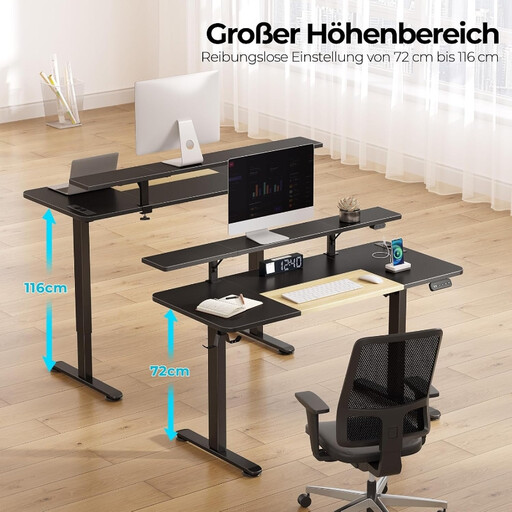
Why This Fits Their Persona: Perfect for those who seamlessly switch between focused work and gaming. The sit-stand function supports a dynamic posture, while the integrated power outlets and RGB lighting create a complete setup without cable chaos.
The quiet electric motor and sturdy frame tackle the problem of wobbly and noisy desks. The integrated features are part of the design, not cheap add-ons.
An all-in-one solution that combines ergonomics (sit-stand), atmosphere (RGB), and convenience (power hub) in one sleek package.
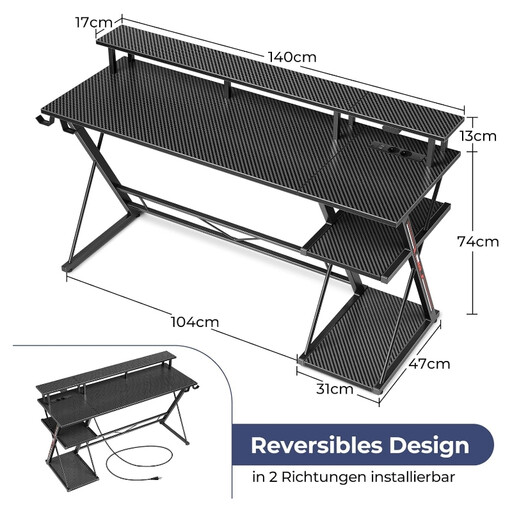
Why This Fits Their Persona: For gamers who value an immersive, organised 'battlestation' more than a sit-stand function. The app-controlled RGB lighting and built-in power supply are designed for a high-tech gaming experience.
This desk focuses on high-quality integrated features (app-controlled RGB, power outlets) instead of cheap plastic extras. The carbon fibre look provides a premium feel that suits a serious setup.
Advanced RGB lighting with app control and music sync; integrated charging station for a clean look.
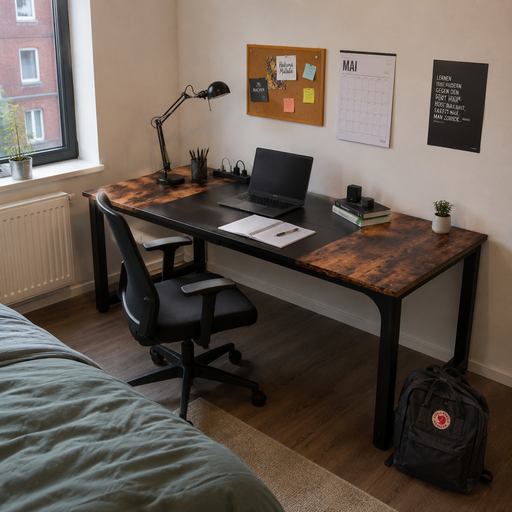
Why This Fits Their Persona: Ideal for those who need a massive work surface for multiple monitors, large projects, or a shared workspace. The focus here is on maximum space and stability, not height adjustment.
This desk focuses on the absolute basics: a rock-solid frame and a gigantic top. No frills, no weak points, just pure functionality and a high load capacity.
Very large work surface (180x80 cm) and an exceptionally stable frame. According to the manufacturer, it can support up to 260 kg.
We have compiled a complete, real-time list of products that fully satisfy these strict selection criteria and UK safety regulations.
Prolonged sitting is associated with various health issues. Alternating between sitting and standing throughout the day can help you vary your posture and keep your muscles active. It's not a miracle cure, but it promotes a more active work or gaming style. Focus on changing your position regularly.
Power consumption is generally low. The motors only draw energy when you are adjusting the height. In standby mode, the consumption is comparable to that of a television that is turned off. So, you don't have to worry about a noticeable increase in your energy bill.
For a good sitting posture, adjust the height so that your arms form a 90-degree angle when your elbows are resting on the desk and your feet are flat on the floor. In the standing position, the same rule applies to your arms. Your monitor should be at eye level to prevent neck strain; a monitor stand or arm can help with this.
