
Vandaag of morgen in huis

Kwaliteit gegarandeerd

Welkomstaanbiedingen ontgrendelen: GRATIS bezorging | Tot 80% korting | Gratis 30 dagen JoyPlus-proefperiode
Download de app
For many of us, long days behind a computer are the norm. Whether you work from home, study, or are in the office, a good workspace is essential, not an optional luxury. A sit-stand desk is often seen as the solution for a more active and healthier posture. However, the market is flooded with models that look good at first glance but disappoint in practice.
Before you buy a sit-stand desk, it's crucial to know what to look for. Many buyers make the same mistakes and end up with a desk that wobbles, makes noise, or simply isn't sturdy enough. In this guide, we'll expose the most common pitfalls and provide practical tips to help you choose a model that truly suits your needs.
Marketing jargon can make a product seem better than it is. Pay close attention to these three common problems that can seriously ruin your work experience.
One of the biggest annoyances is a desk that's unstable at standing height. A little wobble might seem harmless, but when you're trying to concentrate, it quickly becomes a distraction. This problem is often caused by a frame that is too light or poor leg construction. Stability becomes a critical factor, especially if you use multiple monitors or heavy equipment.
The whole point of an electric sit-stand desk is to switch effortlessly between sitting and standing. If the motor is loud or takes a long time to adjust the height, you'll likely stop using the feature after a few weeks. A quiet and smooth motor is essential for a pleasant user experience. Models with a single motor are often noisier and slower than desks with dual motors.
Manufacturers specify a maximum load capacity, but this number can be misleading. There's a difference between static load capacity (what the desk can hold when stationary) and dynamic load capacity (what the motor can handle during adjustment). An overloaded desk may exhibit a slower mechanism, or the motor could even fail over time. Calculate the weight of your setup and choose a model with a sufficient margin.
To avoid the pitfalls mentioned above, there are a few technical specifications you should always check. These determine the quality and lifespan of your ergonomic desk.
Frame and Motor(s): The frame is the backbone of your desk. A steel frame offers the most sturdiness. Also, check if the desk has a single or dual motor. A dual motor typically provides faster, quieter, and more stable adjustment, especially with a wider or more heavily loaded desktop. If you're considering buying a separate electric desk frame, this is a key point of consideration.
Load Capacity and Stability: Look at the dynamic load capacity. A setup with a PC, two monitors, and some accessories can easily weigh 20-25 kg. A load capacity of at least 70 kg is a safe bet for most home office setups. Stability is also determined by the leg design; models with an inverted leg design (the thickest part at the bottom) are often more stable at their highest setting.
Dimensions and Height Range: Measure your available space and decide what size desktop you need. Standard sizes like 120x60 cm are ideal for smaller rooms, while 160x80 cm offers more workspace. Also, check the minimum and maximum height range. Ensure the desk can go low enough for a correct sitting posture and high enough for a comfortable standing posture, suitable for your body height.
Not everyone needs the same thing. Below are some recommendations, linked to specific user profiles and how they bypass the previously mentioned pitfalls.

Why This Fits Their Persona: Ideal for those seeking a full-featured electric sit-stand desk for a smaller room or apartment. The compact 120x60 cm size fits almost anywhere without compromising on functionality.
The solid steel frame ensures good stability, even at standing height. According to the manufacturer, the motor is designed for quiet operation, ensuring you'll actually keep using the feature.
Four memory presets for saving your favourite heights. Includes handy extras like a storage drawer and cable grommets for a tidy desk.
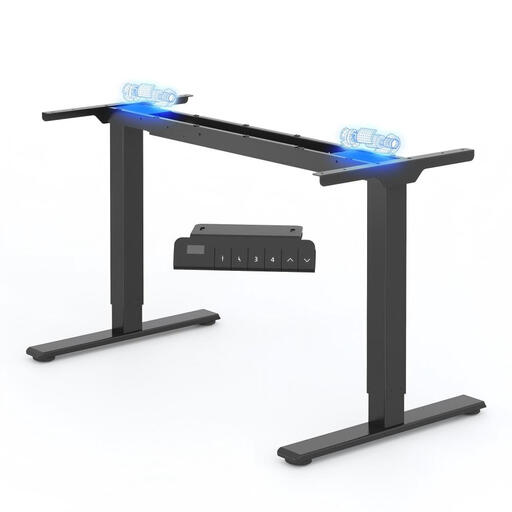
Why This Fits Their Persona: Perfect for the user who wants to personalise their workspace. Combine this frame with a desktop of your choice. Suitable for heavy setups with multiple monitors and equipment.
The dual motor ensures smooth and quiet operation, while the 100 kg load capacity prevents the pitfall of overloading. The inverted leg design provides excellent stability.
Flexible width, suitable for desktops from 120 cm to 180 cm. The LED control panel with 4 memory presets makes changing heights effortless.
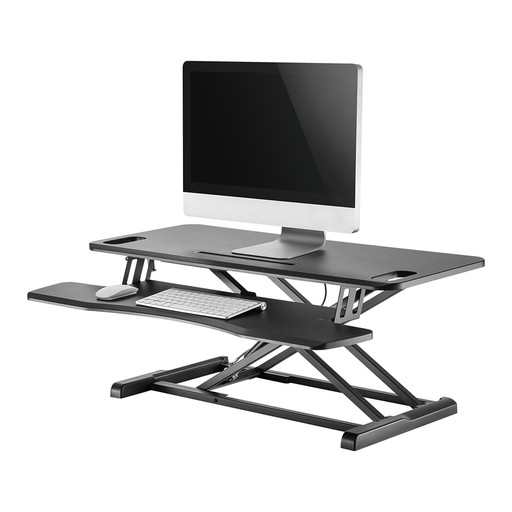
Why This Fits Their Persona: For those who already have a good desk but want the ergonomic benefits of standing. This converter transforms any standard desk into a sit-stand workstation.
This isn't an electric desk; it uses a gas spring. This mechanism is silent and reliable. You avoid the cost and complexity of a completely new desk and the risk of a poor-quality motor.
No assembly required; ready to use right out of the box. Offers a spacious surface for two monitors and a separate tray for a keyboard and mouse.
Power consumption is generally low. The motor only draws power while adjusting the height. In standby mode, consumption is negligible, comparable to a charger plugged into the wall. Therefore, the impact on your energy bill will be hardly noticeable, even with daily use.
A desk converter, like the Neomounts workstation mentioned above, can be an excellent alternative. It's a cost-effective solution if you already have a desk you're happy with. The downside is that your workspace may look less streamlined, and the available space on your existing desk is reduced. For those seeking flexibility and a lower investment, it's an outstanding choice.
For an ergonomic sitting position, adjust the height so your arms rest on the desk at an angle of approximately 90 degrees, with your shoulders relaxed. Your feet should be able to rest flat on the floor. For the standing position, the same principle applies to your arms: a 90-degree angle. Make sure your monitor is at eye level to prevent neck strain. Use the memory presets to save these ideal heights.
