
当日/次日达

品质保障

开启新人专享福利: 全场免邮 | 低至 2 折 | 免费试用 30 天 JoyPlus 会员
下载 Joybuy
As a Joybuy Product Recommendation Officer, I see daily how the right workspace can make all the difference. More and more people working from home or in the office are switching to a sit-stand desk. The promise is a more active and comfortable workday. But the market is flooded with options, and not every choice is a good one. Many desks look great at first glance but show signs of wear and tear after just a few months.
Before you invest in a new sit-stand workstation, it's crucial to know the common pitfalls. These are the three problems buyers most often encounter:
To prevent these issues, you don't need to memorise technical specifications. Pay attention to the following three practical points to avoid a bad purchase and choose a durable ergonomic desk.
The stability of an electric sit-stand desk depends on its frame and motor(s).
Always look at the dynamic lifting capacity. This is the weight the motor can actually move up and down. A safe margin is important. Add up the weight of your monitors, laptop, books, and other accessories. For a typical workstation with two monitors, a dynamic capacity of at least 70 kg is a good guideline. Anything less can overload the motor over time.
A height-adjustable desk must fit your body height and the available space.
Not everyone needs the same type of desk. Below are some popular choices, matched to different user profiles.
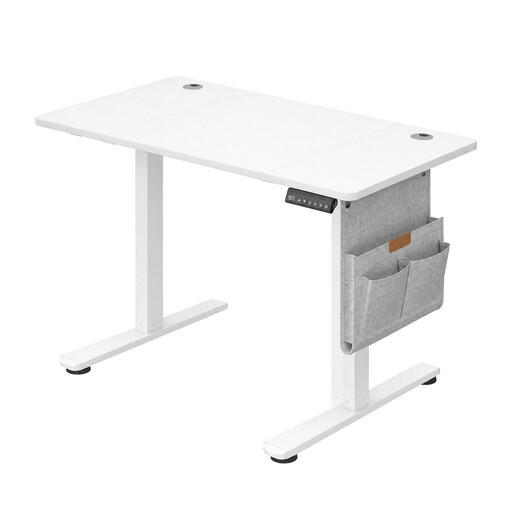
Why This Fits Their Persona: Ideal for those seeking a complete and functional sit-stand workstation without a large budget. The 120x60 cm size fits well in most living rooms or home offices.
The solid steel frame provides sufficient stability for normal use. According to the manufacturer, the motor is quiet, and the static load capacity of 70 kg is clearly specified, which is adequate for a standard setup with a laptop and a single monitor.
Complete package (frame and desktop), 4 height memory presets, and handy extras like a storage drawer and cable grommets for a tidy desk.
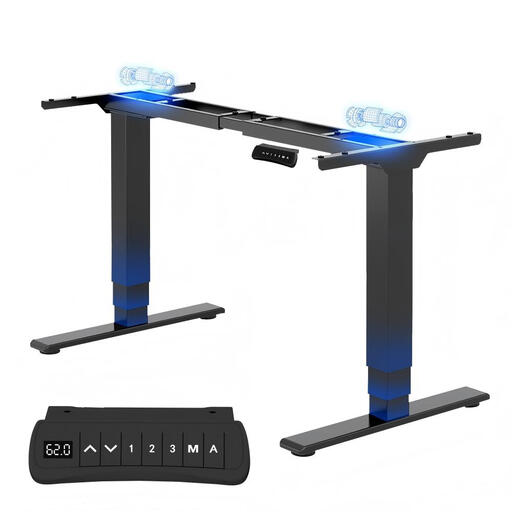
Why This Fits Their Persona: For the professional who refuses to compromise. This standalone frame offers the freedom to choose your own desktop and is built for heavy-duty setups with multiple monitors and equipment.
The dual motor and 3-stage legs ensure maximum stability, even at the highest setting. With a lifting capacity of 160 kg, you don't have to worry about overloading, which prevents the "wobble effect" and motor issues.
Very high load capacity (160 kg), smooth and fast adjustment thanks to the dual motor, and the flexibility to combine it with a desktop of your choice.
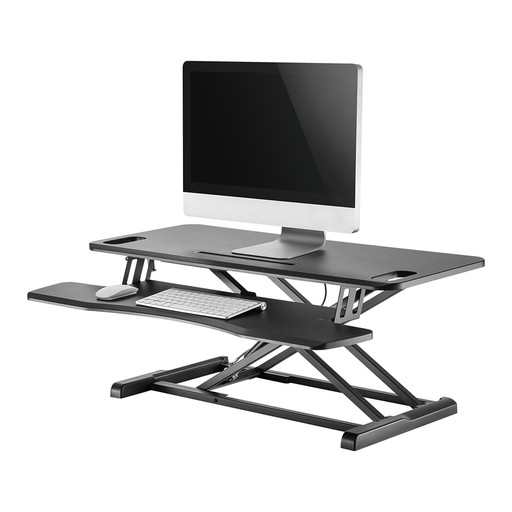
Why This Fits Their Persona: Perfect for those who don't want to replace their current desk but still want to experience the benefits of standing while working. This standing desk converter is placed directly on your existing table.
This isn't a full desk, so the pitfalls of a wobbly frame or a faulty motor don't apply. It provides a stable platform for your laptop and monitor (up to 15 kg) and uses a reliable gas spring mechanism instead of electricity.
No assembly required, ready to use out of the box. The gas spring adjustment is quick and effortless. A cost-effective and space-saving solution for creating an ergonomic workstation.
Power consumption is surprisingly low. Most desks only use a noticeable amount of power while adjusting the height, which takes just a few seconds. In standby mode, consumption is negligible, comparable to a charger left plugged into the wall. The impact on your energy bill is minimal.
For light use, with just a laptop for example, a single-motor desk can be sufficient. However, for most workstations with one or two external monitors, a dual motor system is recommended. This provides better stability, a higher lifting capacity, and smoother operation, which benefits the desk's lifespan.
Yes, that's a popular option. Brands like FlexiSpot offer a separate electric desk frame that you can mount your own top onto. Always check the frame's specifications to ensure your desktop is compatible in terms of size and weight. This gives you the freedom to create a workstation that perfectly matches your interior design.
