
Teacher with a busy desk
Wants to keep a mouse and teaching documents within easy reach. BakkerElkhuizen describes the S-board 840 as compact because it has no separate numeric keypad.


Choose a keyboard that you can use comfortably at the right height, both sitting and standing. Arboportaal recommends an adjustable working height to help you maintain a neutral posture. A compact model leaves room for your mouse and teaching documents, while a split model may be worth considering if hand position matters to you when typing for long periods. Remember to change your posture too: a different keyboard shape is no substitute for a properly adjusted workstation or regular movement.
Wants to keep a mouse and teaching documents within easy reach. BakkerElkhuizen describes the S-board 840 as compact because it has no separate numeric keypad.
Weighs up the keyboard shape alongside the set-up of their sit-stand workstation. Arboportaal recommends an adjustable working height so you can work in a neutral posture.
Wants to edit teaching materials on different devices and switch between them easily. Trust says the Lyra can connect to up to three devices.
First, readjust your workstation when switching between sitting and standing. Then choose a keyboard based on the desk space available, your typing posture and the devices you use to edit teaching materials.
| What to consider | What should you check? | Who is it for? |
|---|---|---|
| Typing posture when sitting and standing | Check that you are sitting or standing squarely in front of your workstation in both positions, and that your hands rest comfortably on the keys. | If you type a lot and regularly change position, consider both your hand position and the height of the keyboard. Around 36% of consumers prioritise typing posture. |
| Space for your mouse and teaching materials | Measure the space available and work out how often you use a separate numeric keypad. | If you want to keep your mouse and teaching documents close at hand, a compact model can free up space. Around 29% of consumers give desk space top priority. |
| Switching between devices | Check the supported connection, operating system and required port for each device. | If you work on, for example, both a laptop and a tablet while organising materials, easy switching matters. Around 21% of consumers prioritise switching between devices. |
| Key layout and noise | Check the physical language layout and the keyboard settings; try the keys for yourself if noise matters to you. | When typing in a shared space, having the right characters and a suitable key sound can make all the difference. Around 14% of consumers give layout and noise top priority. |
A different key layout won’t make an unsuitable working height or excessive reaching any better.
Check your keyboard position both sitting and standing, and change your posture regularly.
Compact models may not have a separate numeric keypad, and the options for entering numbers vary by model.
Decide in advance whether a number row or an integrated number function will suit your work.
Keyboards can differ in their receiver, Bluetooth connection and physical layout.
Check the exact model variant, connection, operating system and visible key layout.
The models reviewed include the compact MX Keys Mini and the split ERGO K860, which has a numeric keypad.
The S-board 840 is a compact, wired option for a fixed workstation.
The models reviewed range from the compact Lyra set to the full-size Vaiya and the split Keyra.
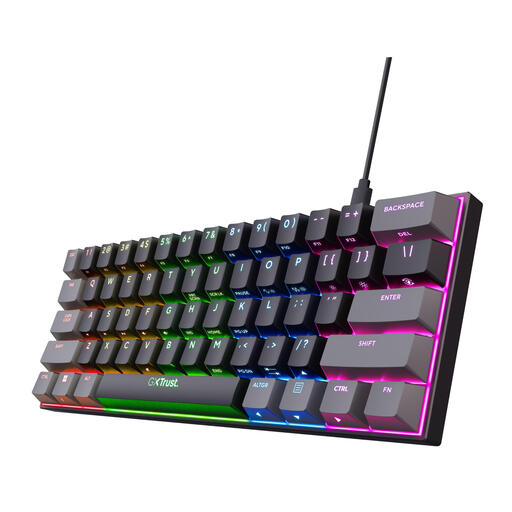
The PERIBOARD-429 is a compact, wired alternative with USB-A and backlighting.
This selection includes compact keyboards that leave you more desk space, models for switching between devices and options for a fixed workstation.
 No image available
Suitable if you want a compact, wired layout that leaves space free on your desk.
The listed specifications are US-QWERTY, Outemu Red switches and a detachable USB-C cable; navigation functions are accessed via an Fn layer.
 No image available
Suitable if you edit teaching materials on several devices and want a full-size keyboard with a numeric keypad.
This US-QWERTY model has a numeric keypad and, according to the product specifications, can connect to up to four devices via a USB receiver and Bluetooth.
 No image available
Suitable if you’re looking for a compact layout for a fixed workstation.
The listed specifications are wired use and US-QWERTY; the product information also mentions an adjustable foot.
 No image available
Suitable if you want to combine a compact layout with the option to switch between devices.
The listed connection options are wired, Bluetooth and 2.4G; the product specifications say it can connect to up to three devices.
 No image available
Suitable if you want a small wired layout and don’t need a separate numeric keypad.
The listed features are 61 keys, US-QWERTY and a wired connection.
Readjust the working height so you can work in a neutral posture without reaching too far for the keys. Arboportaal recommends an adjustable working height; you should also change your posture regularly.
For employees who work at a screen for more than two hours a day, Arboportaal says the screen and keyboard must not be attached to each other. When using a laptop, it must therefore be possible to use a separate screen or keyboard; this workplace rule is not a general product requirement for every buyer.
Break up screen work with tasks that don’t require a screen, and change your posture regularly. Arboportaal recommends contacting the occupational health doctor if symptoms start to appear, and arranging a workstation assessment if needed; product claims are no substitute for this advice.
For a standard online consumer purchase in the Netherlands, you generally have a statutory cooling-off period of up to 14 days after delivery, with some exceptions, according to ACM ConsuWijzer. If the keyboard breaks too soon, the retailer is responsible for the statutory guarantee; what you could reasonably expect from the product is also taken into account.