
Vandaag of morgen in huis

Kwaliteit gegarandeerd

Welkomstaanbiedingen ontgrendelen: GRATIS bezorging | Tot 80% korting | Gratis 30 dagen JoyPlus-proefperiode
Download de app
A good sit-stand desk can be the difference between a productive workday and one filled with back pain and loss of concentration. But the market is flooded with models that look good at first glance but disappoint in practice. Many buyers fall into the same traps: choosing a desk that starts to wobble after a few months, has a motor that sounds like a coffee grinder, or lacks the features that make daily use convenient.
Before you invest in a new home office desk, it's crucial to know what to look for. These are the three most common problems and how you can avoid them.
To avoid buyer's remorse, focus on a few key specifications. These determine the long-term quality and usability of your ergonomic desk.
The foundation of a good sit-stand desk is its frame. A solid steel frame is essential for stability, especially when the desk is fully extended. Always check the maximum load capacity. A capacity of 70 kg (approx. 154 lbs) is a safe minimum for a setup with one or two monitors, a laptop, and other accessories. A lower load capacity can be a sign of a less robust construction, leading to the dreaded wobble.
An electric adjustable desk is powered by a motor, and its quality is crucial. A good motor not only operates quietly (under 50 dB is ideal for a peaceful work environment) but also ensures a smooth and even movement.
The controls are just as important. A panel with a desk memory function is not a luxury, but a necessity. It allows you to save your ideal sitting and standing heights. With a single press of a button, the desk changes height, significantly lowering the barrier to movement. Some models even offer reminders to change your posture.
Carefully consider the workspace you need. A compact 120 x 60 cm desk may be sufficient for a laptop and a single monitor. If you work with multiple screens or need space for documents and other equipment, a larger top of 160 x 70 cm or more is a better choice. Measure your available space and account for freedom of movement around the desk.
Based on these criteria, we have selected a few products that suit different user profiles.
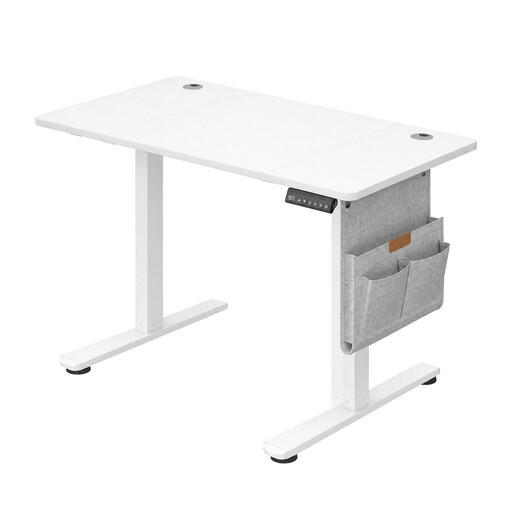
Why This Fits Their Persona: Ideal for those looking to create a full-featured ergonomic workspace in an apartment or a smaller room. Its size is perfect for a standard home office setup without taking over the entire room.
The solid steel frame and 70 kg maximum load capacity prevent instability. The motor is described as quiet, and the four memory presets make changing posture effortless.
Full electric functionality with memory presets in a compact design. Includes handy extras like a storage drawer and cable grommets.

Why This Fits Their Persona: Suitable for professionals who work with multiple monitors or require a large desk area. This desk offers the space and features for an extensive and tidy workspace.
The stable steel frame with a 70 kg load capacity, the quiet motor, and the memory function with reminders tackle all the common problems. Cable management prevents a cluttered desk.
Large 160 x 70 cm work surface, a convenient USB-C port for charging, and smart extras like hooks and an organizer.
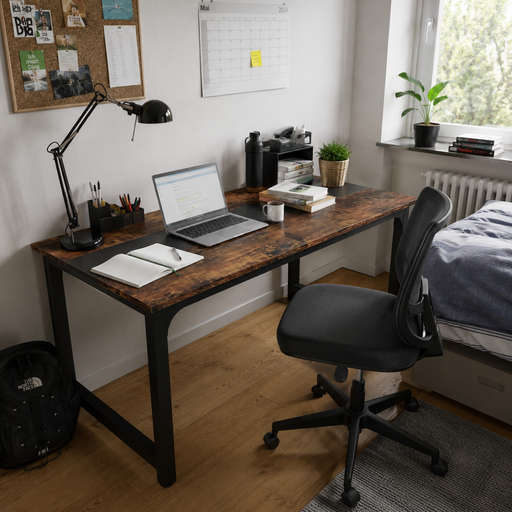
Why This Fits Their Persona: For those who need a very large and stable work surface and for whom height adjustment is not a priority. Perfect as a workstation for heavy equipment, creative projects, or as a meeting table.
This is a fixed-height desk. It completely bypasses the pitfalls of motors and at-height instability by its very design. The focus is 100% on a robust and unshakeable work surface.
A very high load capacity (up to 400 kg according to the description) and an extra-large 160 x 80 cm desktop. The adjustable feet ensure stability on any surface.
We have compiled a complete, up-to-date list of products that meet these strict selection criteria. Find the desk that perfectly suits your workspace.
Power consumption is minimal. The motor only uses energy during adjustment, which amounts to a few seconds per day. In standby mode, consumption is negligible, often less than 0.5 watts. Therefore, it has virtually no impact on your energy bill.
A desk with a manual crank can be a budget-friendly option. The downside is that adjusting it requires more effort, which raises the barrier to changing your posture. An electrically adjustable desk with a memory function makes switching so easy that you'll do it consistently, which is essential for reaping the ergonomic benefits.
The correct setting is personal, but there are a few guidelines. When sitting, ensure your feet are flat on the floor and your knees are at an approximate 90-degree angle. Your elbows should rest on the armrests or the desk at a 90-degree angle, with your shoulders relaxed. For the standing height, the same rule applies to your arms and shoulders. In both positions, your monitor should be at eye level to prevent neck strain.
