
Vandaag of morgen in huis

Kwaliteit gegarandeerd

Welkomstaanbiedingen ontgrendelen: GRATIS bezorging | Tot 80% korting | Gratis 30 dagen JoyPlus-proefperiode
Download de app
Whether you work from home, study, or game, a proper workspace is essential. The sit-stand desk is becoming increasingly popular, and for good reason. Alternating between sitting and standing can contribute to a more active work posture. But when buying a desk, it's easy to fall for slick marketing talk. Many desks look great online but turn out to be impractical or of subpar quality in reality.
As a Joybuy Product Recommendation Officer, I'm here to help you cut through the noise. We'll focus on the specifications that truly matter, so you can make a choice you'll be happy with for years to come. Let's look at the three most common pitfalls.
To make the right choice, it's important to look beyond just appearances. A good height-adjustable desk meets a few key criteria.
Stability is determined by the frame. A frame made of heavy-gauge steel is the foundation for a sturdy desk. Also, pay attention to the leg construction. Models with a dual motor (one in each leg) often provide a smoother, more stable movement than single-motor models, especially under a heavier load.
Always check the maximum static load capacity. This indicates how much weight the desk can support. For a typical work-from-home setup with a monitor, laptop, and some accessories, a capacity of 50 kg is often sufficient, but for an extensive gaming desk with multiple screens, 70 kg or more is recommended.
How much space do you really need? A standard computer desk of 120 x 60 cm is fine for a laptop and a single external monitor. Do you work with multiple screens or need space for writing? Then look for a desktop that is 140 cm or even 180 cm wide. The depth is also important; an 80 cm depth gives you more distance from your screen and more room for your keyboard and mouse.
Modern sit-stand desks often come with handy features. A memory function that lets you switch to your favorite sitting or standing height with a single button press is very practical. Some models even have built-in USB ports to charge your devices. Good cable management, such as cable grommets or a tray under the desktop, helps keep your workspace neat and tidy.
To help you with your choice, we've highlighted a few models that suit different needs and situations.

Why This Fits Their Persona: Ideal for those who want a full-featured ergonomic desk but have limited space, such as in a dorm room or a small apartment. It offers the benefits of an electric desk in a compact size.
The sturdy steel frame ensures stability, even at its highest setting. The motor is designed for smooth and quiet operation, avoiding the pitfall of a noisy mechanism.
Electric height adjustment (72-120 cm) with a memory function and a convenient USB-C port. The 70 kg load capacity is more than enough for a standard setup.
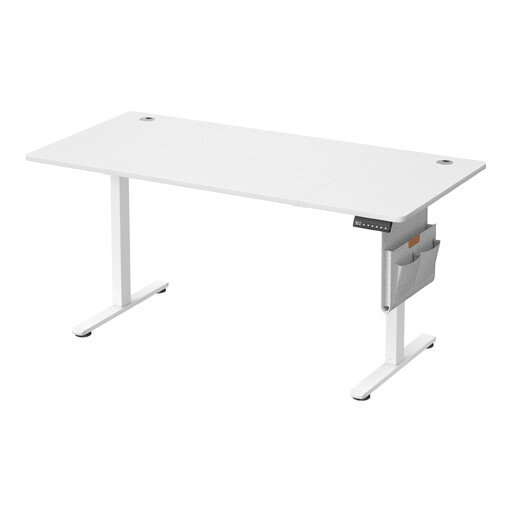
Why This Fits Their Persona: Perfect for the professional who spends long hours at their desk and needs space for multiple monitors, documents, and other equipment. The sleek white finish fits well in a modern home office.
The very spacious 180x80 cm desktop combined with the robust steel frame prevents the 'wobbly tower' pitfall. It provides a solid and stable workspace, even when the desk is fully extended.
A huge work surface for maximum productivity. The memory function for 4 heights and the USB-C port make daily use extremely comfortable.

Why This Fits Their Persona: For those who want a functional and ergonomic desk that also enhances their interior design. The vintage brown and black finish provides a modern, industrial look. A great middle ground for both work and hobbies.
This model combines a reliable motor with a sturdy frame, so you don't have to compromise on quality for a stylish design. The 140x60 cm size offers a good balance between workspace and a compact footprint.
Four memory presets for optimal convenience, a built-in USB-C port, and handy extras like a storage pouch and hooks for cable management.
We have compiled a complete, up-to-date list of products that fully meet these strict selection criteria and local regulations.
Power consumption is a common concern, but in practice, it's quite low. An electric desk only consumes power when the motor is active, i.e., while adjusting the height. In standby mode, the consumption is negligible, comparable to a charger left plugged into the wall. Many modern desks, like the recommended Ochama models, have an energy-saving mode.
Most sit-stand desks are designed for self-assembly. The instructions are typically clear, and the parts are often numbered. With the included tools, assembly can usually be completed within an hour. However, it is advisable to assemble it with two people, especially when placing the heavy desktop onto the frame.
The motor's lifespan is a crucial factor. Manufacturers don't always provide firm guarantees, but a high-quality motor in an ergonomic desk is designed for thousands of cycles (one cycle is one up-and-down movement). With normal use, changing height a few times a day, the motor should function without issues for many years. Look for overheat protection: if you adjust the desk for too long consecutively, the motor will temporarily shut off to prevent damage. This is a sign of a well-designed system.
