
Vandaag of morgen in huis

Kwaliteit gegarandeerd

Welkomstaanbiedingen ontgrendelen: GRATIS bezorging | Tot 80% korting | Gratis 30 dagen JoyPlus-proefperiode
Download de app
A good desk is the foundation of a productive workspace. More and more people who work from home, study, or game are considering a sit-stand desk. The promise of a more active posture and greater comfort is appealing. But the market is flooded with models that look great at first glance but disappoint in practice. Before you invest, it's crucial to know what to look for.
As a Joybuy Product Recommendation Officer, I'll help you see through the marketing claims. We'll look at the hidden flaws that often only come to light after purchase and how you can avoid them.
Many desks seem perfect on paper, but the reality can be different. Watch out for these three common problems to avoid a bad purchase.
To make the right choice, you need to look beyond the marketing. These three technical specifications determine the quality and usability of an electrically adjustable desk.
The motor and frame are the heart of any height-adjustable desk. This is where the difference is made between a durable product and a source of frustration.
The size of the desktop determines how much space you have for your work. A desktop that's too small leads to a cluttered and inefficient workspace.
home office desk with a laptop and a single monitor. Do you work with multiple screens or need more writing space? Then look for 160 x 80 cm or even 180 x 80 cm.The right extras can make an ergonomic desk much more practical.
computer desk tidy. No more fussing with extension cords under your desk. A USB-C port with fast-charging capability is a modern touch.Not every desk is right for everyone. Below are some popular choices, matched to different user profiles.

Why This Fits Their Persona: Ideal for students or remote workers with limited space. This desk offers the core benefits of an electric sit-stand desk without the high price tag. Its compact size fits perfectly in an apartment or dorm room.
This model focuses on the essentials: a reliable motor and a stable frame for its size. It avoids the pitfall of expensive, unnecessary extras and delivers the basic functions well.
Electric adjustability, memory presets, and a USB-C port in a compact and affordable package. Includes a handy storage bag and hooks.
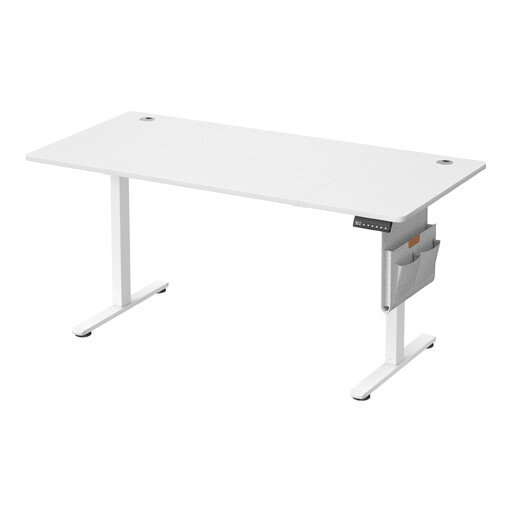
Why This Fits Their Persona: For the professional who works from home full-time and needs a spacious, reliable workspace. The large desktop provides enough room for multiple monitors, documents, and other essentials, which is crucial for a productive day.
This desk avoids the pitfall of instability. Its robust steel frame and high-quality motor ensure smooth and stable movement, even with a heavy load on the large desktop.
Very spacious work surface (180 x 80 cm) and 4 memory presets for maximum convenience. Includes cable grommets and an organizer for a tidy workspace.
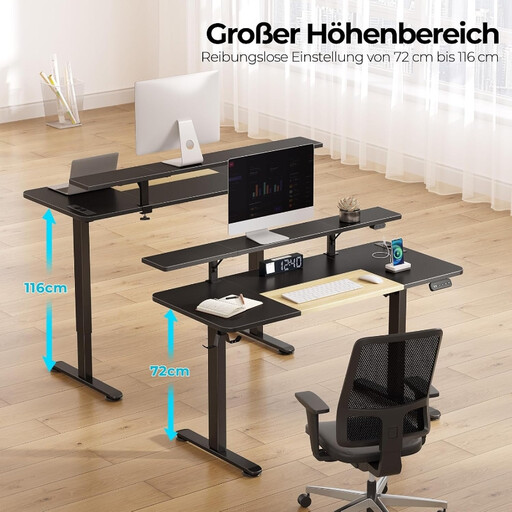
Why This Fits Their Persona: This is more than a desk; it's a command center. Perfect for gamers and tech professionals who want a fully integrated setup. The built-in power outlets and lighting make external accessories redundant.
Here, the extras aren't a gimmick; they're functional. The power hub solves the problem of cable management, while the monitor stand contributes to better ergonomics. The focus is on useful integration.
Built-in power hub with 2 outlets and 2 USB ports. Customizable RGB lighting with a memory function and an integrated monitor stand for a better posture.
We have compiled a complete, up-to-date list of products that fully meet these strict selection criteria and safety regulations.
Surprisingly little. The motor only uses power during height adjustment. In standby mode, consumption is negligible, often less than 0.5 watts. Some models even have a power-saving mode that turns off the display after a few seconds. The impact on your energy bill is therefore minimal.
Alternating between sitting and standing throughout the workday can contribute to a more active work posture. It helps to break the static load on your back and neck caused by sitting in the same position for hours. It's not a medical solution for back problems, but a tool that encourages movement and can contribute to overall well-being.
Yes, that's often possible. Many manufacturers also sell the electric frames separately. This is a great option if you already have a nice desktop you want to reuse. However, make sure to double-check that the dimensions and weight of your top are compatible with the frame. Pay specific attention to the maximum load capacity and the recommended top width and depth in the frame's specifications.
