
Vandaag of morgen in huis

Kwaliteit gegarandeerd

Welkomstaanbiedingen ontgrendelen: GRATIS bezorging | Tot 80% korting | Gratis 30 dagen JoyPlus-proefperiode
Download de app
Prolonged sitting has become the norm for many, whether you're working from home, studying, or at the office. Unfortunately, so have the associated back and neck complaints. A sit-stand desk is often seen as the solution, but the market is flooded with options that don't always deliver on their promises. Before you invest in a new sit-stand workstation, it's crucial to know what to look for.
Many models look good at first glance but hide design flaws that only become apparent after a few months of use. We'll help you see through the marketing jargon and avoid the common pitfalls.
The wrong choice can lead to frustration and a desk you end up only using while seated. Watch out for these three common problems:
To bypass the pitfalls mentioned above, focus on the technical specifications that truly matter. These are the objective criteria for a durable and functional ergonomic desk.
Stability is determined by the electric desk frame and the motor type.
A height-adjustable desk is only ergonomic if it fits your body. Measure your ideal sitting and standing heights.
Make a quick estimate of your setup's weight. An average monitor weighs 3-5 kg, a laptop 2 kg, and a PC tower can be up to 15 kg. Add the weight of books, a monitor arm, and other accessories. Choose a desk with a maximum static load capacity that is at least 20% above your estimated total weight. A capacity of 70 kg is sufficient for most home office setups, but for heavier setups with multiple screens, 100 kg or more is recommended.
Not everyone needs the same type of desk. Here are some options tailored to different user profiles.
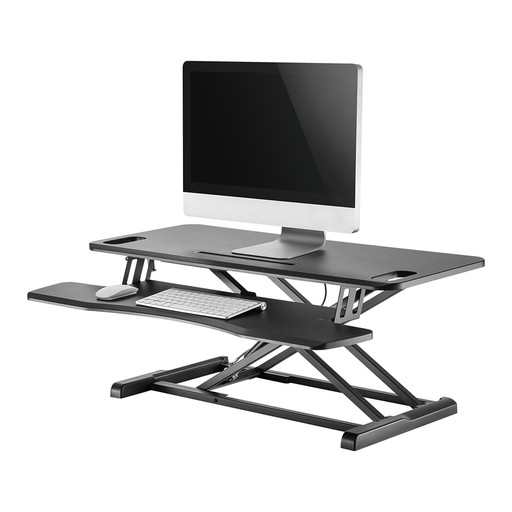
Why This Fits Their Persona: Ideal for those who want to keep their current desk. This sit-stand desk converter transforms any table into a dynamic workspace without needing to buy a whole new piece of furniture. Perfect for rentals or smaller spaces.
This is not an electric desk, so the noisy motor pitfall doesn't apply. The gas spring ensures a quiet and rapid adjustment. It sits on your existing, stable desk, which minimises the wobble problem.
Stepless height adjustment (11-50.5 cm) with a gas spring. Spacious work surface (95x40 cm) and a separate keyboard tray. No assembly required.
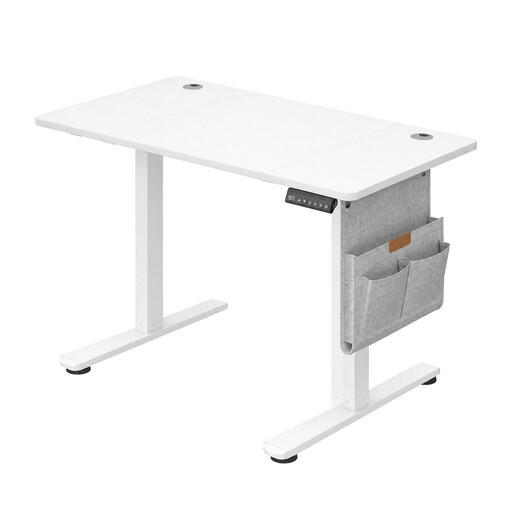
Why This Fits Their Persona: A complete electric sit-stand desk for the serious home worker. It offers the functionality and comfort for a full workday, with handy extras like memory presets for quick posture changes.
The solid steel frame is designed for stability, even at higher settings. The manufacturer states the motor is quiet, which avoids the pitfall of a noisy adjustment. The load capacity of 70 kg is more than enough for a standard home office setup.
4 memory presets to save your favourite heights. Includes a storage drawer and cable management grommets for a tidy desk. Wide height range of 72-120 cm.
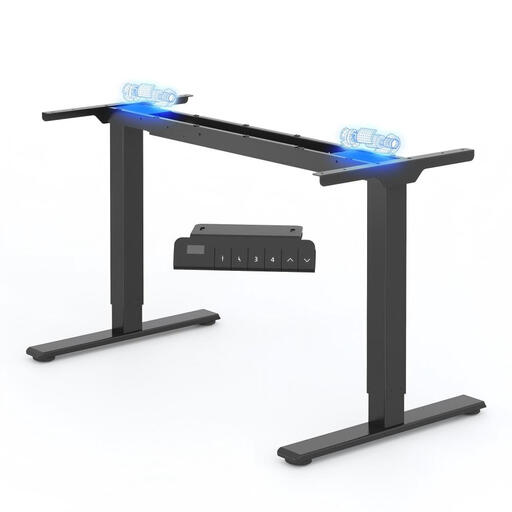
Why This Fits Their Persona: For the user who has a heavy setup or wants to choose their own desktop. This electric desk frame provides the strength and flexibility to create a personalised and extremely stable workstation.
The dual-motor system directly addresses the pitfalls of instability and noise. According to FlexiSpot, the motor is quiet (<50dB) and smooth. The massive 100 kg load capacity prevents overload, even with the heaviest equipment.
Dual motor for superior performance. High load capacity of 100 kg. Adjustable width, suitable for desktops from 120 cm to 180 cm.
We have compiled a complete, up-to-date list of products that fully meet these strict selection criteria and all applicable safety regulations.
The lifespan depends heavily on the quality of the frame and motor. A model with a robust steel frame and a dual-motor system from a reputable brand will generally last longer than a budget model with a single motor. Pay attention to the warranty period offered by the manufacturer; this often indicates their confidence in the product. With normal use and by respecting the maximum load capacity, you can expect a quality desk to last for many years.
A sit-stand desk converter (also called a sit-stand workstation) is a platform you place on your existing desk. It has its own mechanism (often a gas spring) to adjust the height of your monitor and keyboard. It's a cost-effective and flexible solution. A full electric sit-stand desk is a complete piece of furniture where the entire desktop is height-adjustable. This provides more workspace and a sleeker, more integrated look.
