
当日/次日达

品质保障

开启新人专享福利: 全场免邮 | 低至 2 折 | 免费试用 30 天 JoyPlus 会员
下载 Joybuy
Prolonged sitting has become the norm for many remote workers and gamers. A good desk is therefore not a luxury, but a necessity. A sit-stand desk offers the flexibility to change your posture, which can contribute to a more comfortable workday. However, the market is flooded with models that promise more than they deliver. Before you invest in a new home office desk, it's crucial to know what to look for to avoid common pitfalls.
As a Joybuy Product Recommendation Officer, I'll help you see through the marketing jargon and make a choice based on what truly matters.
Many desks look great at first glance but show defects after just a few months. Watch out for these three common problems:
To avoid buyer's remorse, focus on the specifications that truly matter. These are the three most important factors for an electric adjustable desk.
The stability of a sit-stand desk depends entirely on its base.
The right size is crucial for a comfortable workspace. A 140 cm desk is a popular choice that offers enough space for a monitor, laptop, and keyboard for most remote workers and gamers. Do you have a larger setup with multiple screens? Then consider a 160 cm or even 180 cm desk. Measure your room beforehand and determine how much space you actually need. The desktop material is also important; most desks use sturdy particleboard with a scratch-resistant finish, which offers a good balance between durability and price.
Modern desks offer more than just a flat surface. A desk with power outlets and USB ports is particularly practical. It centralises your power supply and helps with tidy cable management. Other useful features include:
Not every desk is right for everyone. Below are a few options tailored to different user profiles.

Why This Fits Their Persona: Ideal for those seeking a compact, functional, and budget-friendly solution. This desk provides the essential features for a healthy home office without unnecessary frills. Perfect for smaller rooms or as a starting point.
This model focuses on the essentials: a stable steel frame and a motor that the manufacturer claims is quiet. It avoids costly extras and offers practical features like memory presets and a USB-C port.
Complete core functionality with electric height adjustment, memory presets, and a convenient USB-C port. The included storage bag and hooks help keep the workspace tidy.
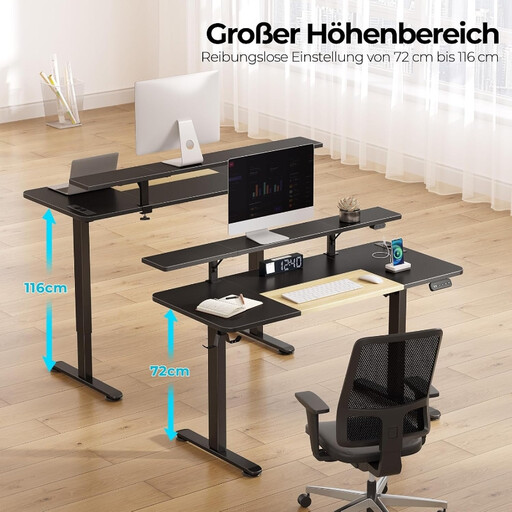
Why This Fits Their Persona: This `gaming desk` is designed for an extensive setup. It offers not only electric height adjustment but also an integrated power supply and ambient lighting—features that gamers appreciate.
The manufacturer describes a quiet electric motor and a sturdy frame. The extras, like RGB and the power hub, aren't gimmicks here but functional additions for the target audience.
Built-in power hub with 2 outlets and 2 USB ports for a clean setup. The monitor stand promotes better ergonomic posture during long sessions.

Why This Fits Their Persona: For professionals who need a spacious, reliable, and organised workspace. The large 160 cm desktop provides more than enough room for a serious office setup.
This desk focuses on stability and ease of use. The description highlights a sturdy steel frame and a quiet motor, addressing concerns about wobbling and noise.
Very spacious 160 x 70 cm desktop. Includes handy extras like cable management, a storage bag, and a USB-C port to keep the workspace efficient and organised.
We have compiled a complete, up-to-date list of products that meet these selection criteria and current safety regulations.
Power consumption is generally very low. The motor only uses energy while adjusting the height. In standby mode, consumption is minimal, often less than 0.5 watts. This will not have a noticeable impact on your energy bill.
Most models are designed for self-assembly. Thanks to labeled parts and a clear manual, assembly usually takes between 30 and 60 minutes. It can be helpful to have a second person assist with lifting the heavy desktop.
Stability depends on the quality of the frame. Models with a dual motor and a robust steel T-frame are typically significantly more stable than cheaper single-motor variants. Always check the maximum weight capacity and the base specifications before making a purchase.
