
Vandaag of morgen in huis

Kwaliteit gegarandeerd

Welkomstaanbiedingen ontgrendelen: GRATIS bezorging | Tot 80% korting | Gratis 30 dagen JoyPlus-proefperiode
Download de app
A good desk is the foundation of any productive home office, study, or gaming setup. More and more people are discovering the benefits of a sit-stand desk, which allows you to alternate between sitting and standing throughout the day. However, the market is flooded with models that look great at first glance but disappoint in practice. Before you invest in a new height-adjustable desk, it's crucial to know what to look for.
As a Product Recommendation Officer at Joybuy, I see which desks are popular and what pitfalls buyers often encounter. Here are the three most common problems and how you can avoid them.
electric desk is its motor. Cheaper versions are often loud, adjust height with jerky movements, or break down after just a few months.To avoid a bad purchase, it's wise to focus on a few key specifications. These determine the long-term quality and usability of your ergonomic desk.
The stability of a sit-stand desk depends entirely on the frame and the motor. A solid steel frame is the foundation. Also, pay attention to the maximum load capacity. A capacity of 70 kg is sufficient for most home offices, but if you use multiple heavy monitors or other equipment, a higher load capacity is recommended. Electric desks have one or two motors. Models with two motors are generally faster, quieter, and can handle more weight, contributing to a more stable experience.
The right size is a personal choice. A computer desk of 120 x 60 cm is often sufficient for a laptop and an extra screen. Need more space for documents or an extensive gaming setup? Then look at sizes like 140 x 60 cm or even 160 x 80 cm. Most desktops are made of particleboard with a finish layer. This material is affordable, sturdy enough for daily use, and easy to maintain.
Some features are definitely worth considering.
To help you with your choice, we have matched some popular models to different user profiles.

Why This Fits Their Persona: This desk offers full sit-stand functionality in a compact format that fits into most homes. Ideal for those looking for a functional `home office desk` without taking up an entire room.
The solid steel frame is designed for stability, which limits wobbling at standing height. The manufacturer describes the motor as quiet, avoiding the pitfall of a noisy mechanism.
Four memory presets for quick height adjustments and included storage options like a storage compartment and hook for a tidy desk.
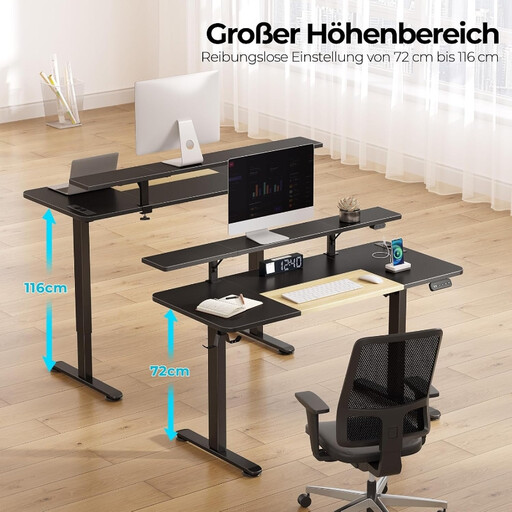
Why This Fits Their Persona: This `gaming desk` is designed with the gamer in mind. The integrated power supply and RGB lighting are not mere add-ons but a core part of the design for a complete setup.
Instead of useless gimmicks, this desk offers a truly functional power hub. The two power outlets and USB ports are built directly into the desk, which significantly simplifies cable management.
Integrated power supply (2 outlets, 2 USB ports), customizable RGB lighting, and a built-in monitor stand for better ergonomic posture.
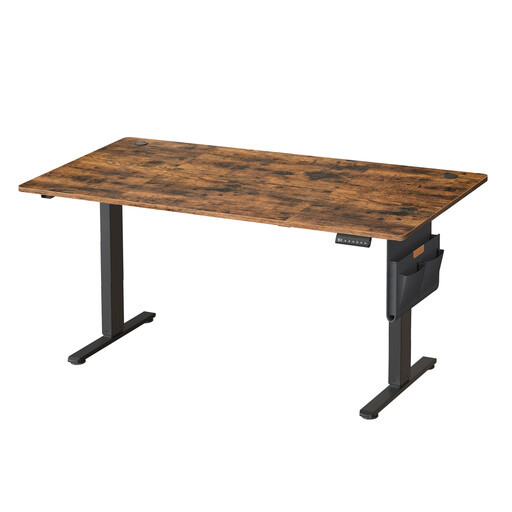
Why This Fits Their Persona: For professionals who work with multiple screens, documents, and devices, this desk offers a generous 160 cm wide work surface. It combines ample space with the flexibility of an electrically adjustable frame.
The robust steel frame and spacious desktop are designed to ensure stability, even with a heavy load at maximum height. This prevents the typical instability of larger, cheaper desks.
A very spacious work surface (160 x 70 cm) combined with a quiet electric system, four memory presets, and handy extras for cable management.
Didn't find what you were looking for? Perhaps an accessory like a monitor stand or a storage rack is the solution. Check out our selection of complementary products.
The prices for electric sit-stand desks vary widely. Entry-level models often start around €200-€300. In this category, you'll find functional desks with a single motor and a standard size. For models with dual motors, a higher load capacity, larger dimensions, and extras like memory presets or built-in ports, prices typically range between €300 and €600.
No, the purpose of a sit-stand desk is not to stand all day, but to alternate. Prolonged standing, just like prolonged sitting, can lead to physical complaints. The alternation is what counts. A common guideline is to stand for fifteen to thirty minutes after every hour of sitting. Most importantly, listen to your own body.
A good ergonomic posture is crucial. Follow these simple steps:
