
Vandaag of morgen in huis

Kwaliteit gegarandeerd

Welkomstaanbiedingen ontgrendelen: GRATIS bezorging | Tot 80% korting | Gratis 30 dagen JoyPlus-proefperiode
Download de app
Long days spent at a computer take their toll. An increasing number of remote workers, students, and office employees in the UK are therefore seeking a solution in a sit-stand desk. The idea is simple: by alternating between sitting and standing, you improve your posture and stay more energised.
But the market is flooded with options. Let's be honest: not every height-adjustable desk is a good investment. Before you buy a standing desk, it's crucial to know what to look for to avoid wasting money on a product that develops issues after just a few months.
Many desks look good at first glance but hide flaws that only become apparent after purchase. These are the most common problems.
One of the biggest annoyances is a desk that wobbles as soon as you raise it to the standing position. This is often caused by a frame that's too light, a single motor, or poor construction. Your coffee spills, and it's hard to concentrate. A stable desk is fundamental, especially at its maximum height.
The heart of an electric desk is its motor. Cheaper models often use noisy motors that are slow and tend to fail over time. A smooth, quiet, and fast adjustment isn't a luxury—it's a requirement for a desk you use daily.
The term 'ergonomic' is used too often without substance. A truly ergonomic desk has a height range that suits your body height, both when sitting and standing. A desk that is too low or too high in either position doesn't solve the problem and can even cause new physical complaints.
To avoid the pitfalls mentioned above, there are a few technical specifications you need to check.
The stability of an electric adjustable desk depends on its frame. Look for a desk with a solid steel frame. Models with a dual motor (one in each leg) are generally more stable, more powerful, and last longer than models with a single motor driving both legs. Also, pay attention to the maximum load capacity. If you use multiple monitors and other equipment, you'll need a desk that can support at least 70 kg.
A good home office desk should be adjustable to a height that suits you. For most people, a range of approximately 70 cm to 120 cm is sufficient. A desk with a memory function is a very practical addition. It allows you to switch between your favourite sitting and standing heights with a single button press. This significantly lowers the barrier to changing your posture, ensuring you actually use the desk as intended.
Based on these criteria, we have selected a number of products that suit different user profiles.

Why This Fits Their Persona: Ideal for those looking to switch to an ergonomic workspace without paying a premium. This desk offers the essential features needed for a healthy work posture, such as electric adjustment and memory presets.
This model combines a stable steel frame with a quiet motor, avoiding the common issues of wobbling and noise found in this price range.
Four memory presets for instant height adjustment and a convenient built-in USB-C port for charging devices.
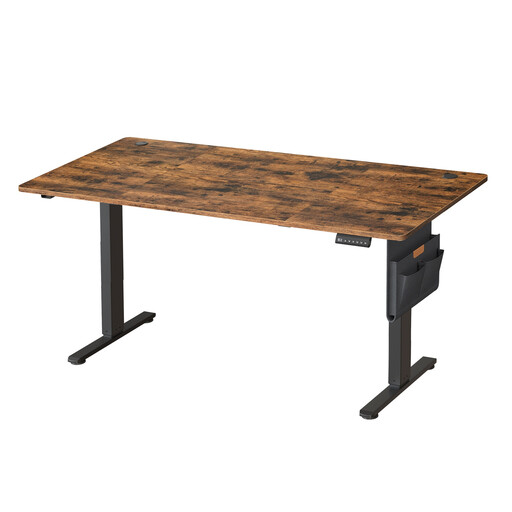
Why This Fits Their Persona: For the serious remote worker who needs ample space. The extra-large desktop is ideal for multiple monitors, documents, and other essentials without feeling cramped.
The robust steel frame is designed for a high load capacity (70 kg) and minimises wobbling, even at the highest setting and with a heavy setup.
A very spacious 180 x 80 cm desktop. Includes handy extras like cable grommets and an organiser to keep the workspace tidy.
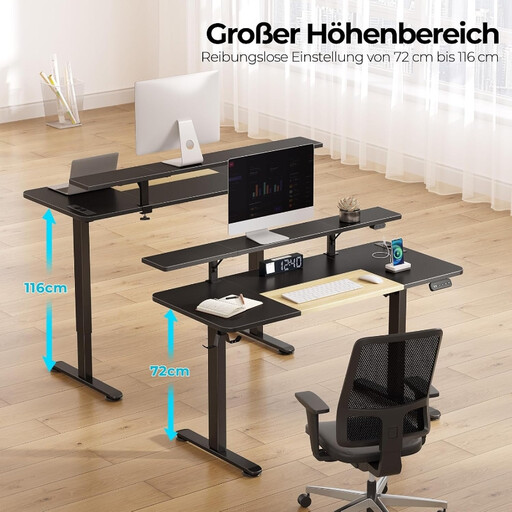
Why This Fits Their Persona: This desk combines ergonomics with ambiance and functionality. Perfect for gamers or tech enthusiasts who want to personalise their setup with RGB lighting and always have power within reach.
The quiet electric motor is designed for smooth transitions, which is essential during work or gaming. The integrated monitor stand directly contributes to a better, more ergonomic posture.
Built-in power outlets and USB ports for all your devices. The customisable RGB lighting with a memory function creates the perfect atmosphere.
We have compiled a complete, up-to-date list of products that fully meet these strict selection criteria and safety regulations.
The load capacity varies by model, but most quality sit-stand desks can support between 70 kg and 100 kg. This is typically more than enough for a standard setup with a computer, one or two monitors, and other accessories. Always check the specifications of the specific model you are considering.
For people who spend many hours a day at a desk, a sit-stand desk can be a worthwhile investment. Alternating your posture can help reduce back and neck pain and increase productivity. It's not a miracle cure, but a tool for a healthier work habit.
For a sitting position: ensure your feet are flat on the floor and your knees are at a 90-degree angle. Your armrests should be level with the desk, allowing your shoulders to relax. For a standing position: adjust the desk so that your elbows form a 90-degree angle when you type. Your wrists should remain straight. In both positions, the top of your monitor should be at eye level.
