
Vandaag of morgen in huis

Kwaliteit gegarandeerd

Welkomstaanbiedingen ontgrendelen: GRATIS bezorging | Tot 80% korting | Gratis 30 dagen JoyPlus-proefperiode
Download de app
Prolonged sitting has become the norm for many remote workers and students. A sit-stand desk seems like the ideal solution to bring more movement into your day. But the market is flooded with models that look good at first glance but disappoint in practice. Before you invest in an ergonomic desk, it's crucial to know what to look for to avoid wasting money on a wobbly frame or a noisy motor.
As a Joybuy Product Recommendation Officer, I'll help you see through the marketing jargon. We'll look at the specifications that truly matter. These are the most common pitfalls and how to avoid them.
Many desks are advertised with features that sound great but add little practical value. Pay attention to the following three points where things often go wrong:
height-adjustable desk without memory presets is impractical. You're constantly searching for the right sitting and standing height, which means you'll stop using the feature after a while. The entire purpose of active working is lost.To bypass the pitfalls above, there are a few technical specifications you need to check. These determine the durability and ease of use of your home office desk.
The motor is the heart of an electric adjustable desk. The choice is simple: one or two motors.
The frame should be made of solid steel to minimise wobbling. A frame with inverted legs (the thickest part of the leg is at the top) often provides extra stability.
A good control panel makes the difference between a desk you use daily and one that always stays at the same height. A desk with a memory function is indispensable here. Look for a model with at least 3 to 4 memory presets, so you can switch between your ideal sitting and standing heights with a single button press.
Also, check the minimum and maximum height range. A good ergonomic desk should be able to go low enough for a seated position (elbows at a 90-degree angle) and high enough for a comfortable standing position.
The size of the desktop depends on your available space and your work. A sit-stand desk 160x80 cm is a popular size because it offers enough room for two monitors and extra workspace. When it comes to the material, pay attention to durability. MDF or solid wood is generally sturdier and more scratch-resistant than cheap particleboard.
Not everyone needs the same type of desk. Below are some options that suit different needs and budgets, based on their specifications.
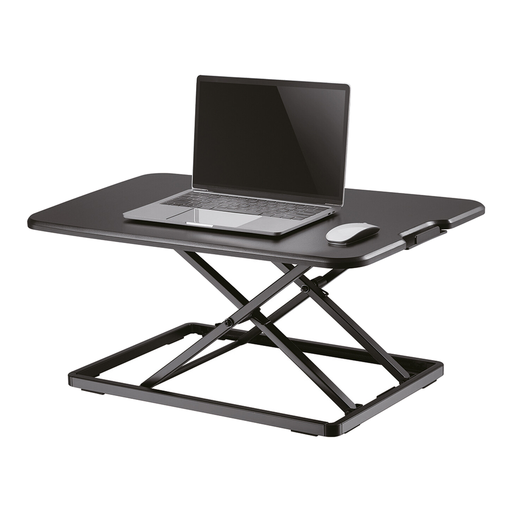
Why This Fits Their Persona: Ideal for those who want to start working standing up without immediately buying a whole new desk. You place this converter on your existing desk, which is a flexible and budget-friendly solution.
This model completely bypasses the weak motor pitfall because it has a manual adjustment mechanism. The construction is simple and robust, focused on one function: raising your workspace.
Lightweight and portable. Five height settings for an ergonomic position. Steel frame for stability.

Why This Fits Their Persona: A complete solution for the serious home worker. This desk combines a spacious work surface with modern conveniences like a memory function, USB-C port, and cable management, ideal for a tidy and productive workspace.
Directly tackles the impractical controls pitfall with a memory function and reminders. The description emphasizes a stable steel frame and a quiet motor, addressing concerns about a weak construction.
All-in-one package with a spacious 160x70 cm top. Includes handy extras like a storage bag, hooks, and a USB-C port.
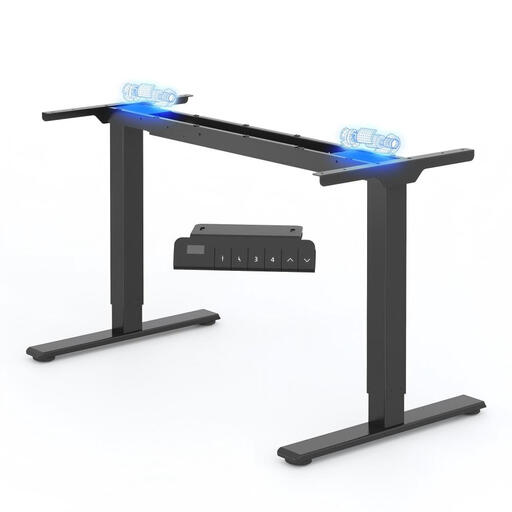
Why This Fits Their Persona: For the user who doesn't want to compromise on performance. This frame offers the freedom to choose your own desktop and combine it with a powerful and stable base.
This frame is the direct solution to the 'weak motor' pitfall. The dual-motor system ensures superior lifting capacity (100 kg) and stability. Since you choose the desktop yourself, you also avoid the pitfall of a cheap, scratch-prone surface.
Powerful dual-motor system (<50dB). 4 memory presets. Adjustable width for various desktops (120-180 cm).
We have compiled a complete, up-to-date list of products that meet these strict selection criteria and local regulations.
The lifespan of an electric adjustable desk heavily depends on the quality of the motor and frame. A model with a dual-motor system from a reputable brand will generally last longer than a cheaper model with a single motor. Most manufacturers provide a 2 to 5-year warranty on the frame and motor. With normal use and by not exceeding the maximum weight capacity, you can expect a quality desk to last for many years.
For people who spend many hours a day at a desk, a sit-stand desk can be a worthwhile investment. Alternating your posture can help you feel more energetic and focused throughout the workday. It's less about burning calories and more about breaking a static sitting posture. The practical benefits, such as easily adjusting the working height, make it a comfortable upgrade for any home office desk.
A correct ergonomic posture is crucial. Follow these simple guidelines:
memory function to save these two heights.