
Vandaag of morgen in huis

Kwaliteit gegarandeerd

Welkomstaanbiedingen ontgrendelen: GRATIS bezorging | Tot 80% korting | Gratis 30 dagen JoyPlus-proefperiode
Download de app
Tired of drifting through the corners of Zandvoort or landing a Boeing 787 with a standard controller? You're not alone. For serious sim gamers, a regular gamepad quickly feels limiting. You're looking for deeper immersion, greater precision, and an experience that's closer to reality. However, the market for simulation controllers can be overwhelming, flooded with technical specifications and marketing promises.
As a Joybuy Product Recommendation Officer, my job is to help you make the right choices. In this article, we'll explore the key factors to consider when choosing your next piece of sim gear for PC and Xbox and highlight some popular choices for different types of simulations.
Before you make a decision, there are a few practical points to consider. These will help you find a controller that truly fits your playstyle and setup.
Not every controller works on every platform. Most realistic gaming controllers are designed for PC, but an increasing number of models also offer support for consoles like the Xbox Series X|S. Always double-check that the controller you're considering is compatible with your system and your favourite games. This will prevent any post-purchase disappointment.
This is a key term, especially in racing games. A force feedback racing wheel uses motors to simulate the forces acting on a car's wheels. You'll feel the car pull in a sharp corner, the vibrations from the road surface, and the impact of a skid. This technology elevates the realism to a new level and gives you better control over your vehicle.
A sim racing wheel is perfect for F1 2026, but less suitable for operating a virtual tractor. Think carefully about which type of simulation you play most often.
Based on specifications and functionality, we've curated a selection of controllers that excel in their respective categories.
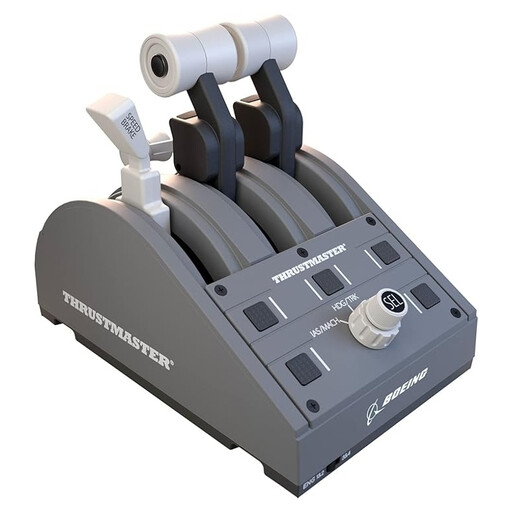
Why It Stands Out: This is an officially licensed replica of the throttle quadrant from a Boeing 787. The Thrustmaster TCA Boeing edition is designed for an authentic experience in Microsoft Flight Simulator and other flight simulations.
Advantages:
Who Is It For? This is the ideal choice for serious flight sim pilots looking to upgrade their cockpit. It's especially suited for Microsoft Flight Simulator players seeking immersive and realistic control of commercial aircraft.
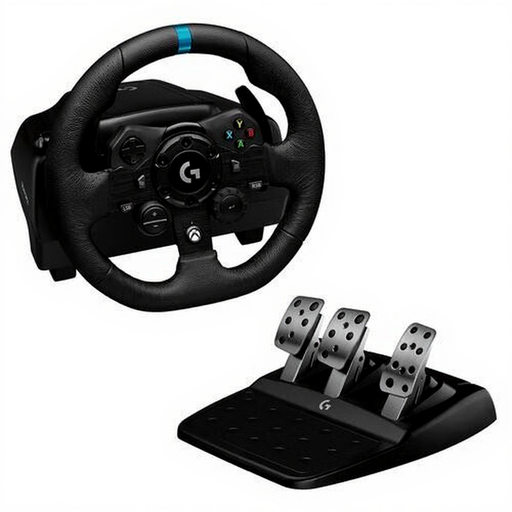
Why It Stands Out: The Logitech G923 distinguishes itself with its TRUEFORCE technology. According to Logitech, this advanced force feedback system connects directly to in-game physics for unprecedented realism.
Advantages:
Who Is It For? This force feedback racing wheel is aimed at sim racers on PC and Xbox who are looking for a step up in realism. If you want to feel the nuances of the road and your car, the G923 is a strong contender.
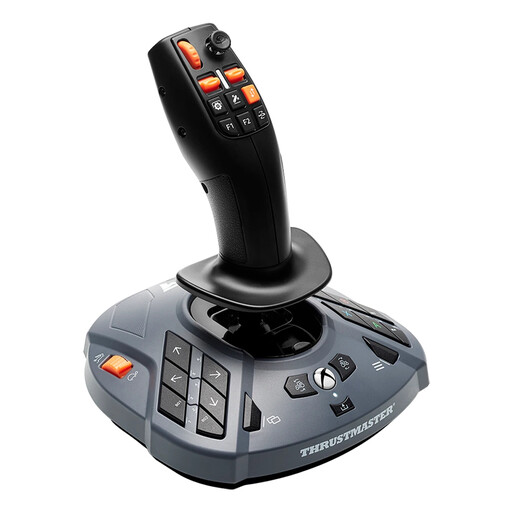
Why It Stands Out: The SimTask FarmStick is specifically designed for controlling agricultural machinery and heavy equipment, with a focus on functionality and a high button count.
Advantages:
Who Is It For? This is the ultimate farming simulator controller for dedicated players of Farming Simulator, Construction Simulator, and similar games. If you want more control than a standard wheel or gamepad can offer, this is the solution.
These three recommendations cover the most popular simulation genres, but the world of sim hardware is vast. Are you looking for a different type of wheel, a complete cockpit setup, or specific accessories?
? Explore our full Racing Console collection for more options.
1. What is force feedback, and do I really need it? Force feedback is a system in racing wheels that simulates the forces you would feel in a real car, such as resistance in corners or vibrations from the road surface. While you can race without it, it's highly recommended for anyone seeking a realistic and immersive experience. It gives you better feedback on what the car is doing.
2. Are these simulation controllers compatible with PlayStation? The models highlighted here are specifically designed for PC and Xbox. Many manufacturers, such as Logitech and Thrustmaster, often release separate versions of their products for PlayStation. Always check the product page and specifications to ensure the controller is compatible with your console.
3. Can I use a flight stick for racing games? Technically, it's sometimes possible to map the controls, but it's not recommended. Each controller is designed for a specific purpose. A joystick lacks the precision and feel of a wheel and pedals for racing, just as a racing wheel is unsuitable for piloting an aircraft. For the best experience, choose the controller that matches your favourite simulation.
