Who are these pedals for?

Drivers practising braking in the wet

If you want to practise applying and releasing brake pressure consistently, choose pedals that suit the feel you’re looking for. Don’t expect the pedals themselves to show you the ideal wet racing line: iRacing Support says the usual line can be more slippery in the rain.

Drivers with limited mounting options

If you don’t yet have a dedicated cockpit, first check that the pedals can be secured firmly and that your current setup is suitable for the brake you’ve chosen.

Drivers connecting pedals to their system

If you want to use pedals with a PC or console, make sure the connection is compatible with the exact pedal set and wheelbase. Having a single monitor says nothing about compatibility.

What should you look for in sim racing pedals?

First, check that you can mount and connect the set securely. Then compare the braking feel and the options for adjusting the throttle.

The percentages below show the main purchase concern for consumers choosing sim racing pedals for this practice scenario.

What to consider What should you check? Who is this important for?
Consistent braking Check whether the brake measures force or pedal position, and which calibration and resistance settings are available. If I want to build and release brake pressure on changing grip, I’m mainly looking for a control I can use consistently. Around 36% of consumers put brake control first.
Secure mounting Check the mounting points, available space and whether the set needs a sturdy base or pedal plate. If my seat or pedal base moves, it’s harder to repeat the same braking pressure. Around 29% of consumers prioritise a fixed pedal position.
Throttle and pedal feel Check which springs, brake elastomers and pedal settings can be adjusted on each version. If I want to fine-tune my throttle input as well as my braking, I look at the adjustment options for both pedals. Around 21% of consumers choose pedal feel and throttle adjustment as their main consideration.
Connection and what’s included Check whether it can be used with a PC or console, whether it needs a wheelbase or USB connection, and which pedals are included. If you want to connect an upgrade or standalone set to your system, make sure the connection and included components are suitable. Around 14% of consumers prioritise compatibility and the pedals included.

Common pitfalls

  • Confusing the sensor specification with the force needed to brake

    For the Heusinkveld Sprint, the manufacturer lists a 120 kg load cell sensor and a maximum actual braking force of 65 kg. These figures measure different things.

    Compare the sensor specification, stated operating force and available brake adjustments separately.

  • Mistaking a load cell upgrade kit for a complete set

    The Fanatec CSL Pedals Load Cell Kit replaces the brake on existing CSL Pedals; it isn’t a complete pedal set on its own.

    Before buying, check which pedals you already need and what’s included in the version you’ve chosen.

  • Choosing a stiff brake without checking the mounting

    Heusinkveld specifies that the Sprint must be mounted on a full-frame rig or a very rigid base.

    Check the mounting diagram, fixing points and available pedal space before choosing a set designed for a cockpit setup.

  • Expecting different pedals to make the wet racing line easier to see

    According to iRacing Support, the usual racing line can actually be more slippery in the rain. Pedals change how you control the car, not how clearly you can see an alternative line on a single monitor.

    Keep your pedal choice separate from your display settings, and practise different lines and braking points in the simulator you use.

Brands to consider as a point of reference

Thrustmaster

The T3PM is a magnetic pedal set with adjustable brake resistance; the T-LCM is a load cell set with interchangeable springs.

  • Thrustmaster says the T-LCM can connect to a compatible PC via USB and to a console via a compatible wheelbase.
  • Check the connection for your platform and exact wheelbase; the platform listing alone doesn’t tell you which connection will work.

Fanatec

The CSL Pedals Load Cell Kit is designed to replace the brake on existing CSL Pedals.

  • Fanatec says the upgraded pedals can connect directly to a PC via USB.
  • The kit isn’t a complete set. According to Fanatec, console use requires a compatible Fanatec wheelbase.

MOZA Racing

The CRP2 version reviewed is listed as Throttle+Brake and is designed for drivers who want to adjust the feel of the brake and throttle.

  • MOZA lists a 200 kg sensor for the CRP2, along with adjustable brake and throttle feel.
  • The sensor specification doesn’t prove a performance advantage on a wet circuit. Don’t assume the version listed also includes a clutch.

Logitech G

The PRO Racing Pedals are worth comparing if you’re looking for a load cell brake and adjustable pedal modules.

  • Logitech describes a load cell brake and interchangeable springs.
  • Check that the exact set connects to your system.

Heusinkveld

The Sprint is an adjustable set for a securely mounted setup.

  • For the Sprint, Heusinkveld lists a maximum actual braking force of 65 kg and a 120 kg load cell sensor; these are different measurements.
  • The manufacturer specifies mounting on a full-frame rig or a very rigid base. A pedal plate may need to be purchased separately.

Sim-Lab

The XP1 Loadcell Pedal Set is designed for drivers who want to adjust pedal resistance, preload and pedal angle.

  • Sim-Lab lists adjustments for resistance, preload and pedal angle.
  • If you have a cockpit from another brand, check the mounting points and available space. Choose the version with the number of pedals you need.

Joybuy brake pedal pick

The product below is a brake pedal for use with certain Logitech pedal sets. Check that it’s compatible with your model and whether you need a standalone brake pedal or a complete set.
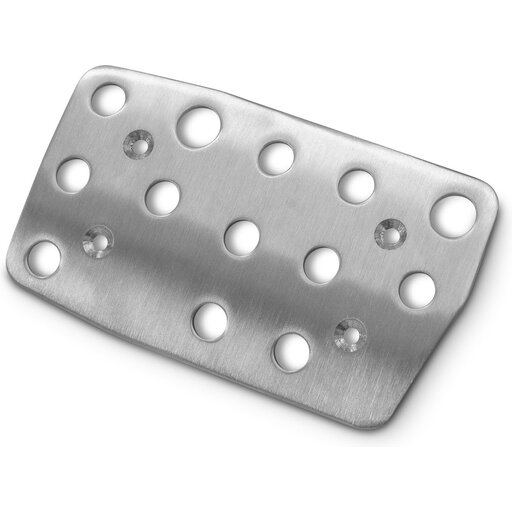
Playseat G Brake Pedal for Logitech G27 Action Grip

Playseat G Brake Pedal for Logitech G27 Action Grip

A brake pedal for anyone looking to use or customise a compatible Logitech pedal set.

It’s listed as compatible with Logitech G25, G27, G29 and G920 pedal sets. Before buying, check that your set is one of these models.

Joybuy

Frequently asked questions

Do I need to buy load cell pedals straight away to practise in the wet?

No. Start by calibrating your pedals correctly, then see whether a force-measuring brake suits your mounting setup and preferred feel. For iRacing, the calibration guide from iRacing Support specifies a brake force factor of 0.00 for load cell pedals. This is a setting for that game, not a general rule.

How do I connect Thrustmaster T-LCM pedals?

According to Thrustmaster, T-LCM pedals can connect to a compatible Windows PC via USB, or via RJ12 to a compatible wheelbase. For consoles, Thrustmaster describes connecting via RJ12 to a Thrustmaster wheelbase; for normal use, connect one cable at a time.

What should I recalibrate after connecting the pedals?

Recalibrate the brake and throttle in the game. iRacing Support recommends recalibrating whenever you connect a new controller or use a different USB port. In that game, also check the brake force factor for your type of brake.

What if a pedal set bought online isn’t right for me?

For eligible online purchases from a business, customers in the Netherlands generally have 14 days to change their mind, subject to legal exceptions, according to the Dutch government. Your statutory guarantee is separate: if a product is faulty, the seller must offer a solution. The Dutch government says there is no fixed statutory guarantee period in the Netherlands.
