
Drivers looking to reproduce their braking pressure
You already know a few visual track references and want to practise braking from a stable seated position. Look for resistance that suits you and a mounting setup that won’t shift.


To learn consistent braking points on a single monitor, start by choosing pedals that stay firmly in place and offer a braking feel you can comfortably reproduce. iRacing describes a braking point as a recognisable reference on or beside the track; a load cell brake won’t automatically teach you where to brake. Position-based brakes may suit you if you don’t yet have a sturdy mounting setup, while a load cell is most useful if you can mount the set securely and comfortably control the required foot pressure. Also check whether your exact pedals work independently via USB or require a specific wheel base, adapter or upgrade.
You already know a few visual track references and want to practise braking from a stable seated position. Look for resistance that suits you and a mounting setup that won’t shift.
You practise at a desk or with a setup you can move. In that case, preventing the pedals or chair from shifting may matter more than having a stiff brake setting.
You want to connect pedals to equipment you already own. Check the connection and compatibility of the exact combination of pedals, wheel and platform.
When practising consistent braking points, stable, repeatable control matters more than the sensor type alone. First, work out which limitation in your setup matters most.
| Consideration | What to look for | Who is this important for? |
|---|---|---|
| Repeatable braking feel | Check the sensor type and how adjustable the resistance is. Don’t compare sensor ratings unless they use the same basis of measurement. | If I want to practise from the same point on the track, I need to be able to operate the brake comfortably and consistently. Around 33% of consumers prioritise repeatable braking above all else. |
| Stable positioning | Check the available space, seating position and mounting options. Make sure the chosen resistance is practical without the set shifting. | With a desk setup or a separate chair, I want to stop my pedals sliding away when I brake. Around 27% of consumers primarily need a stable setup. |
| Connection | Check the exact model of the pedals and wheel base, your platform, and any cables or adapters you may need. Don’t assume console compatibility just because there’s a USB connection. | I want to use my new pedals with my existing wheel and platform. Around 20% of consumers prioritise connecting their pedals to existing equipment. |
| Parts required | Check what’s included in the set and which additional parts, if any, you may need for connection, pairing or mounting. | I want to know in advance whether my chosen configuration is complete for my setup. Around 20% of consumers want to keep the need for extra parts to a minimum. |
Sensor ratings and the force applied to the pedal plate are different measurements. Fanatec lists them separately for the CSL Elite Pedals V2.
Choose resistance you can reproduce comfortably and consistently, and only compare figures when they’re based on the same measurement method.
A set that shifts can make it harder to repeat the same foot movement. Heusinkveld specifies a very rigid base for mounting the Sprint.
Check your mounting setup before choosing a stiff brake setting. You may need a suitable mounting plate or a sturdier base.
According to Fanatec, the standard CSL Pedals need a separate adapter or the appropriate load cell upgrade to work independently via USB on a PC.
Check the exact model, what’s included and how it connects to your PC or wheel base. Bear in mind that additional hardware may be needed for standalone use on a PC.
The standard CSL Pedals offer a position-based option, while the CSL Elite Pedals V2 are a complete set with a load cell brake.
The T-LCM is a three-pedal set with a load cell brake and interchangeable springs for adjusting brake resistance.
The PRO Racing Pedals are a modular set with a load cell brake, interchangeable parts and movable pedal modules.
The Sprint is designed for a permanent PC setup where the pedals can be firmly mounted and mechanically adjusted.
The XP1 Loadcell Pedal Set offers mechanical adjustments for brake resistance, preload and pedal angle, among other things.
This Joybuy pick is a standalone brake pedal for use with a compatible existing Logitech pedal set, not a complete set of sim racing pedals.
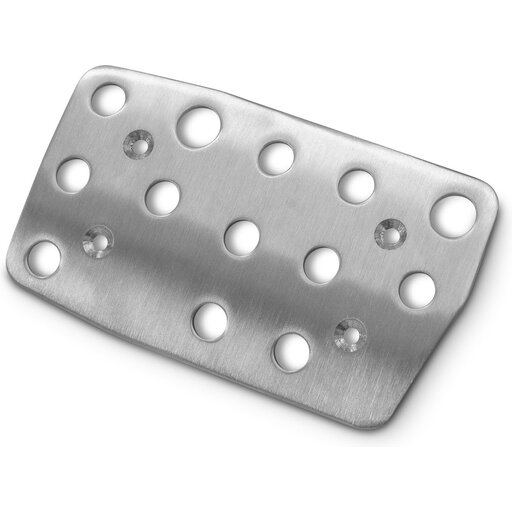 Image unavailable
Designed for anyone looking for a compatible brake pedal for an existing Logitech pedal set.
The product description lists compatibility with Logitech G25, G27, G29 and G920 pedal sets. Check that your existing set is one of these models.
No. A load cell brake won’t tell you where to brake. Practise using a recognisable reference on or beside the track, and compare your braking points. A load cell changes the pedal input you control; the sources don’t show that a pedal set compensates for having just one monitor.
Mount or support the set according to the instructions for your model, choose a comfortable resistance and calibrate it where the manufacturer offers this option. Keep the setting the same throughout a practice session so you can compare how you brake at the same point on the track. Fanatec describes calibration for the CSL Elite Pedals V2, while Thrustmaster provides calibration software for the T-LCM.
Not without an additional part: Fanatec specifies the separate ClubSport USB Adapter or the CSL Pedals Load Cell Kit. Check which configuration you need before buying.
According to ACM ConsuWijzer, online purchases generally come with a cooling-off period of up to 14 days after delivery, subject to legal exceptions. A product must also meet the standard you’re entitled to expect with normal use; if it develops a fault too soon, the seller must resolve the issue free of charge under the applicable conditions. A manufacturer’s warranty doesn’t replace this legal right.