What should you consider when choosing?
One 16:9 monitor
A good fit if: you want a simple setup or have limited space and few video outputs.
Bear in mind: you’ll have less horizontal screen space than with an ultrawide or three screens. A high stated refresh rate won’t, by itself, show you more of the pit entry.
One 21:9 or 32:9 ultrawide
A good fit if: extra horizontal space matters and you don’t want to line up three separate screens.
Bear in mind: the physical width, viewing distance, support in your racing game and what your PC can handle at the resolution you choose. Screen size doesn’t guarantee that a particular marker will be visible.
Three monitors
A good fit if: a view to the sides is your main priority and you have room for the screens and their mounts.
Bear in mind: you’ll need extra connections and time to adjust everything. iRacing Support explains how to position the view across three monitors; also check that your graphics card and game support this setup.
The percentages below indicate which needs may come first for consumers choosing a sim racing setup to practise virtual pit entries.
| Consideration |
What to look for |
Who is this important to? |
| Pit entry and markers |
Check what your game supports, measure your viewing distance and adjust the field of view. Also check whether the game has a pit-line aid. |
I want to be able to spot the pit entry and track markers from my usual seating position; the game settings matter too. For around 36% of consumers, seeing those markers is the top purchase priority. |
| Space and setup |
Measure the available width and viewing distance; check the mounts, video outputs and multi-screen settings. |
I want to know whether the screens, mounts and connections will fit in my gaming room and whether I can set them up properly. For around 29% of consumers, the physical setup comes first. |
| Performance on your PC |
Compare the resolution and stated refresh rate with your PC’s connections and its performance in the racing game you play. |
I want my PC to handle the chosen resolution and desired frame rate in my racing game. For around 21% of consumers, a suitable, smooth picture is the top priority. |
| Overall setup |
Consider what you’ll need for all the screens and mounts; compare the energy label for the exact models. |
I want to weigh up the complete setup and running costs in advance, not just one monitor. For around 14% of consumers, the total purchase and running costs come first. |
Monitors at Joybuy
These Joybuy monitors suit a sim racing setup with one conventional screen or one ultrawide. Measure the available space and check that your racing game and PC support your chosen setup before you buy.
 No image available
MSI MAG 272QPF E20 27-inch gaming monitor
A 16:9 option to consider if you want to practise with one conventional screen.
27 inches; 2560 × 1440; Rapid IPS; 200 Hz; Adaptive Sync.
Joybuy
 No image available
Philips Evnia 49M2C8900/00 49-inch gaming monitor
An option to compare if you want one extra-wide screen instead of three separate monitors; check that it will fit in your room.
49 inches; 32:9; 5120 × 1440; QD-OLED; 240 Hz.
The stated weight is 13.96 kg. Use a stable surface that can support this weight; the product information recommends two people for installation.
Joybuy
 No image available
MSI MAG 342CQRF E20 34-inch gaming monitor
A 21:9 option if you want extra horizontal screen space without three separate screens.
34 inches; 21:9; 3440 × 1440; VA; 200 Hz; 1500R curvature.
The product name lists two HDMI connections and one DisplayPort connection.
Joybuy
 No image available
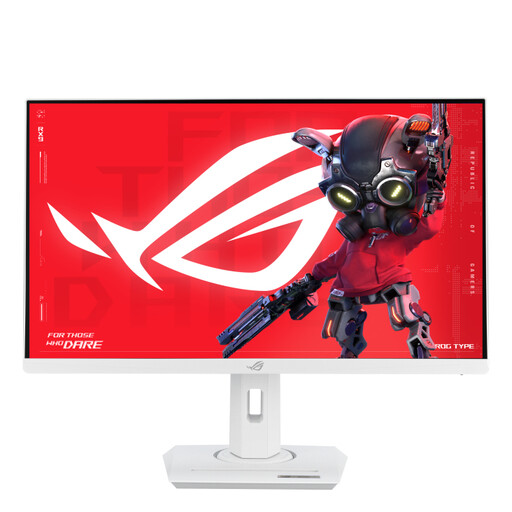
ASUS ROG Strix XG27ACSW 27-inch gaming monitor, white
A conventional 16:9 option if you want to practise with one 27-inch screen; check that the connections are compatible with your PC.
2560 × 1440; 180 Hz; HDR10; AMD FreeSync and NVIDIA G-SYNC support.
The product information lists VESA mount compatibility and a height-adjustable, tiltable stand.
Joybuy
 No image available
TITAN ARMY C24A1H 23.6-inch gaming monitor
A 16:9 option to compare if you’re choosing a conventional screen setup.
23.6 inches; 1920 × 1080; 240 Hz; tiltable stand.
For wall mounting, the product information recommends professional installation and a mount that can support the monitor’s weight.
Joybuy
Frequently asked questions
Will a wider monitor automatically teach me to find the pit entry?
No, a wider screen won’t automatically make the pit entry easier to spot. Screen placement and your racing game’s settings matter too. iRacing Support describes a setting that can display the pit-entry line; check which aids your game offers. A monitor won’t brake for you either: iRacing Support says the driver must enter below the pit speed limit.
What should I set up when using three monitors?
First check whether your PC can connect to three screens and whether your game supports a multi-screen setup. iRacing Support explains how to position the simulation view across the screens and enter monitor details. For NVIDIA Surround, iRacing Support strongly recommends three screens with matching resolutions; this recommendation applies to that configuration.
What can I do if my monitor breaks too soon during normal use?
According to ACM ConsuWijzer, in the Netherlands you have a statutory guarantee in addition to any commercial warranty. If a product breaks during normal use sooner than you could reasonably expect, the seller must offer an appropriate remedy free of charge, such as a repair, replacement or refund. There isn’t one fixed statutory guarantee period for every monitor.
Can I return a monitor bought online within 14 days?
For consumer purchases made online, there is generally a statutory cooling-off period which, according to ACM ConsuWijzer, ends 14 days after delivery. See the official guidance for exceptions and the rules on unpacking, trying out and returning the product.
What energy-use information applies to monitors?
The European Commission states that electronic displays, including computer monitors, have an energy label on a scale from A to G. Compare the label for the exact model; the letter alone doesn’t tell you how much energy your entire gaming-room setup uses.


