
Building a triple-screen sim rig
You want the side screens to extend your field of view and need a setup that works in terms of size, alignment, connections and software settings. iRacing Support explains several ways to set up three screens.


Start with three screens that match in resolution and alignment, and check that your PC and connections can handle your preferred settings. iRacing Support recommends using the same resolution and says the same make and model are recommended, but not essential. Then choose IPS, VA or OLED based on your image preferences and how you’ll use the screens. No panel type determines where the grip is: iRacing Support explains that the usual, rubbered-in racing line can actually be slippery in the rain.
You want the side screens to extend your field of view and need a setup that works in terms of size, alignment, connections and software settings. iRacing Support explains several ways to set up three screens.
You want smooth performance, so you’ll need to match the screen resolution and refresh rate you want with what your PC and connections can handle. Also check how many screens your graphics card supports; AMD says this depends on the card’s specifications.
You want to assess changing track conditions and your chosen line without assuming that contrast or HDR tells you anything about grip. iRacing Support explains how rain can change the usual, rubbered-in racing line.
When: If you want to match the resolution and alignment of all three screens as a complete setup.
Trade-off: Three QHD screens require more rendering power than three Full HD screens.
When: If the features of a particular VA model suit your image preferences.
Trade-off: A quoted response time doesn’t prove how clearly moving track details will appear in your simulator.
When: If you’re considering OLED and want to follow the guidance on displaying static cockpit images for long periods.
Trade-off: Check the care and warranty terms for the exact model, especially if interface elements will remain on screen.
| Consideration | What should you check? | Who is this important for? |
|---|---|---|
| PC load and smooth performance | Check the resolution of each screen, the available graphics card outputs and the refresh rate supported by each input. | If you want to run three screens smoothly, focus on what your PC and connections can handle. Around 36% of consumers prioritise PC load and smooth performance. |
| Field of view and alignment | Measure the available space and check the dimensions, mounting points and settings for the angle of the side screens. | If you want to use the side screens to widen your field of view, the physical setup needs to be adjustable too. Around 29% of consumers give field of view and alignment top priority. |
| Picture quality in wet races | Assess motion handling in your own simulator, and don’t treat panel or HDR specifications as a measure of grip. | If you want to assess the track and your racing line in the rain, you don’t want to confuse what you see on screen with the car’s handling. Around 21% of consumers prioritise assessing wet-track visuals. |
| Care and service | Read the care and warranty terms for the specific model, and consider the components you’ll need for the complete setup. | If you’re buying several screens and plan to use them for a long time, you’ll want to know in advance what care and service terms apply. Around 14% of consumers give lifespan and service top priority. |
The maximum refresh rate can vary by input. ASUS specifies up to 180 Hz via DisplayPort and 144 Hz via HDMI for the TUF Gaming VG27AQ3A.
For each screen, check the combination of resolution, input, cable and graphics card output.
The Samsung LS27FG502SUXEN and the Joybuy listing LS27FG500SUXEN have different full model numbers. Don’t assume their specifications are identical based on the series name alone.
Compare the full model number and key specifications before buying screens for a triple-screen setup.
According to iRacing Support, an extra correction in NVIDIA Surround may be unnecessary if bezel correction is already set up in the simulator, and could make the image look wrong.
Set the screen geometry in the simulator first, and don’t automatically add a correction in the driver as well.
Monitor specifications describe the screen, not the track’s grip. iRacing Support explains that the usual, rubbered-in racing line can become slippery in the rain.
Assess the image and the racing line separately, and check how your simulator displays rain.
AOC offers a 27-inch QHD IPS model for comparison, the Q27G4XF, as well as a QHD Fast VA model, the Q27G42XNE.
The TUF Gaming VG27AQ3A is a 27-inch QHD Fast IPS model with VESA mounting.
The Odyssey OLED G5 LS27FG502SUXEN is an OLED option with QHD resolution and a 180 Hz refresh rate, according to Samsung.
The G2725D is a 27-inch QHD IPS alternative for comparing connections, mounting and service terms.
These Joybuy products are gaming monitors to compare for a multi-screen PC sim racing setup. Check that the resolution, connections and physical setup work together for each model.
 No image available
A 27-inch option to compare if you’re considering QHD and a Rapid IPS panel for a multi-screen setup.
WQHD; Rapid IPS; 200 Hz.
 No image available
A VA model to compare with other panel types. Test the motion handling of this exact model in your own simulator.
QHD; Fast VA according to AOC; FreeSync Premium; HDR10; 2 × HDMI 2.0 and 1 × DisplayPort 1.4. Check the refresh rate for the input you choose.
 No image available
A Full HD option to consider when weighing screen resolution against the demands of running multiple screens on your PC.
1920 × 1080; 240 Hz; AMD Adaptive Sync; VESA mounting; tilt-adjustable.
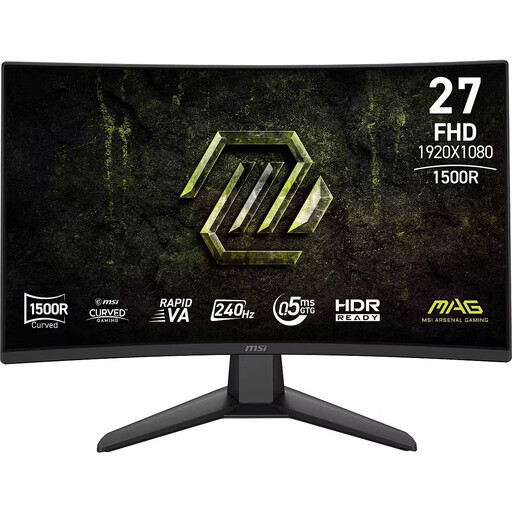 No image available
A curved VA option to compare if you want to assess the screen curvature and panel type in your own setup.
Full HD; Rapid VA; 240 Hz; 0.5 ms; Adaptive-Sync.
 No image available
A curved WQHD option to compare if you want to factor higher screen resolution into your choice of PC setup.
2560 × 1440; Rapid VA; 240 Hz; 0.5 ms; FreeSync Premium; HDR Ready.
No, the same model isn’t essential for iRacing’s triple-screen setup. iRacing Support recommends using the same resolution and says the same make and model are recommended. Also check that the dimensions, connections and side-screen angle settings suit your setup.
Not necessarily for iRacing: the iRacing Support guide also explains how to use a window that spans three monitors. For a combined display with AMD Eyefinity, the number of supported screens depends on your graphics card’s specifications.
No, a monitor doesn’t measure the track’s grip. iRacing Support explains that the usual, rubbered-in racing line can actually become slippery in the rain. Use the image to assess the situation, but don’t treat contrast, HDR or response time as a measure of grip.
Follow the guidance and terms for the exact model. For the LS27FG502SUXEN, Samsung describes features that adjust the brightness of static logos and taskbars to help prevent burn-in; this doesn’t mean burn-in is impossible.
If you buy online from a business as a consumer, the Dutch government says you’ll often have a 14-day cooling-off period; check whether it applies to your purchase. If a product is faulty, the seller is responsible for providing a product that works properly. The Dutch government says there is no fixed statutory warranty period that applies to all products in the Netherlands.