Which factors should you consider?
One 16:9 monitor
A good fit if: you have limited space or want to start by setting up the view from one fixed seating position.
Bear in mind: you’ll have less horizontal screen space than with an ultrawide or three screens. The right viewing angle also depends on your viewing distance and screen width.
One ultrawide monitor
A good fit if: you want a wider view from the cockpit without setting up three screens.
Bear in mind: the physical width, curvature, resolution and how it displays in your simulator. A higher pixel count also puts more demand on your PC.
Three monitors
A good fit if: you have a fixed cockpit and enough room for screens at the sides.
Bear in mind: you’ll need extra space for mounting and time to configure the setup. iRacing describes both a window spanning three screens and a combined display configured through the graphics card.
First, measure from your usual driving position. Then check which screen setup your simulator and PC can display.
| Factor |
What to look for when buying |
Who is this important to? |
| View from your seating position |
Measure the distance from your eyes to the screen and the screen width. Check the viewing angle settings in your simulator. |
With a fixed cockpit, I want a clear view of the track without changing my driving position. Around 33% of consumers prioritise the view from their seating position. |
| Displaying wet-weather scenes |
Compare the panel type and the specified contrast and HDR features of the exact model. Also check your simulator’s display settings. |
When practising in the rain, I want to be able to assess puddles, reflections and reduced visibility. Around 27% of consumers prioritise the display of wet-weather scenes. |
| Smooth motion |
Check the resolution and maximum refresh rate through the connection you’ll actually use. |
When driving, I want to know whether my PC can run the chosen resolution and refresh rate through my connection. Around 20% of consumers prioritise motion performance. |
| Fit and usability |
Check the dimensions, available connections and space for any side screens. Review the warranty terms for the exact model. |
For my cockpit, I want a screen setup that fits the available space and is practical to configure. Around 20% of consumers prioritise fit and ease of use after purchase. |
Joybuy product picks
This selection of Joybuy gaming monitors for sim racing includes different screen sizes and features to suit your seating position and PC.
 No image available
Samsung Odyssey G5 G50F 32-inch IPS, LS32FG502EUXEN
An option for anyone looking for a gaming monitor with an adjustable position for a fixed seating setup.
32-inch IPS panel, 2560 × 1440, 180 Hz and 1 ms. The stand is height-adjustable and can swivel and tilt. The description lists support for NVIDIA G-SYNC and AMD FreeSync.
View at Joybuy
 No image available
AOC Gaming Q27G42XNE 27-inch Quad HD, 180 Hz
A 27-inch screen to consider if you’re looking for a QHD gaming monitor for your setup.
2560 × 1440, 180 Hz, VA panel and HDR10. The listed connections are 2 × HDMI 2.0 and 1 × DisplayPort 1.4; check that they’re compatible with your PC.
View at Joybuy
 No image available
LG UltraWide 34U601B-B 34-inch
An ultrawide option for anyone looking for more horizontal screen space on a single monitor.
21:9 aspect ratio, 3440 × 1440, VA panel, 1800R curvature and 120 Hz. Check that your PC can run the chosen resolution and refresh rate.
View at Joybuy
 No image available
KTC H32S17 32-inch QHD, 180 Hz
An option for anyone considering a curved QHD gaming monitor for a fixed setup.
2560 × 1440, HVA panel, 1500R curvature, 180 Hz, Adaptive Sync and HDR10. The stand tilts, and VESA mounting is listed.
View at Joybuy
 No image available
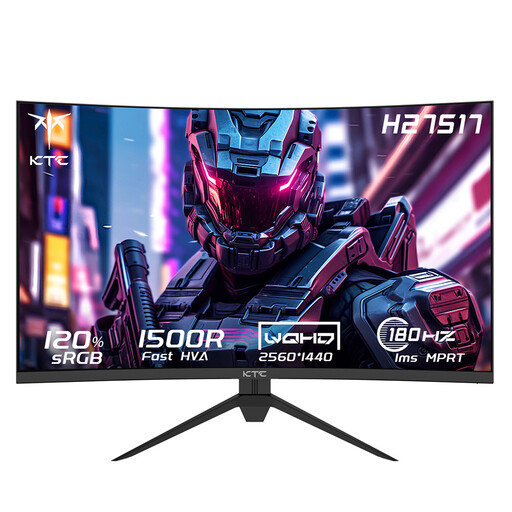
KTC H27S17 27-inch QHD, 180 Hz
A 27-inch curved screen to compare if you’re looking for QHD gaming from a single seating position.
2560 × 1440, HVA panel, 1500R curvature, 180 Hz and Adaptive-Sync. The description lists game presets, including a RAC mode.
View at Joybuy
Frequently asked questions
How do I set the view from my racing seat?
From your usual driving position, measure the distance from your eyes to the screen and the screen width. In iRacing, enter these measurements in the monitor settings. With three screens, you’ll also need to measure the angles.
Will a high-contrast or ultrawide screen automatically show me the right racing line in the wet?
No. iRacing shows features such as puddles, reflections and spray, but iRacing Support also explains that the usual rubbered-in racing line can be more slippery in the rain. Practise using both what you see on screen and how you drive; monitor specifications don’t prove better driving performance.
What extra setup is needed for three monitors?
In iRacing, you can use a window spanning three screens or configure a single combined display through your graphics card. Measure your viewing distance and screen angles, then enter the monitor details in the simulator.
What are my cancellation and warranty rights for an online purchase in the Netherlands?
According to ACM ConsuWijzer, the statutory cancellation period usually ends 14 days after delivery; check which terms apply to your purchase. If a product is faulty, the seller is responsible for the statutory guarantee. Any manufacturer’s guarantee has its own terms and doesn’t replace your statutory rights.


