First, check whether you can watch the silent film you want on your TV using a working viewing option. Only then choose a streamer. If you want to read intertitles from the sofa, your screen, seating position and the way the film is displayed all matter too. A 4K output alone won’t make small text in a film any larger.
Who is this for?
Anyone looking for a specific silent film
You want to check whether a film, for example one from the Eye collection, is available to watch on your TV before buying new hardware. Eye Film Player describes several ways to watch, including connecting a laptop via HDMI.
Anyone sitting a long way from the screen
You want to be able to read intertitles and menus from your usual seat. So assess your entire viewing setup, not just a streamer’s maximum output resolution. Sony Netherlands links the recommended viewing distance to screen size and resolution.
Anyone with limited connection options
Your choice depends on Wi-Fi or Ethernet, a spare HDMI port, power supply and the space around your TV. Connections and included accessories vary by model.
What should you look for?
Existing TV or laptop with HDMI
A good fit when: the film already works on your smart TV, or you can open Eye Film Player on a laptop and both your laptop and TV have HDMI.
Bear in mind: using a laptop with a cable takes up space and means operating it by the TV, but it could save you from needing an extra streamer.
Google TV stick with Cast
A good fit when: the supported Cast or Chrome option works for your film, Wi-Fi is reliable by the TV, and you have HDMI and power available.
Bear in mind: Eye describes limitations when using Chrome on iOS. Check how you can watch the film and which device you’ll use before relying on casting.
Streaming box with Ethernet
A good fit when: you have a network cable by the TV, or specific connections and a remote control are important to you. Google TV Streamer, STRONG LEAP-S3PRO and Apple TV 4K list built-in Ethernet.
Bear in mind: a box takes up space and may require a separate HDMI cable. Ethernet won’t make on-screen text any larger.
| Consideration |
What should you check? |
Who is this important for? |
| Access to the film |
Look up the film title and test the viewing option the provider recommends for your TV, browser or device. |
If I want to watch a specific film, I want to know first that it works on my TV. Around 34% of consumers say access to the film they want is their main concern. |
| Readability from your seat |
Test a scene with intertitles from your usual seat. Check separately which text settings the film or app offers. |
If I sit a long way from the screen, I want to be able to read the intertitles while watching. Around 33% of consumers put readability first. |
| Connections and network |
Check for a spare HDMI port, power, Wi-Fi reception or an accessible network cable, and the accessories included with the exact model. |
If my TV has limited connection options, I want to know which connection will work in practice. Around 20% of consumers make this their main consideration. |
| Total cost |
Check the hire terms for each film and see which cables and other accessories come with the device. |
If I can use equipment I already own, I don’t want to buy a streamer or cable I don’t need. Around 13% of consumers focus mainly on the total cost. |
Eye Film Player lists free films and films to hire from €2; Eye states that hired films are available for 48 hours. Check the terms for the specific title. Google TV requires your source device and TV to be on the same Wi-Fi network for Cast. Google also warns that subtitle preferences may not apply in every app.
Common buying mistakes
-
Buying a 4K streamer to make small intertitles easier to read
What you actually see depends on both the TV and the source; viewing distance is another factor. Google TV Help notes that the actual resolution also depends on the TV and the content.
Play a scene with intertitles from your usual seat before deciding based on a streamer’s resolution.
-
Assuming every film website works on every streamer
Eye Film Player describes specific browser, HDMI and Cast options. That doesn’t automatically mean every film is available as a TV app on every device.
Check the film you want and the supported way to watch it before choosing a streamer.
-
Checking cables and power only after you’ve bought
What you need varies by device. Xiaomi lists a power adapter and HDMI extension cable with the TV Stick 4K (2nd Gen) mentioned here; Apple says the current Apple TV 4K requires an HDMI cable, sold separately.
Compare what’s in the box with the spare ports and power sockets by your TV.
Brands to compare
Google
Google TV Streamer (4K) is a box for anyone looking for Google TV, Cast and built-in Ethernet in one device.
- Google lists a remote control, Ethernet and output up to 4K.
- According to Google, actual resolution and display quality also depend on the TV and content. The recommended HDMI cable is sold separately.
Xiaomi
The TV Stick 4K (2nd Gen) is a compact Google TV stick for a setup with Wi-Fi and HDMI.
- Xiaomi lists 8 GB storage, 2.4 and 5 GHz Wi-Fi, a power adapter and an HDMI extension cable in the box.
- The published connections don’t list a built-in Ethernet port. Check the film service and Cast option for how you plan to use it.
Apple
The current Apple TV 4K (4th generation) is a box to consider if Apple controls and built-in Ethernet matter to you.
- Apple lists 128 GB storage, Ethernet and accessibility features.
- An HDMI cable is required separately. The available information doesn’t confirm that every specific silent film will work using your preferred option, or that you’ll be able to read the intertitles from your seat.
STRONG
The LEAP-S3PRO is a Google TV box for anyone looking for Ethernet, Google Cast and a backlit remote control.
- For this model, STRONG lists 32 GB storage, built-in Ethernet and a backlit remote control.
- The listed features don’t confirm that a specific silent film will work through a particular app. Check how you can watch the film beforehand.
Joybuy products
The Joybuy options below are projectors, not streaming sticks or streaming boxes. They may be worth considering if you mainly want a larger picture from your seat. First, check whether the film you want is available through the listed apps and whether the projection will suit your room.
 No image available
XGODY N7 Cine Smart Projector
An option to consider if you’re looking for a projected picture and built-in streaming apps. Check whether the film you want is available through the listed apps.
The product name lists native 1080p, 1000 ANSI lumens, 2 GB + 16 GB, autofocus and keystone correction. The product information mentions Whale TV OS, Netflix and a picture size of 60 to 140 inches.
Joybuy
 No image available
Football World Cup HP CC360 FHD Smart Projector
An option to compare if you’re considering a projector with streaming apps and a large picture. Check that you can access the specific film you want.
The product information lists native 1080p and an 80-inch picture at 2.1 m. The product name mentions autofocus, keystone correction and Netflix, YouTube and Disney+ apps.
Joybuy
 No image available
2026 Video Projector with built-in apps, 50–200 inches
An option if you want to compare projectors with built-in apps and a large, adjustable picture. Check that the film you want is available through the listed option.
The product name lists Wi-Fi 6, Bluetooth, automatic picture correction, 180° rotation and a picture size of 50–200 inches.
Joybuy
 No image available
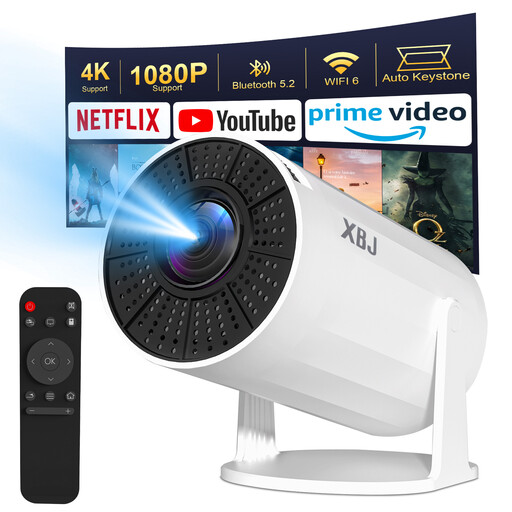
Lite Entertainment Upgraded XBJ Portable White Projector
An option if you’re considering a projector with Android TV and app-based entertainment. Test whether you can watch the film you want on the device.
The product name lists WiFi6, BT5.2, 180° rotation and a picture size of 40–200 inches. The product information mentions Android TV 11.0 and 200 ANSI lumens. The device has no battery and must be connected to mains power while in use.
Joybuy
Frequently asked questions
Can I install Eye Film Player directly on any streamer?
Don’t assume so without checking. Eye Film Player describes watching in a browser, connecting a laptop via HDMI, and specific options using Apple TV, Chromecast or a browser on a media player. Check the film you want and your exact device before relying on an app being available.
Why isn’t the Cast button appearing?
First, check that you’re using the Chrome option described by Eye Film Player and that your source device and receiver are on the same Wi-Fi network. Eye notes a limitation for Chrome on iOS; Google TV Help says the same network is required to cast to Google TV.
Can I make intertitles larger using subtitle settings?
Not always. Google TV offers subtitle options, but Google warns that preferences may not apply in every app. Test the text in the film from your seat; don’t assume that text already part of the film image can be adjusted.
What extra costs might be involved?
Eye Film Player lists free films and films to hire from €2; Eye says you need an account to hire a film, which is available for 48 hours. Apple says the current Apple TV 4K requires an HDMI cable, sold separately. Check the terms for the specific film and which accessories come with your chosen device.
What are my rights when I buy a streamer online in the Netherlands?
According to ACM ConsuWijzer, when you buy online you usually have 14 days from delivery to change your mind, subject to legal exceptions. You’re also entitled to a product that, under normal use, meets what you could reasonably expect. If it develops a fault too soon, the seller must resolve the issue in line with the applicable terms.


