What should you look for when choosing?
First, work out from which seat and at what image size the intertitles are readable. Then measure the space available for the projector and screen, and finally check your film source and how dark scenes look.
| What to consider |
What should you check? |
Who is this important for? |
| Readable intertitles |
Test title cards from your actual seat and at your intended image size. Don’t assume that the maximum screen diagonal guarantees readability. |
If I sit at the back of the room, I want to be able to read the intertitles at the size I’ve chosen. Around 28% of consumers prioritise being able to read intertitles from their seat. |
| A suitable set-up |
Measure the distance from the lens to the screen and compare it with the throw ratio and optical zoom of the exact model. Check lens shift if the projector cannot be positioned directly in front of the screen. |
If the available space limits where I can put the projector or how far it can be from the screen, I want to know whether I can achieve my preferred image width. Around 22% of consumers say the set-up is their main concern. |
| Black-and-white images and restoration |
Watch a light scene and a dark scene using the lighting conditions you’ll actually have. Compare image settings using the same film clip. |
When I watch old black-and-white films, I want to assess the nuances of my version of the film rather than relying on a specification alone. Around 22% of consumers prioritise image presentation. |
| Film source and connections |
Check that your player and film version are compatible with the projector and that intertitles display correctly. The restoration and presentation of the film print still matter. |
If I use a specific digital film copy or player, I want to know whether they’ll work together. Around 17% of consumers focus mainly on film copies and playback devices. |
| Light source and terms of use |
Check the type of light source, the usage mode associated with its stated lifespan and the terms of any additional warranty. |
When weighing up maintenance and my rights after purchase, I want to know the terms that apply to the light source and warranty. Around 11% of consumers prioritise these points. |
Projectors at Joybuy
This selection at Joybuy includes portable projectors and models with a stated short throw ratio. Above all, check that your preferred image size suits the throw distance and that you can read the intertitles from your seat.
 No image available
ETOE Dolphin 2 RGB laser projector
This portable model may suit you if you’re looking for a projector you can move around; check that the image is readable from your seat.
The product title lists Full HD 1080p, 800 ANSI lumens, a built-in battery with a stated 2-hour run time, HDMI 2.1 and USB-C.
View at Joybuy
 No image available
XGIMI Vibe One Full HD, with screen and stand
This model may suit a portable set-up; check that the supplied screen size works for your viewing distance.
The product title lists Full HD 1080p, a supplied projection screen with stand and a built-in battery. The description gives 250 ISO lumens and a throw ratio of 1.3:1.
View at Joybuy
 No image available
Yaber L2 projector
The stated short throw ratio may be useful if there’s no suitable place for a projector at the back of the room. Check your preferred image size from your seat.
The product information lists native 1080p, a throw ratio of 1.17:1 and an image size range of 40–150 inches. The title lists 520 ISO lumens and compatibility with a flexible stand.
View at Joybuy
 No image available
XGODY N7 Cine Smart projector
The stated throw ratio may be useful if the projector needs to sit close to the screen; check that the image size is readable from your seat.
The product information lists native 1080p, a throw ratio of 1.1:1 and an image size of 60–140 inches. The product title lists 1,000 ANSI lumens and automatic focus and keystone correction.
View at Joybuy
 No image available
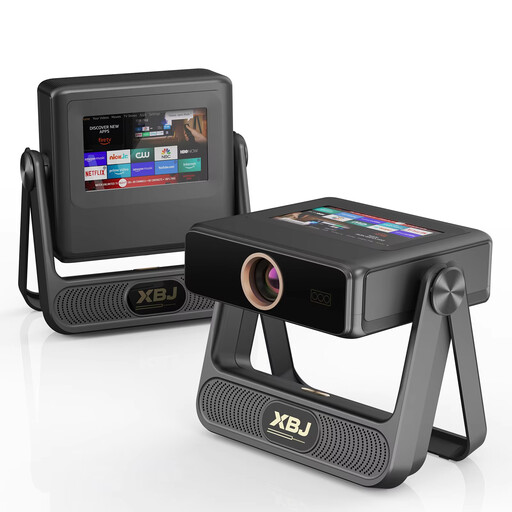
XBJ A5Pro Outdoor Smart Projector, grey
The stated maximum image size doesn’t guarantee that intertitles will be readable from a distant seat; assess the image at your intended size.
The product title lists native 1080p, an image size of up to 300 inches, 900 ANSI lumens and automatic focus and keystone correction. The stated image size is a product specification, not a promise that text will be readable in your room.
View at Joybuy
Frequently asked questions
Does my distant seat also determine the required throw distance?
No. Throw distance is measured from the projector to the screen; viewing distance is measured from your seat to the screen. First decide on an image size that’s easy to read, then check whether the model can produce it from the available projector position.
Do I automatically need a 4K projector for intertitles?
No. A resolution label alone doesn’t determine whether intertitles are readable. Test the actual film copy at your preferred image size from your seat, and bear in mind how that version of the film is presented.
How can I check that the image will fit before installation?
Measure your preferred screen width and the available distance from the lens to the screen, then compare them with the specifications for the exact model. Also check zoom and lens shift separately if the projector cannot be positioned directly in front of the screen.
What does a stated lamp or laser lifespan mean?
Check the usage conditions that apply to the figure. Epson gives the EH-TW7000 lamp a lifespan of 5,000 hours in Eco mode, and states up to 20,000 hours of use for the laser light source in the separate EH-LS7000. These are manufacturer figures, not predictions for every user.
Which product safety rule applies to an electric projector sold in the Dutch market?
According to the Netherlands Food and Consumer Product Safety Authority, CE marking is compulsory for electrical products placed on the market in the Netherlands. This doesn’t confirm that a specific listing meets the requirement; check the details of the exact version.


