Who is this choice relevant to?

Collectors who want to avoid losing their data

If you store catalogue files and shell photos locally, you can use an external drive to keep a separate copy. Microsoft explains how to use File History to back up to external storage, while Apple provides instructions for Time Machine.

Collectors with lots of photos

When importing and organising images alongside descriptions, connectivity, available storage and screen space all matter. Samsung and Apple list different ports and screen sizes for the laptop models featured here.

Collectors who enter data on the go

If you record finds in different locations, you can weigh portability against screen space and the ports you need for a camera, card reader or external drive. Compare the full specification of the model you choose.

What should you look for?

Windows laptop with built-in ports

A good fit if: your catalogue software supports Windows and you want to connect your camera, card reader or external drive directly. Samsung lists USB-A, USB-C and microSD for the Galaxy Book4 NP750XGK-KG3NL.

Bear in mind: Microsoft’s File History can back up files to an external drive, but check that it includes catalogue folders outside the default libraries too.

MacBook Air with Time Machine

A good fit if: your catalogue software supports macOS and you want to use an external drive with Time Machine. Apple explains how to back up to connected storage using Time Machine.

Bear in mind: Apple lists two Thunderbolt 4 ports with USB-C for the 13-inch MacBook Air M5 reviewed here; no USB-A port is listed. Apple recommends a Time Machine drive with at least twice the storage capacity of your Mac.

What to consider What should you check? Who is this important for?
Local backup Check the external drive’s connection and capacity, and whether your catalogue folder is included in the backup. I want to be able to restore my catalogue and photos from a separate drive if I lose my laptop. Around 36% of consumers prioritise a recoverable local backup.
Data entry and importing Check that your catalogue software runs on the operating system and that the ports work with your camera or card reader. When I enter data and import images, I want my software and equipment to work with my laptop. Around 29% of consumers say data entry and importing are their main buying concern.
Viewing photos and labels Compare the screen size and resolution of the exact configuration with your own photos and catalogue fields. I want to be able to assess shell photos alongside their descriptions on the built-in screen. Around 21% of consumers give photo viewing top priority.
Portability Consider the laptop, power supply, external drive and any adapter as a single set. If I record finds in different locations, I want to be able to take my laptop and the equipment I need with me. Around 14% of consumers name portability as their main buying concern.

Common buying mistakes

  • Thinking the internal SSD is a backup

    A copy on the same laptop is not a separate backup if the laptop is lost or damaged.

    Plan to use an external drive and, once it’s set up, check that you can restore a catalogue file and a photo.

  • Assuming every backup feature stores files locally

    Microsoft explains that Windows Backup syncs selected folders with OneDrive. That is not the same as a local copy on an external drive.

    Check where the backup is saved. If you use File History, make sure you explicitly include catalogue folders outside the default libraries.

  • Assuming every model in a range has the same ports

    Ports can vary between laptops. Samsung lists USB-A and microSD, among other connections, for the Galaxy Book4 NP750XGK-KG3NL; Apple lists USB-C ports for the MacBook Air reviewed here. HP warns that components and features vary by configuration.

    Compare the connectors on your camera, card reader and backup drive with the specifications for the full model number.

Brands to compare

Samsung

The Galaxy Book4 NP750XGK-KG3NL may be worth considering if you want to connect several external devices.

  • Samsung lists two USB-A ports, two USB-C ports and microSD for this model.
  • These ports don’t guarantee compatibility with a specific camera, drive or catalogue app, so check each one separately.

Lenovo

The IdeaPad Slim 5 15ARP10 range is an option to compare if you have a dedicated spot for cataloguing.

  • Lenovo lists USB-A, USB-C and microSD for the range.
  • The range includes configurations with different processors and storage. Check the memory, screen and ports for the full model number.

Apple

The 13-inch MacBook Air M5 suits a macOS workflow with an external drive for Time Machine.

  • Apple lists a 13.6-inch screen and two Thunderbolt 4 ports with USB-C for this model.
  • No USB-A port is listed. Check whether your equipment connects directly or needs an adapter, and whether your catalogue software supports macOS.

HP

The HP 15-fd1000 series is a Windows range to compare if you’re looking for a 15.6-inch laptop.

  • It gives you another range of models to compare with other laptops.
  • HP says that components and features vary by configuration and region. Don’t assume the ports or storage based on the series name alone.

Joybuy product picks

This selection includes Windows laptops for connecting external equipment and a backup drive, as well as a MacBook Air for a macOS workflow with Time Machine. Before you choose, check that your catalogue software and equipment are compatible with the full configuration.

HP OmniBook 3 14-hy0058ndx laptop

HP OmniBook 3 14-hy0058ndx

An option if you’re looking for a Windows laptop with a 14-inch screen and a separate external backup drive.

AMD Ryzen 5 7520U, 8 GB RAM, 512 GB SSD and Windows 11 Home.

Charger not included.

Joybuy
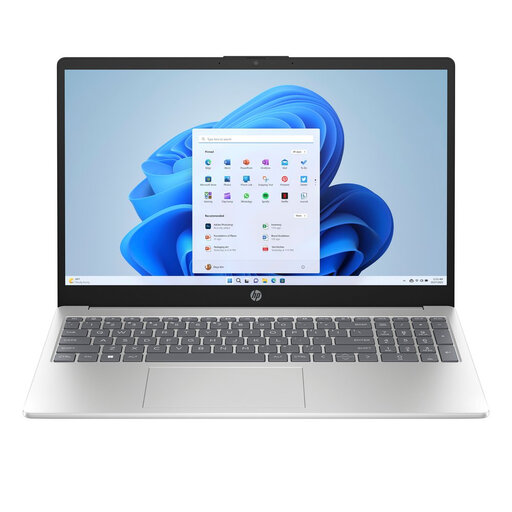
HP Laptop 15-fd1252ndx

HP Laptop 15-fd1252ndx

An option if you want to view catalogue fields and photos on a 15.6-inch screen and are looking for a Windows laptop.

Intel Core 5 120U 10-Core, 8 GB DDR5, 512 GB SSD and Windows 11 Home; the screen is Full HD.

Joybuy

Apple MacBook Air 15-inch M5, 16GB, 512GB, Starlight, QWERTY Keyboard

Apple MacBook Air 15-inch M5 16 GB 512 GB, Starlight, QWERTY Keyboard

An option if your catalogue software supports macOS and you want to use a Mac with an external drive for Time Machine.

M5, 16 GB memory and 512 GB SSD.

Power adapter not included; the product description specifies a USB-C adapter of 35 W or higher.

Joybuy

ASUS Zenbook A14 UX3407QA-QD479W, 14-inch, 16GB, 512GB, WUXGA OLED

ASUS Zenbook A14 UX3407QA-QD479W

An option if you’re looking for a Windows laptop to use in different locations and want to connect an external drive.

Snapdragon X, 16 GB RAM, 512 GB SSD, WUXGA OLED and Windows 11 Home.

Charger not included; the product description specifies a separate 65 W USB-C Power Delivery charger.

Joybuy

Samsung Galaxy Book4 NP750XGK-KG3NL, 15.6-inch, 16GB, 512GB

Samsung Galaxy Book4 NP750XGK-KG3NL

An option if you’re looking for a Windows laptop with room for catalogue fields and photos. Samsung lists USB-A, USB-C and microSD for this model.

Intel Core 7 150U, 16 GB RAM, 512 GB SSD and a 15.6-inch Full HD screen.

Joybuy

Frequently asked questions

Can Windows Backup make a local-only backup?

Not for the folder backup described in Microsoft’s Windows Backup guide: it syncs selected folders with OneDrive. To save a copy to an external drive, you could set up File History, for example, and check that your catalogue folder is included.

How do I set up a local backup on a Mac?

Connect a suitable external drive and set it up as a Time Machine drive. Apple recommends a drive with at least twice the storage capacity of your Mac; ideally, don’t store other files on it.

What if the laptop breaks sooner than expected?

For purchases made by consumers in the Netherlands, the retailer is responsible for the statutory guarantee. There is no fixed duration: what you could reasonably expect from the laptop and how you have used it are taken into account. Any manufacturer’s guarantee offered does not replace this statutory right.

Do privacy rules apply to my shell catalogue?

A catalogue containing only shell data does not automatically include personal data. Material you keep solely for private use may fall under the personal or household exemption. According to the Dutch Data Protection Authority, this exemption does not apply if identifiable people are shown widely or if you use the material on behalf of an organisation.
