For local file sharing, a router is only suitable if the documentation for the exact model confirms that it supports your storage device and preferred sharing method. If your home office is outside reliable Wi-Fi range, first look at router placement and possible ways to extend coverage. Always keep a separate backup of project files, as shared storage does not automatically protect against loss or ransomware.
Who is this advice for?
Home worker sharing files locally
You want to open project folders from several of your own computers, and need to check whether the exact router model supports storage sharing and offers suitable access settings. TP-Link and FRITZ! describe storage features for specific models.
Home worker with a distant office
You mainly need a reliable connection where you work. The Consumers’ Association notes that distance and obstacles such as walls and ceilings can weaken the Wi-Fi signal.
Home worker with confidential projects
You want to restrict access to shared files, keep equipment up to date and store a separate backup. The NCSC recommends paying attention to security settings and updates; the Consumers’ Association explains that ransomware can also affect accessible network storage.
What should you look for when sharing project files?
First decide whether you want to share storage, need a reliable connection where you work, or mainly want to protect your files and existing network.
| What to consider |
What should you check? |
Who is this important for? |
| Local file sharing |
Check the manual for the exact model to see whether it supports your storage device and preferred sharing method. |
I want to open project folders from my own computers and find out first whether the router can share my storage. Around 36% of consumers give local file sharing top priority. |
| Coverage where you work |
Check the connection in your office and review the router’s placement; the Consumers’ Association lists distance and obstacles as factors that can weaken Wi-Fi. |
If I work in an office further away, I need a reliable connection there. For around 29% of consumers, coverage where they work is their top purchasing priority. |
| File protection |
Review access settings and updates, and keep a backup separate from the shared drive. The Consumers’ Association warns that ransomware can also affect accessible network storage. |
For confidential projects, I want to restrict access and keep a separate copy. File protection comes first for around 21% of consumers. |
| Connecting your equipment |
Check the WAN and LAN ports, and ask your provider which settings are needed for your connection. |
I want to know how the router connects to my modem, desktop computer and storage before choosing one. For around 14% of consumers, compatibility with existing equipment is the main priority. |
Common buying mistakes
-
Assuming a USB port guarantees suitable file sharing
The port alone does not tell you which sharing methods, drives or access permissions will work with your model and hardware version.
Before ordering, compare the manual for the exact version with your storage and computers.
If the storage or features are not suitable, you may need a different storage solution or router.
-
Using a shared project drive as your only backup
Ransomware can also affect accessible network storage, so a shared drive is not automatically a safe backup.
Keep a recent copy separately from your working files, and check that you can restore it.
A separate backup solution requires extra storage in addition to the shared drive.
-
Relying only on the advertised Wi-Fi speed
Distance and obstacles affect the connection where you work; a higher stated speed does not tell you how well the connection will perform there.
Check the connection in your office and, if necessary, start by improving the router’s placement. Then compare a suitable additional access point, mesh system or wired connection.
An extra Wi-Fi access point or cabling may require additional equipment and installation.
Brands to compare
TP-Link
The Archer AX55 is worth considering if you want to connect USB storage to your router. TP-Link Netherlands lists USB 3.0 and gigabit ports for this model.
- These ports give you specific points to check when assessing connections to your storage and network equipment.
- A USB port does not confirm which sharing settings are available on every hardware version; check the manual for the version you are considering.
FRITZ!
According to FRITZ!, the FRITZ!Box 4050 combines FRITZ!NAS with gigabit LAN ports and is designed for use behind an existing modem.
- FRITZ!NAS and the listed LAN ports are worth comparing with the way you work with files.
- Before buying, check that the storage controls and ports suit your equipment; model specifications are no substitute for testing the connection in your home.
Synology
The RT6600ax is worth considering if you want to explore separate networks for work, guests and other devices. Synology lists network segmentation and a configurable 2.5GbE WAN/LAN port.
- These network features give you specific options to consider when separating devices and connections.
- These features alone do not show that the router offers the file storage you need; check its storage features separately.
ASUS
The RT-AX86U Pro is worth comparing if you need a guest network and expandable Wi-Fi. ASUS lists AiMesh and a guest network that restricts access to the local network.
- These model features are worth checking if you want to extend Wi-Fi or keep guests separate from your local network.
- Check the exact version and required storage features separately; these specifications do not show whether file sharing will suit the way you work.
Joybuy products for a home office
The options below are suited to a wired workspace, extendable Wi-Fi or comparing local storage for project files. For each model, check that its ports and storage features are compatible with your equipment.
 No image available
TP-Link Deco BE68 2-Pack
Worth comparing if you want to connect a desktop computer or NAS and improve Wi-Fi coverage across several rooms.
View at Joybuy
 No image available
ASUS ZenWiFi BD4 Wi-Fi 7, dual-band (2.4 GHz / 5 GHz), white
Worth comparing if you are looking for a mesh solution for a home network with a wired workspace.
Wi-Fi 7 (802.11be); dual-band (2.4 GHz / 5 GHz).
View at Joybuy
 No image available
ASUS RT-AX52 AX1800 AiMesh router, gigabit Ethernet
Worth comparing if you want to connect a wired device at your desk and explore ways to extend your Wi-Fi.
Dual-band (2.4 GHz / 5 GHz); gigabit Ethernet.
View at Joybuy
 No image available
ASUS RT-AX52 Pro AX3000 router, gigabit Ethernet
Worth comparing if you want to connect a wired device at your desk and explore compatible Wi-Fi extension options.
Dual-band (2.4 GHz / 5 GHz); gigabit Ethernet.
View at Joybuy
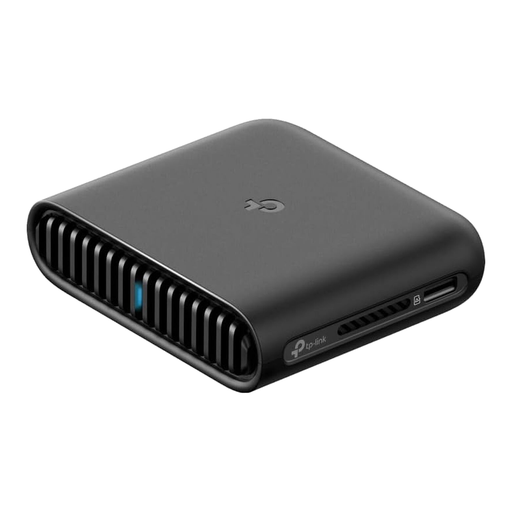 No image available
TP-Link TL-WR3002X router, gigabit Ethernet
Worth comparing if you are considering local file sharing from card storage and want to connect a computer via cable.
Gigabit Ethernet; dual-band (2.4 GHz / 5 GHz).
View at Joybuy
Frequently asked questions
Can I use my own router with a Dutch internet provider?
Yes. According to ACM ConsuWijzer, you can choose your own modem, router or decoder, and your provider must give you the connection details you need. Ask which settings are required for your connection and decide whether to keep your provider’s modem.
How do you start sharing a USB drive via a router safely?
First check whether the exact model version can share storage. Then set access permissions and a separate administrator password, keep the router up to date, and do not automatically give guests access to project files. TP-Link’s instructions describe local access via SMB or FTP for supported routers; also check your model’s manual.
Is the shared drive also your backup?
Not if it is your only copy. The Consumers’ Association warns that ransomware can also affect accessible network storage, so keep a recent backup separately from your shared files.
Do you need to buy a new router straight away if files open slowly in your office?
No, not before checking the router’s placement and the connection where you work. Distance and obstacles such as walls and ceilings can weaken Wi-Fi. Then consider whether an additional access point, mesh system or cable would suit your setup.


